Some formulas in the spreadsheet are not updating and there is no automatic calculation option

Hi all!

I am using OnlyOffice Desktop Editors on Fedora. Some spreadsheet formulas only update after pressing F9 (though not all of them seem to need it).

The ‘Formula → Calculation’ menu only offers ‘Calculate Workbook’ or ‘Calculate Current Sheet’, but there is no option for automatic calculation, even though I’ve seen online that others have it (as seen here).

For example, I have applied a conditional formatting rule to cell N2 using the formula =IF($N$2<>$M$2,1,0). If cell N2 is filled before cell M2, N2 remains red (the formatting does not update automatically). However, if M2 is filled before N2, it works correctly. Furthermore, if I manually edit the conditional formatting rule, the color updates immediately.

What is causing this issue and why is there no automatic update?

I would appreciate any help with this!

OS version: Fedora 44
App version: 9.1.3.8
Downloaded from: GitHub page (RPM)
Additional information: Same problem with the Flatpak version


Hi @fl0rian ,

The bottom line is that a spreadsheet will not recalculate when it is opened, unless one of the cells in the in the chain of linked cells, contains a formula which will resolve to a new value without interaction.

Each cell contains a resolved value from the last recalculation prior to save, and that will be displayed upon opening.

For reference, have a look at this thread; OpenOffice does not automatically recalculate workbook created in OnlyOffice (TEXT formula shows cached value)

Hello @DavidRGreen,

thanks you for your answer!

But when I am changing the value in M2, then the chain you mentioned should be triggered and the conditional formatting too? As mentioned this does not happen always…

G’day Florian,

I may be missing something, or maybe there is a bigger issue here than I can see.

Given your formula; =IF($N$2<>$M$2,1,0)
It should make no difference, and certainly in my test, the cell of this formula changed to “1” or “0” irrespective of which order I changed the contents of N2 or M2. Similarly, conditional formatting also behaved on either of those cells, irrespective of order of change.

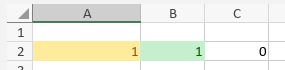
My small tests did not yield any anomalous behaviour;

Screenshot 2026-05-17 162108

Screenshot 2026-05-17 162139

Screenshot 2026-05-17 162212

with this formula is C2; =IF($A$2<>$B$2,1,0)

The “chain” I am referring to is the formula dependency resolution order. If a cell’s value changes, then its dependant cells will recalculate as a result, automatically. ie. if the value of N2 changes, then the formula which tests N2 will recalculate as a result.

Conditional formatting is also a dependant formula.

You did not give any context as to the scope of your spreadsheet, so, if it is really large, there may be a lag between changes and final resolution of the sheet, but I would imagine that it would have to be really large to have a significant impact.

So, I am wondering if there is some other detail, unique to your situation, which may help lead to a solution to your issue.
My imagination is running “a bit thin” for this right now.

Hello David!

Thanks for your effort! I just opened a new spreadsheet and did some tests. It works there.

Because its not something sensitive I just uploaded my spreadsheet. It’s in German but I think the content is not relevant for the issue. Maybe you can just open it shortly to see if you have the same problem?

For example in the tab “Rechnung 1” when you fill in M2 wit a value that is not the same as calculated in N2 and O2, N2 should be red. But the the refresh does not work, only if you click on manual refresh of the page…

I was not able to upload here, therefore you can find the zipped file at this link:

G’day Florian,

I should have gotten a look at your spreadsheet much earlier on.
I didn’t realise fully that the formula you were referring to was a conditional formatting formula.

Ironically, in all my years of using Office, I have never used conditional formatting. It is quite sophisticated, and from the looks, much more powerful in scope that I would have credited.

However; experienced or not, I have discovered the source of your issue and what appears to be a solution. And that is to correct your formula.

The formula that you are using is; =IF($N$2<>$M$2,1,0)

But this only works when you force the spreadsheet to recalculate.

The formula, it appears, that you should be using is; =IF($N$2<>$M$2,TRUE(),FALSE()) which from my test takes effect as soon as M2 changes.

I am not sure how MS Excel handles the conditional return of numeric values of one or zero in this context, but OnlyOffice is expecting boolean values of True and False. The forced recalculation is probably forcing OO to resolve 1 as True and 0 as False, which is not unreasonable, in fact, that convention is quite popular across many software languages, but it is not intuitive, for want of a better word, in OnlyOffice’s conditional formula.

So, give it a try in Rechnung 1, and if it works for you as it did for me, that is probably the solution that you are looking for. And sorry for going off in unexpected territory earlier due to a miss-understanding on my part.
… at least I learnt something new today as well.

Hello David,

I am glad that you experienced something new you can use in your future!

You are right! I can even use something like =$N$2<>$M$2 for the Formula which returns true or false automatically and then it works, thanks a lot. Therefore, I will be more precisely when using that kind of return value in the future.

But there is still a problem left with the same impact: the hidden columns AB, AC and so on are sometimes also only recalculated when I do that manually. And there is no true or false contained there… Do you also know the cause of that issue?

I just had a deeper look for you to reproduce the issue.

When I set some different x in column F or G of the billing tabs, the “Dashboard” tab is only updated when manually refreshing the whole sheet. This also happens sometimes on the mentioned columns AB, AC and so on. That’s a very strange behavior that never happened in Excel where this sheet is from.

Is it possible that there are some issues due to creating it in Excel and then opening it with OnlyOffice? Or do the macro I use trigger some refresh blocking? Or are the formulas not optimal as before? Or is there a OnlyOffice Bug? Or is OnlyOffice just handling it that way? Many possibilities I am not familiar with…

G’day Florian,

It’s good that you confirmed that the boolean expression works in that context. I did wonder after I made the post.

As for the hidden column matter, I still have your spreadsheet, so I’ll have peek when I get back to my desk; in the next day, or so.

No promises on a solution though :grin: but I’ll what I can figure out.

Hello David,

it’s not urgent, but I am looking forward what you find out.

1 Like

Hi Florian,

There is a slight problem with addressing this issue, and that is the new version of OnlyOffice.

Your conditional formatting is causing the spreadsheet to crash OO.

Now, I did get some interesting results from tests on the hidden columns, but now I have consider the veracity of those results in light of being in the new version when I got them.

But I’ll keep this in mind going forward.

Hello @fl0rian,

Thank you for the additional details and for sharing the file.

We checked the behavior on a minimal test sheet, and in a simple scenario the conditional formatting is recalculated correctly when the compared values are changed.

We also noticed that your workbook contains a macro which clears and rewrites several cell ranges on the sheets (A3:D500, F3:J500, M2, AA2, L2). Since these cells can affect dependent formulas and conditional formatting, this macro may influence the behavior you are seeing, especially if the issue appears after the macro is executed.

Could you please help us with a few more details?

  • Does the problem appear immediately after opening the file, after changing cell values, or only after running the macro?
  • Does it still reproduce if you temporarily disable the macro and test the same steps manually?

Also, please record a short video showing the exact steps and the issue from start to finish:

  • opening the file,
  • the values you change,
  • whether the macro is executed,
  • how the affected cells behave before and after the change.

This will help us reproduce the scenario more accurately on our side. If the video file is too large to attach to the forum, you can upload it to any cloud storage and share the link with us.

We will continue checking this behavior on our side as well.


Hello @DavidRGreen,

Thank you very much for taking the time to investigate this case and for sharing your findings.

We really appreciate your help. We will review the behavior you pointed out as a separate issue on our side and will post an update both in this thread and in that one.

Thanks a lot and also for the effort for even make a bug report, I had this issue too when opening the Excel file and trying to save it, but because I used OnlyOffice newly, I had no clue it is a bug…

Hello Marix,

thanks for your reply and for your time.

No the macro only runs when clicking the reset button and I didn’t do that before the issue…

I just recorded a Video of the issue. This is already with the new conditional formula…

Here you can find the video I recorded: New Video (5/20/2026) | Viddler

1 Like

G’day Florian,

Just a quick observation.

The copy of your spreadsheet that I had initially edited in v.9.3.1.8, and then in v.9.4.0.129, and then again in v.9.3.1.8, was starting to behave poorly. The conditional formatting rule was not executing upon cell content updates, but only after forced recalculation (F9).

Once I pulled the original from the .zip file, and applied the formatting rule again, I have been using your variant ( =$N$2<>$M$2 ), then the operation is performing to expectation.

… but still on v.9.3.1.8

Okay Florian,

I went through my tests I starting doing on the current version of OO, but now on the prior version. And I want I am seeing is results that I think you would be expecting.

This is the steps that I did.

I added a new row entry to the “Produkt-Preis” column, being €4.00

  • an expected entry in “Gesamt-Preis” appeared, and the value of “Berechnete Summe Preise” was updated accordingly
  • “Berechnete Summe Preise” went red because it did not match “Rechnungs-Summe”

I tagged “Person FC” with an ‘x’

  • “Berechnete Summe Personen” was updated to match the value in “Berechnete Summe Preise”.
  • both were red as their values did not match “Rechnungs-Summe”

Then updated “Rechnungs-Summe” with the value of the accumulation of “Produkt-Preis”.

  • “Berechnete Summe Preise” and “Berechnete Summe Personen” lost their red colour, as expected.

I can see that “Berechnete Summe Personen” is an accumulation of the column totals for cells AB → AF. This looks like even the columns that were subject to “Hide” were still calculating.

From what I am seeing, I think this is what you were expecting to see as a result. If I am missing a scenario, perhaps you could clarify what scenario is not getting the result you are looking for.

note: all of this test was done on a copy of the spreadsheet untouched by v.9.4.0.129

Hello @fl0rian,

Thank you very much for the detailed description, the new video, and for the additional testing you and @DavidRGreen have done.

We have checked your file on our side as well.
At this point it is still not completely clear what exactly triggers this behavior.
On a fresh spreadsheet, with the rule =$N$2<>$M$2 re‑applied, the conditional formatting seems to work as expected, and the values are updated immediately when the related cells change.

We will discuss this case with our QA team and try to reproduce it more precisely.


Just to make sure we understand your situation correctly, could you please confirm that this list accurately describes the issues you are seeing:

  • The conditional formatting rule that compares Rechnungs‑Summe with the calculated value in N2 sometimes does not update as expected when you change the related values.

  • The calculated totals in the hidden columns (for example, AB, AC, …) are sometimes not recalculated.

  • The values shown on the Dashboard sheet are not always refreshed immediately after you change the x markers in columns F / G on the individual “billing” sheets (Rechnung 1, Rechnung 2, etc.), so the dashboard can temporarily show outdated totals.

If anything in this list is inaccurate, or if there is an additional scenario we are missing, please correct or extend it.


To move forward, could you please help us with one more check?

  • Create a new, simplified test file (for example, a small sheet that reproduces the same logic you use around M2 / N2 / O2 and the “Rechnungs‑Summe” comparison, but without macros and without extra sheets).
  • Add the same formulas and conditional formatting rules that you are using in your main file.
  • Repeat your actions in this simplified file and check whether everything works as expected.

If possible, please share this simplified test file and your observations.

Thanks again for your patience and for all the details you have already provided — this is very helpful for us in tracking down what is going on.

Hello David,

thanks for your reply and sorry for my late reply.

I also upgraded to OnlyOffice to 9.4 and this still occurs, but on other raw sheets it works.

Hello Marix,

thanks for your help.

Yes, all 3 statements are correct and are my current issue.

I did the following now:

  • Start OnlyOffice → new Spreadsheet
  • Conditional Formatting → Manage Rules → New → Formula → “=IF($N$2<>$M$2;1;0)” → Fill color red, bold and white text → OK → OK
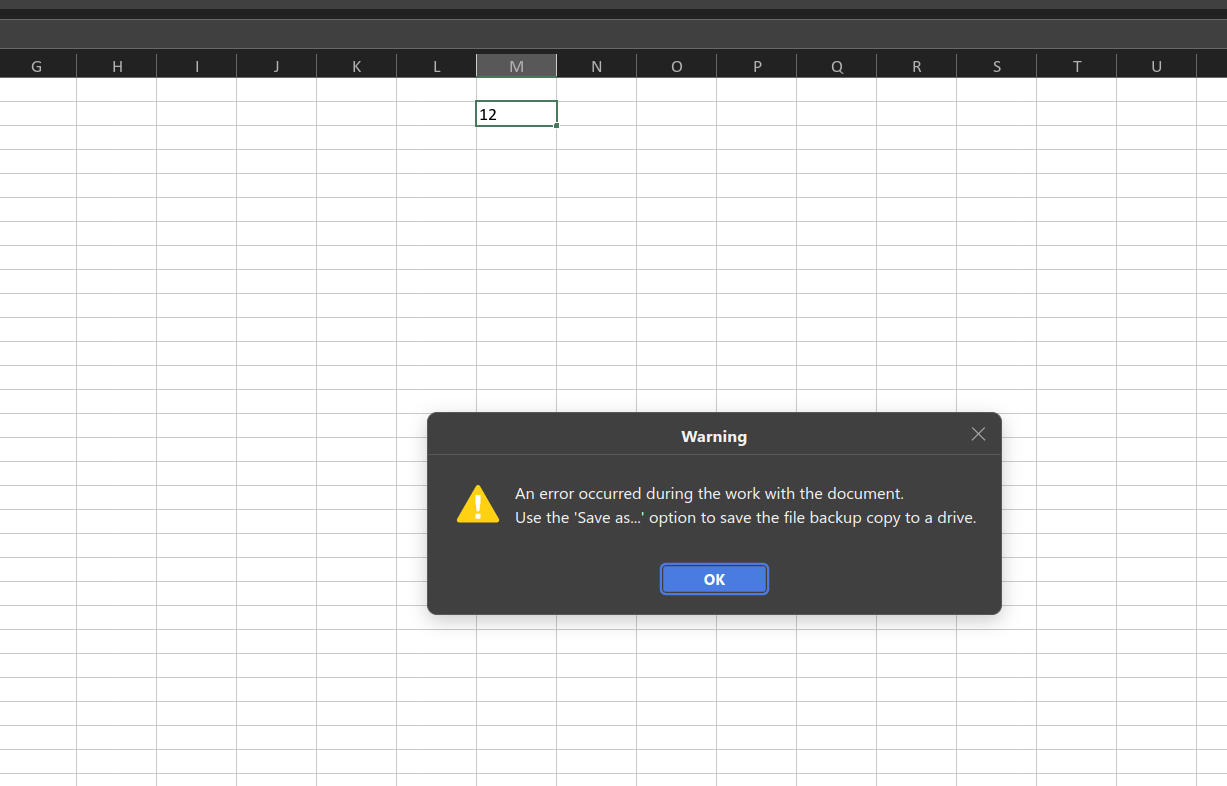
  • Filling a number into field M2 → Error Below

So, there is definitely an issue.
I am using Version V9.4.0.129 of OnlyOffice

This does appear to be the same issue that @DavidRGreen reported earlier. In that report, the conditional formatting test worked in version 9.3.1.8, but in version 9.4.0.129 the same scenario started producing an error, and the case was added to our internal bug tracker for investigation.

Operational issues with spreadsheet on version 9.4.0.129 (x64 exe)

We will continue working on this bug and will update you here as soon as we have more information.

In parallel, we will also review the other spreadsheet behaviors you described (conditional formatting on N2/M2, recalculation of the hidden AB/AC/... columns, and dashboard updates after changing the x markers) to identify the cause of these issues.