Hello,
Could you please attach a sample XLSX file where this behavior reproduces?
If the original file contains sensitive data, you can anonymize it or create a minimal sample with just a couple of cells/sheets that still reproduces the issue — we’ll use it to check the file structure and test on our side.
The ultimate conclusion being that a sheet will not automatically recalculate unless it is forced to by a function that demands it. In this case, the random number generator could act as a catalyst for recalculation.
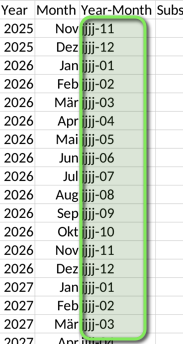
On the matter of cell values, I was mystified by the value of “jjjj-02”. It was mentioned that the formula TEXT(A2,“yyyy-MM”) was used but “jjjj-02” was the result.
I dug very deep, and found the following in the sample spreadsheet. (this is from the XML data that is the building blocks of the sheet)
What it says is Cell C2 has a formula of TEXT(B2,“jjjj-MM”) and a value of “jjjj-11”.
This seems to be indicative of why fields have “j” characters instead of the year value. I could find no reference to “j” being a date format rule character, unless Marix has some knowledge of one.
But the cells have values, and with no catalyst, as mentioned previously, no recalculation on open will occur, and it would appear, that the value of “jjjj-11” is a valid result of the formula.
I hope this may provide a little insight to your issue.
I did suspect as much.
But it would seem that OnlyOffice does not recognise “jjjj” as a functional equivalent to “yyyy”, thus treating it as a string literal and returning it as such.
To me, it would appear that if you used TEXT(B2,"YYYY-MM") instead of TEXT(B2,"jjjj-MM") in your cell formulas, you may get the output that you seek.
The automatic recalculation upon opening is matter that will require the use of an formula that forces recalculation.
Hi, @chrisnoonyes ! Thank you for your patience, and thanks as well to @DavidRGreen for the detailed analysis and help in this discussion.
We checked the situation with our QA team. The issue with the TEXT() formula and the jjjj year format has already been registered in our internal tracker as an existing bug related to incorrect date display when regional settings are changed.
We also confirmed that ONLYOFFICE displays the last calculated value saved inside an XLSX file when the file is opened. Because of that, recalculation may be deferred on opening, and in some cases the saved cached result is shown until recalculation is triggered manually.
As for the automatic recalculation on file open, this has also already been registered as a separate request in our tracker.
As a temporary workaround, please try replacing jjjj with yyyy in the TEXT() format string and then re-save the file. You can also force recalculation manually after opening the workbook if needed.
Thank you again for the sample file and the investigation details. We do not have an exact ETA for a fix at the moment, but we will update this thread as soon as we have any news.
Well, that was a surprise. I would not have expected that a format rule would be localised, especially considering that these files could be shared internationally, causing the formula to fail outside of the specific language group.
Just out of interest @Marix , using this issue as an example; should OnlyOffice be converting the formulas from “jjjj-MM” to “yyyy-MM” when opened by region using “y” instead of “j” for year to maintain functionality, or would all regions support “j” in addition to “y” for year.
We cannot confirm the exact implementation approach yet. We are still working on the best way to handle this scenario, and as soon as I have more information on this point, I will be happy to update you here.
Thanks @Marix
I’ll keep an eye out. It is just a scenario that I was really surprised and curious about.
Especially since I could not find any mention of localisation of formatting strings online.
But the format dialogue for OnlyOffice is quite different to that in Excel.
That is understandable. The general description of the TEXT() function makes this kind of behavior look less obvious at first glance.
Formatting and regional behavior may vary between editors, so cross-editor cases like this can sometimes lead to unexpected results. We are looking into this scenario on our side and will update the thread once we have more information.