Feature request: Button/option to switch of automatic calculation in spreadsheets

When you work with spreadsheets that contain thousands of formulas, editing can be a real pain, as calculations can take several seconds to finish.
MS Excel has such an option. If activated you can edit cells with no recalculation and thus really fast. It helps a lot. Calculation can be activated manually to check if errors have been made. Manual calculation is already available in onlyoffice. But there is no option to deactivate automatic calculation after each edit.
This should be a so called “no-brainer” to implement. Easy and it will benefit a lot of people with extensive spreadsheets while editing.

See screenshot from MS Office (see option “Automatic” activated but “Manual” available, recalculate buttons visible next to the option) :
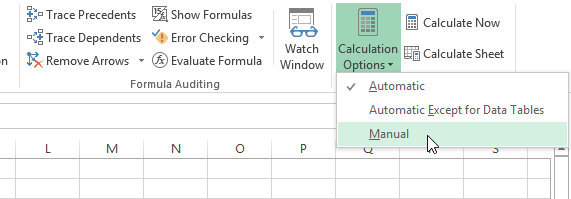
Example_manual_calculation

Hello @anon801025

Thank you for the suggestion. We are taking a closer look at it, I will provide a feedback.

The was registered, thank you for the report.

What is the status of the implementation? It is over a year since this post? I would like to have the possibility that the workbook calculates automatically. Instead I have to calculate the workbook everytime I open onlyoffice. I use ONLYOFFICE 9.2.1 for Mac (M4). Thanks for the update

Hello @chrisnoonyes

This topic suggests implementing manual calculation. Currently Desktop Editors calculate the data automatically. If you are experiencing any issues with the option, please start new topic.