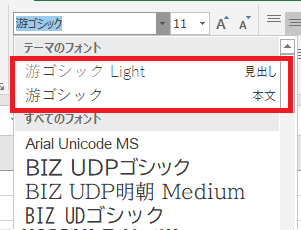
Any text set in MS Office to the font in the red box in the font list image below will automatically change to the default font “Arial” or “Calibri” in the Desktop Editors.
word/powerpoint
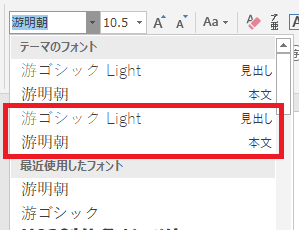
excel
Any text set in MS Office to the font in the red box in the font list image below will automatically change to the default font “Arial” or “Calibri” in the Desktop Editors.
word/powerpoint
excel
Addendum to the previous post:
The font in the red box is a Japanese font in the theme fonts. Many Japanese documents created with MS Office use this font for the Japanese text.
In the Desktop Editors, these fonts are changed to “Arial” or “Calibri,” but these do not support Japanese.
This is one of three issues I would like to see resolved to ensure compatibility with MS Office in Japan.
Thanks @Constantine
I would like a UI with composite fonts, but I think the problem I’m having is related to font handling.
I will present two theme xml.
For example, in MS Office’s xml, the theme fonts is defined as follows:
<a:fontScheme name="Office">
  <a:majorFont>
    <a:latin typeface="游ゴシック Light" panose="020F0302020204030204"/>
    <a:ea typeface=""/>
    <a:cs typeface=""/>
    <a:font script="Jpan" typeface="游ゴシック Light"/>
    <a:font script="Hang" typeface="맑은 고딕"/>
In onlyoffice, the theme fonts seems to change as follows:
<a:fontScheme name="Office">
  <a:majorFont>
    <a:latin typeface="游ゴシック Light" panose="020F0302020204030204"/>
    <a:ea typeface="Arial"/>
    <a:cs typeface="Arial"/>
    <a:font script="Jpan" typeface="游ゴシック Light"/>
    <a:font script="Hang" typeface="맑은 고딕"/>
In files overwritten with Desktop Editors a Japanese font in the theme fonts becomes to “Arial” or “Calibri.”
This is another issue I’d like to see resolved to ensure compatibility with MS Office in Japan.
Can you share both of these files for analysis?
Hello @Constantine
created with MS Word 2019: empty.docx (11.7 KB)
opened it and saved with Deskop Editors: conv.docx (9.3 KB)
Thank you for the files. We are analyzing them.
Thanks @Constantine
I’d be happy if you could find out anything.
Once this is resolved, many Japanese documents will be displayed in the correct font in Desktop Editors, and MS Office users will also see the correct font.
We are analyzing the issue, it turned out to be a bit more complicated, then expected.
Thanks @Constantine
I’m sorry that it wasn’t a simple problem, but I look forward to finding a solution.
Thanks for the patience. The bug number 79246 has been registered in the internal bug tracker. Once any news on this issue comes up, I’ll let you know.
Thanks! @Constantine
I’m looking forward to it.