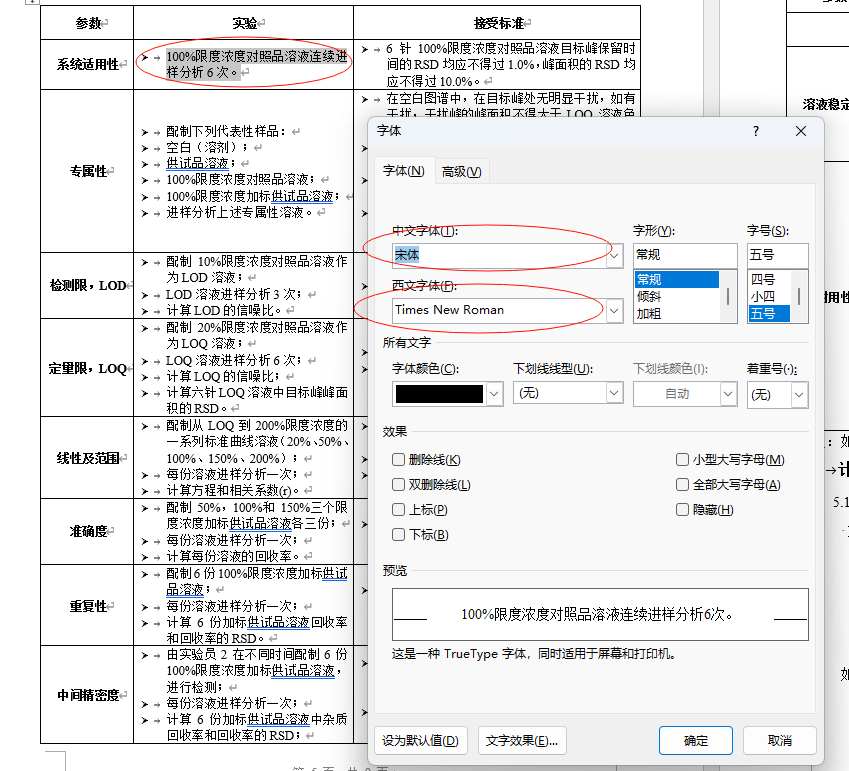
Does onlyoffice support composite fonts?
-<w:docDefaults>
-<w:rPrDefault>
-<w:rPr>
<w:rFonts w:cs=“Times New Roman” w:hAnsi=“Times New Roman”
w:eastAsia=“宋体” w:ascii=“Times New Roman”/>
<w:lang w:eastAsia=“zh-CN” w:bidi=“ar-SA” w:val=“en-US”/>
</w:rPr>
</w:rPrDefault>
<w:pPrDefault/>
</w:docDefaults>
ms word:
Document Server version: 9.1
OS: win 11
Browser version: chrome 141
Additional information:
Any relevant details about the situation. If you’ve modified configuration files or are using a proxy server that might affect the situation, please mention it. You can also attach images and videofile to the post (or to place them to external storage)
Hello @softboy99 ,
ONLYOFFICE supports the following font types:
TrueType: .ttf, .tte
OpenType: .otf, .otc, .ttf, .ttc
Web Open Font Format: .woff, .woff2
If you encounter any issues with fonts, please provide detailed information and send the font file for further investigation. This ensures we can assist you better with any specific font-related problems you might face.
Hi,
It seems that you don’t know CJK eastAsian issue. In China,Japanese,Korea, when an String contains both CJK language charaters and western latin characters, in ms word, can config two fonts at the same time. one for CJK font, another for western latin font. The western latin chracters in the string will automatically use the western latin font and CJK language characters will automatcally use the CJK font. If you don’t support this feature, it will impact on the document final formattng layout,ie, in ms word it have 3 pages, in OO, may be it will have 4 pages.
Helllo @softboy99,
ONLYOFFICE does support CJK (Chinese, Japanese, Korean) composite fonts, and this feature has been available since 2019.
To help investigate the specific issue you’re experiencing, could you please provide sample document file where the composite fonts are not working as expected, the fonts you’re using and screenshot showing the problem.
Hi,
Thanks, But on UI, is there anywhere to configure two fonts?
Hello @softboy99,
Thank you for bringing this to our attention.
We don’t have a UI option to configure two fonts right now.
We’ve added this request as an enhancement in our internal tracking system. While there is no exact timeline for its release yet, we will inform you when we have an update.
Hi @softboy99,
Thank you for following up! The request to support composite font settings is still being tracked internally as a feature enhancement. As of now, there is no scheduled release date we can share.
We’ll update this thread once there’s any progress on the implementation.