While @DmitriiV is currently unavailable, I will be working on your issue in the meantime and will keep you updated on any progress
Thank you for providing the requested information and files. We have successfully downloaded the files from the Dropbox link you shared, so you may now remove the share.
We noticed that you did not provide specific details about your keyboard input settings (e.g., keyboard layout or input language), which were requested. Could you please clarify these settings to help us further investigate the issue?
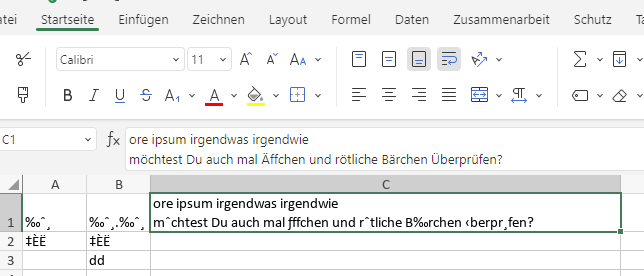
Hi everyone, I’ve been experimenting the same issue, the accents are not displayed correctly (replaced by signs like % or even letters with accents but not the good one “è” replaced by “Ë”, “é” by “È”… but when I copy/paste the text, the corrects accents appears.
Only in Spreadsheet, nothing in Documents.
Only in Arial font.
Appeared around 1-2 month ago approximately.
Windows 11 in French language.
The bug disapears when switching to any other font.
Hello @Nikolas , hello @DmitriiV,
do you have some news for me? I cant figure out where the Problem is, and due to sensible Informations and long entie lists i can not transform everything in a new file. If i open the .xlsx with other programms, like LibreOffice or MS Excel, i have no Problems with the Font.
We’ve logged this as a bug: “Incorrect display of letters with umlauts in Arial font.”
We haven’t pinpointed the cause yet, but we’re actively investigating. I’ll keep you both updated on any progress or fixes. Big thanks to both of you for your help in reporting this!
Hello @Nikolas
thank you for your reply. Please keep me/us updated. I have a lot of Sheets in my Spreadsheet datas, so it is not practicable to format all single to an other font. I hope on a solution soon to fix this, its very annoying to read in the Sheets with this bug.
Hi! Just a bump for this issue! It forces me to allow my team to use MIKROSCHROTT again, so it’s urgent, and it concerns not only the (entire…) German writing community with äöü, but as it seems, also French writers with é etc. And in this case, probably nearly everybody except English-only-writers.
Happens to me not only in Arial, seems not to be bound to a Font as far as I can tell (right now happens in Calibri that was the font set by default in a new spreadsheet).
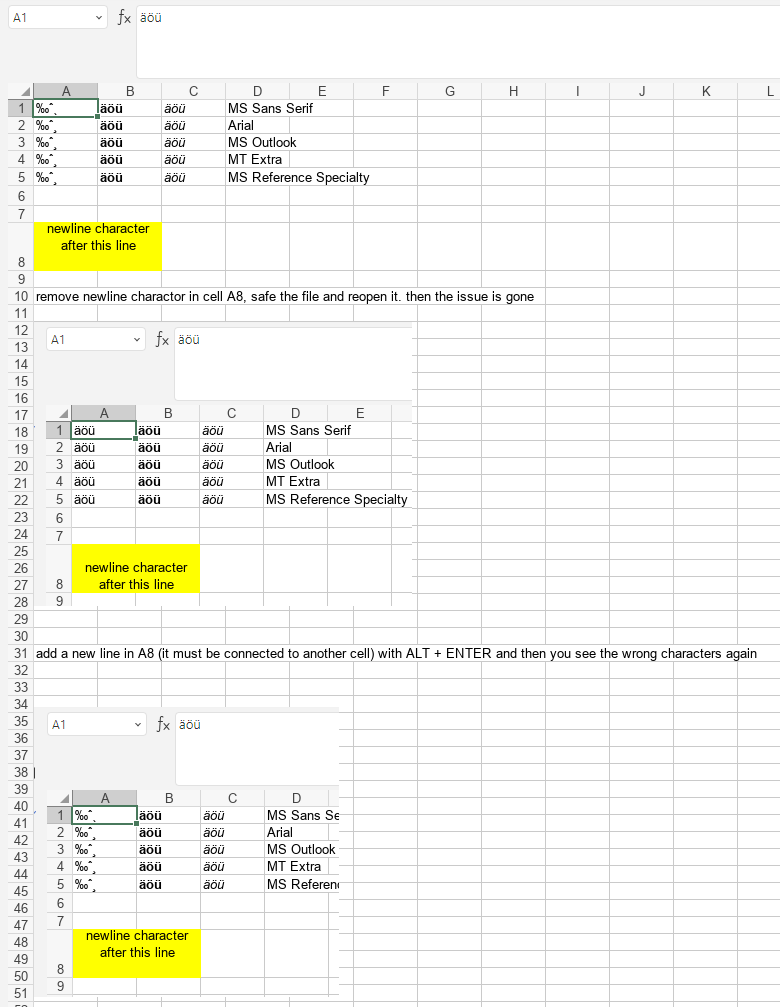
I am able to reproduce this error also for fonts (MS Sans Serif, MS Outlook, MT Extra, MS Reference Specialty, Arial (I did not test every font…)) in this way:
connect and center two cells
enter newline character (ALT+ ENTER)
enter in a new cell “äöü”
set font for that cell to Arial
remove newline character in centered cell, safe the file and reopen it. then the issue is gone
ONLYOFFICE: 9.2.1.43 tested with Windows Store install and website download
OS: Edition Windows 11 Pro
Version 25H2
Installed on 11.11.2025
OS build 26200.7840
Experience Windows Feature Experience Pack 1000.26100.291.0
Windows display language: English (United States)
Preferred languages:
German (Germany)
English (United Kingdom)
Country or region: Germany
Regional format: German (Germany)
Device setup region: Germany
Time zone: UTC+1:00
ONLYOFFICE Advanced settings:
Formelsprache: Deutsch
Region: Deutsch-Deutschland
Maßeinheit: Zoll
Schriftglättung: wie Windows
changed the to Settings
Interface language: English (United States)
Interface scaling: Auto
had to close ONLYOFFICE since the next setting was not translated (it was still in German)
Checkmark with Use graphics acceleration when available
Error still present but Advanced Settings translates now to:
Formula language: German
Region: Deutsch-Deutschland
Unit of measurement: Inch
Font hinting: as Windows
Display 2 + 3 scale & layout
Scale: 100%
Display resolution: 2560 x 1440
Display orientation: Landscape
Connected via USB-C to DP Adapter to 4K DP MST KVMP Switch
Display 1 (laptop) is off
Dear @TUser
Thank you for the provided data, we are looking into it.
Unfortunately, we’re still working on the mentioned bug, and we will update this thread once we have something to share.
Hi,
To contribute to resolving this error, I’d also like to point out that it’s reproducible in Portuguese in spreadsheets.
The characters only appear correctly if I format them to a font other than Arial.
The error occurs with characters like Á, É, Ã, Ç, etc…
It’s a very annoying situation, since I have old and more recent reports generated by software using the Arial font, and it’s not practical to change the font every time I want to consult these documents.
This is the environment where I have the installation:
Windows 11 x64
QWERTY Keyboard
ONLYOFFICE Desktop Editors
Community Version 9.3.1.8 (x64 exe)