Do you want to: Suggest a feature / Report a bug / Ask a how-to question
For feature suggestions, describe the result you would like to achieve in detail.
For bug reports, provide the steps to reproduce and if possible a minimal demo of the problem.
Document Server version: 9.0.4.50
Type of installation of the Document Server (docker, deb/rpm, exe, please point us to the installation guide that you used as well): deb
OS: Linux 5.14.0-503.16.1.el9_5.x86_64 x86_64
Browser version: Firefox 143.0.3 (64-bit)
Additional information:
If I create a conditional rule in a spreadsheet and want it to be copied to adjacent cells, the copied rules reference the original cell. This affects the results when the information in the original cell is changed, since they all point to it and ignore the information that should affect them.
Example:
If I create a conditional rule in cell R5 with the following formula: =Y(R5-TODAY()<=30,R5-TODAY()>15) and copy it to the other cells, the only difference is that each conditional rule adds absolute values where the rule applies but still points to cell R5.
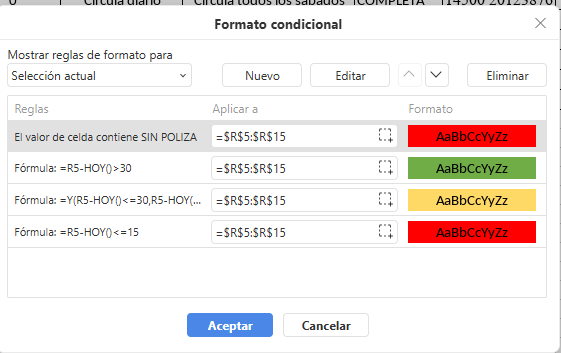
Hello,
To reproduce and diagnose , could you please attach the sample spreadsheet that demonstrates the problem?
Please include the exact steps you used when creating and copying the conditional formatting.
relacion de verificaciones 1er semestre 2025.xlsx (15.9 KB)
To create:
in the cell:
-
click on conditional formatting icon → new rule
-
Rule → Formula → add formula: =R4-HOY()>30
-
Adjust desired format to cell
-
click on accept button
To copy
- Select formated cell
- click on style copy icon
- select cells to be apply conditional formatting
Hello,
Thank you for the sample file and detailed steps.
We have successfully reproduced the issue you described. Our team is currently analyzing this behavior, and we will update you with our findings and a solution as soon as the analysis is complete.