When I edit and overwrite a file on a virtual disk drive using Desktop Editors, the file contents are updated, but the file update date is not updated.
Hey @nishigaki 
Thank you for your report! To better understand the issue, could you please provide the following details:
- Operating System (name and version)
- ONLYOFFICE Desktop Editors version
- Installation type (deb, rpm, AppImage, Snap, exe, or msi)
If possible, it would also be very helpful if you could share a short video demonstrating the behavior (you may upload it to any external storage and share the link).
This information will help us reproduce the issue and investigate it further. 
Hello @Nikolas
I use
ONLYOFFICE: desktop editors: 9.0.4.50 (x64 exe)
OS: windows 10 Pro 22H2
The problem is as follows: ONLYOFFICE
- create test2.xlsx
- edit test2.xlsx by desktop editors
- set “=now()” to a cell
- overwrite to test2.xlsx, but “update time” of test2.xlsx is not updated
- open test2.xlsx by microsoft excel, test2.xlsx has saved
- close tab of test2.xlsx on desktop editors
- “update time” of test2.xlsx is updated
Hello @nishigaki 
Thank you for the provided details and the video.
From what I can see, the file modification date is updated after you close the file in Desktop Editors — at this moment the lock on the file is released and the changes become visible in the system (as shown on your video).
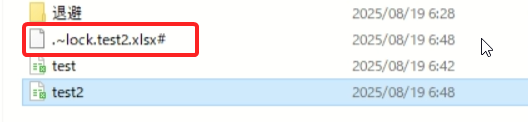
If I misunderstood your case or if you expected a different behavior (e.g., the update time to be refreshed immediately after saving without closing the file), please clarify so we can investigate further.
Hello @Nikolas
First, when I overwrite a file, the “modified time” is not updated, but the changes are reflected in the file.
Second, when I overwrite a file on local disk or cloud, the “modified time” is updated at that time, but the “modified time” of a file on virtual disk drive is not updated.
1 Like
Hello @nishigaki,
Thank you for the additional clarification!
I’ve passed this issue to our team for further investigation.
As soon as I receive any updates or confirmation about this behavior, I’ll get back to you right away.
Thanks @Nikolas
I look forward to the fix.
1 Like
Hey @nishigaki,
To dig a bit deeper:
-
Could you clarify how your virtual disk drive is set up or connected (e.g., is it a network-mounted drive, a specific software like WebDAV, or something else)?
-
Does this behavior happen only with XLSX files, or do you see it with other file formats (e.g., DOCX, PPTX, ODS) as well?
This will help us reproduce and tackle the issue faster. Appreciate your patience and input!
Hello @Nikolas
- I use Drive Explorer of LINE WORKS. LINE WORKS
- This behavior happened not only with xlsx but also with docx, pptx and ods.
1 Like
Hey @nishigaki,
Thanks for the extra details about using LINE WORKS Drive Explorer!
We’ll dig into what might be causing the file modification date not to update on your virtual disk drive and keep you posted.
Thanks @Nikolas
I’m waiting for the cause to be clarified.
Hey @nishigaki,
We are suspicion is that the problem might be on the Drive Explorer side: it could be delaying or skipping the timestamp update during sync because the file is still open/locked in the editor. This would explain why the date updates only after closing the tab (when the lock releases).
To clarify further, could you check:
- The sync status in LINE WORKS Drive Explorer for the affected files (any errors or pending syncs)?
- If there are logs or error messages in the Drive Explorer app (e.g., under settings or diagnostics)?
Unfortunately, we can’t reproduce this without a LINE WORKS account, but any extra details from your side would help confirm if it’s integration-related.
Thanks @Nikolas
- I can’t see any errors or pending status for syncing.
- I can’t check because the Drive Explorer app doesn’t have a logging function. And there were no errors in the Windows Event Viewer.
The Modified date has been updated in Microsoft Office etc. Currently, the date is not updated in the desktop editor only.
Hello @Nikolas
Additional information:
The “Modified Date” is not updated in Windows Explorer, but the “Last Saved Date” in the file properties is updated.
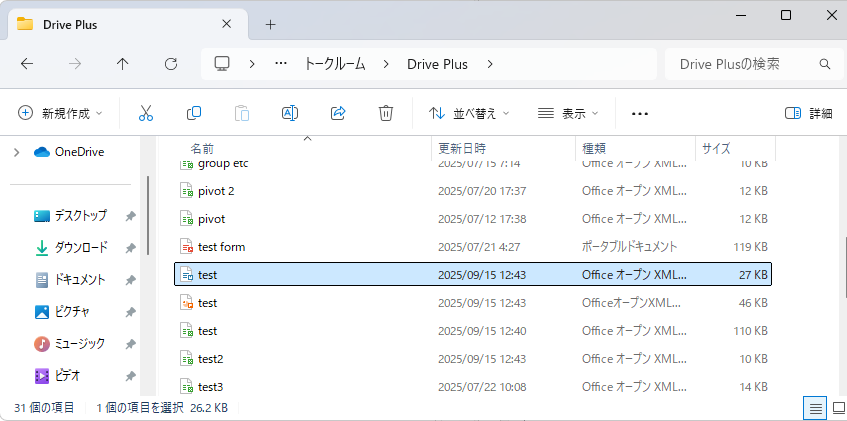
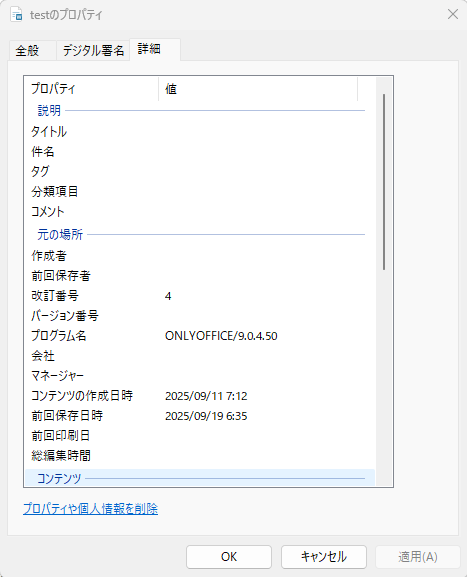
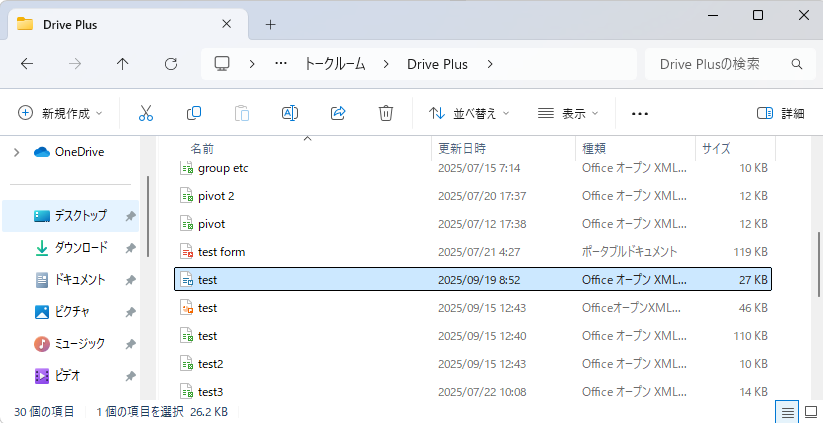
When I close the tab of desktop editors, the “Modified Date” is updated in Windows Explorer, but the “Last Saved Date” in the file properties is not updated.
Hi @nishigaki
Thank you for the additional details and screenshots. We appreciate your patience as we investigate this.
We haven’t conducted tests with this type of virtual disk drive, so we cannot guarantee the correctness of the behavior. However, the issue appears to be related to the virtual disk drive in LINE WORKS Drive Explorer.
To clarify further, do other editors (not MS Word) also correctly save the date value upon saving?
Additionally, to test this fully, the app requires a phone number or account, which I don’t have, so reproducing it isn’t possible at the moment. 
If you have any other details or tests, please share!
Hello @Nikolas
- The “modified date” was saved correctly when saving in Excel, PowerPoint, Notepad, Paint, and Acrobat Reader.
- A corporate contract is required to use LINE WORKS Drive.
In addition, after overwriting the file, I stopped the virtual drive and closed the desktop editors, and I restarted the virtual drive, the file contents and “Last Saved Date” were restored to what they were before the overwrite.
LINE WORKS support says that the “Modified Date” has not been updated because Desktop Editors may has not completed overwriting the file, and that I should close the tab to complete the overwrite.
Is this a difference in the file overwriting procedure policy?
Hey @nishigaki,
Thanks for the details on “Modified Date” and LINE WORKS! We’re actively investigating why ONLYOFFICE doesn’t update the date on the virtual drive until the tab is closed. I’ll update you as soon as we have more info. Appreciate your patience! 
Hey @nishigaki,
We’re still investigating why the date doesn’t update until the tab is closed, and LINE WORKS’ response about incomplete overwrites points to a possible difference in file handling.
To narrow it down, could you try installing an earlier version of Desktop Editors, like v9.0.0, from here and check if the behavior is different (e.g., does the “Modified Date” update properly after saving)? This will help us see if it’s version-specific.
You can download v9.0.0 (x64 exe for Windows 10) and test with the same steps. Let us know the results, and we’ll keep digging!
Hello @Nikolas
Sorry, I’m using windows 11 now. Can I use it on windows 11?
And I’m testing the other issue.
I’ll try v9.0.0 installer once I’ve finished testing the other issue.
1 Like
Hey @nishigaki,
Good to hear you’re now on Windows 11! Yes, you can absolutely use v9.0.0 on Windows 11. No worries about testing the other issue first; take your time.
Thanks for your patience — we’re still on it!