I used to use MS Excel to print accurate templates for labels. For this, it’s important that I can set the cell height and width correctly, ideally in millimeters. Isn’t this option available in onlyOffice Calc? I’ve already searched the options but haven’t found anything. I can only set the width in “sym” and the height in “pt.”
Thanks for reaching out about setting cell width and height in millimeters in ONLYOFFICE Spreadsheet Editor!
Unfortunately, there’s currently no direct option to set cell dimensions in mm/cm in ONLYOFFICE Spreadsheets — width is in “characters” (sym) and height in points (pt).
Are you referring to the same suggestion as in this thread: Spreadsheet column width? If so, we can consolidate the discussion there.
Could you share how you set cell width and height in millimeters in MS Excel? Screenshots or a short video (uploaded to ONLYOFFICE DocSpace, kDrive, or Dropbox) would be super helpful to understand your workflow.
We’ll consider this as a feature request and keep you posted. Thanks!
Hello @Nikolas ,
yeah the question goes into the same direction.
I dont use MS Office animore, so im not able to make screenshots or a video.
I just jumped in Excel into the Site view of the sheet, there i was able to set the high and wide in cm, mm, inch etc. Just like in OnlyOffice with right click onto the row or tab.
Sorry to hear you can’t demonstrate the exact functionality from MS Excel anymore — no worries!
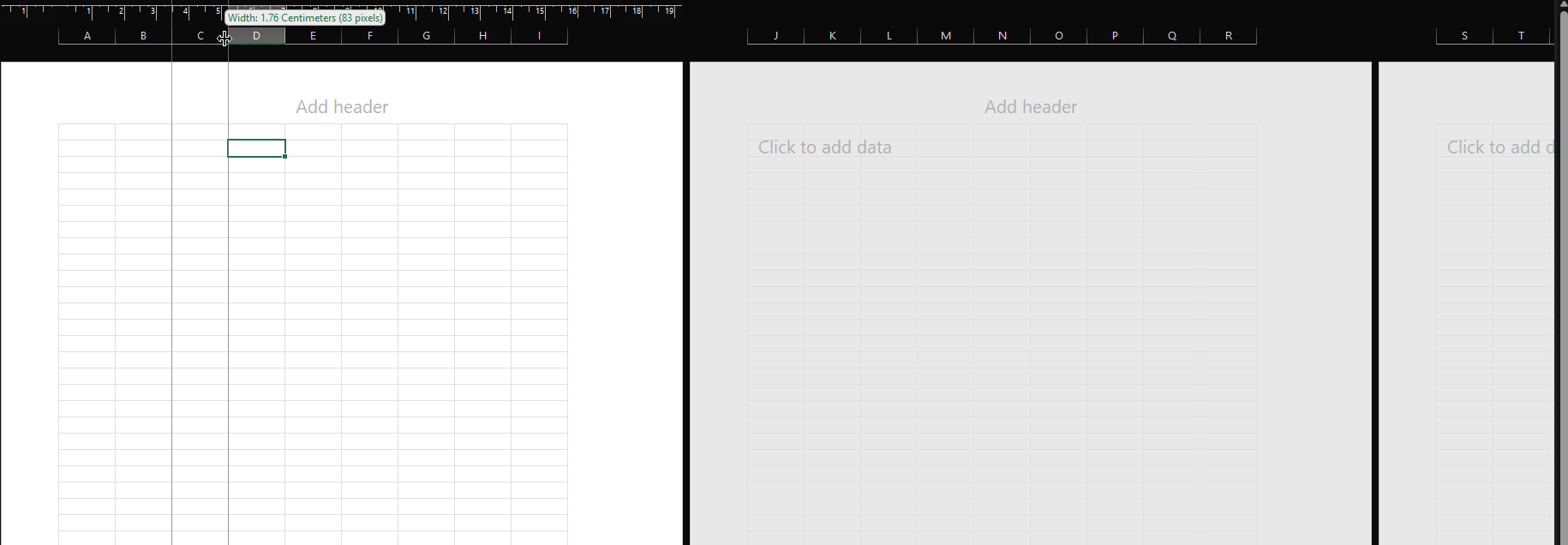
I found a similar feature in Excel where you can set row height and column width in cm/pixels via the Page Layout view (see the screenshot I’ve attached). Is this what you were referring to?
If this matches what you need, please confirm, and I’ll ensure your request to add cm/px support for cell dimensions in ONLYOFFICE Spreadsheet Editor as a feature suggestion. If it’s something different, could you describe it a bit more?
Thanks for confirming — yes, that’s the Excel Page Layout view for setting row/column sizes in cm/mm/inches.
Unfortunately, ONLYOFFICE Spreadsheet Editor doesn’t have a Page Layout mode yet, so this functionality isn’t available at the moment. We’ve logged your request as a feature suggestion, and we’ll notify you in this thread as soon as it’s implemented.