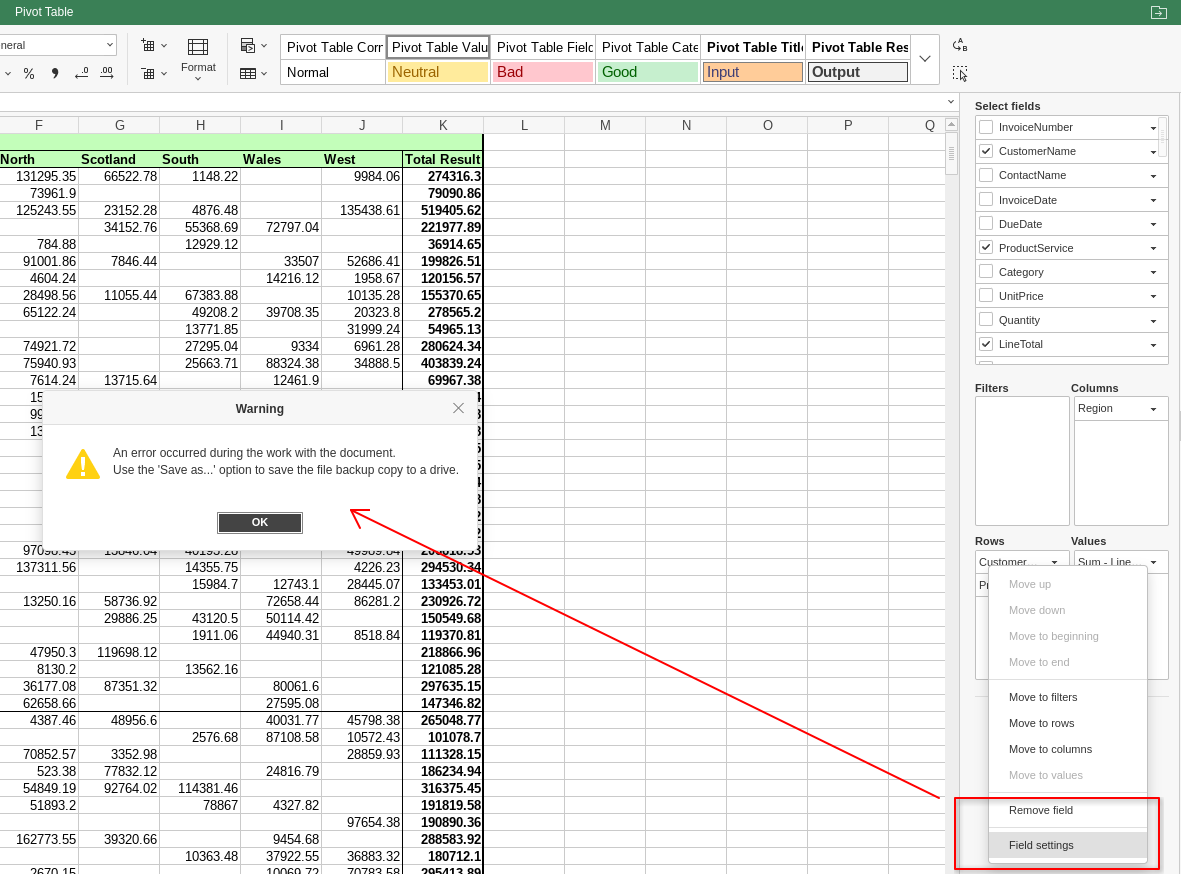
Could you please attach the .xlsx file in which this issue is reproduced? We need the original file to check the behavior on our side.
Also, if possible, please record a short video showing the issue step by step: opening the file, going to the pivot table settings, clicking Field settings, and the app freezing. This will help us verify the exact scenario faster. If the video is too large to attach here, you can upload it to any cloud storage and share the link with us.
Thank you very much for the test file and the detailed screencast – they helped us a lot in reproducing the issue on our side. We’ve registered this behavior as a bug in our internal tracker and passed it to the development team for further investigation and fixing.
At the moment we can’t provide an exact ETA, but as soon as we have any news on the fix or on which version it will be included in, we’ll post an update in this thread.
Thanks again for your help in improving ONLYOFFICE!
Can you, please, advise if I can download the earlier (<=9.2) versions of OnlyOffice? Fedora rpm or AppImage would be fine. These versions didn’t have this issue and I could use them till bug is resolved.
Yes, you can use an earlier Desktop Editors version as a temporary workaround.
Please check the official ONLYOFFICE GitHub releases page here:
You can select one of the older releases there and download the build you need. Please note that we are not providing support for outdated versions so you will be asked to update to actual version first to troubleshoot the issues.
We have just released a new version 9.4.0 that includes a fix for this issue. Please update ONLYOFFICE Desktop Editors to the latest version and check the behavior with your pivot table file again.
If the problem still appears after updating, please let us know and share the new details.