Please add in Zotero plugin possibility to add page number to each cited document (both in footnotes and endnotes). Presently, I can’t use the plugin as much as I like, the manually added page numbers disappear after any action or refresh.
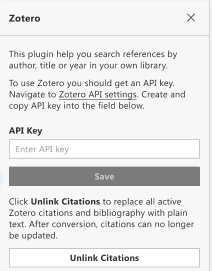
Also, it would be very helpful if you could add a button for unlinking the Zotero citations in whole document. Or is there any way to do it manually? (OnlyOffice 9.10 for macOS).
Thank you! I really like OnlyOffice and I appreciate your work.
For researchers in humanities (and not only), citing exact page numbers and page number ranges (i.e. “pp. 30-43”) is a crucial feature. Unlinking citations is a mandatory step before submitting any text to a publisher, almost all of the book/journal editors I know, demand switching them off.
Adding page numbers / page ranges to citations
We’re actively working on this — it’s coming in Zotero plugin v1.0.6 (currently in development).
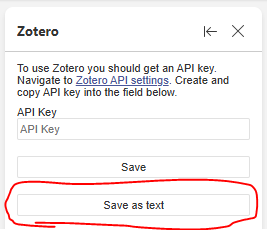
Unlink all citations / “Save as text”
This is already implemented! In the current version you’ll find the “Save as text” button (screenshot below). In v1.0.6 we’ll rename it to “Unlink citations” so it’s clearer.
Thanks again for the super valuable feedback — it’s exactly what helps us make the plugin work the way researchers need!