Community Server/Control Panel version:
Type of installation of Workspace (docker, deb/rpm, exe)
OS: Windows 2016 Server
Browser version: Google Chrome 114
I have installed OnlyOffice Workspace in Windows Server 2016 which is having 500 GB. I am having another 5TB local disk.
I want to know that how to configure/add/mount an additional local disk in workspace to save all type of data. My Community Server is in Intranet. Internet is not available.
Hello @ls_venkat
Please specify versions of all Workspace components.
You can find them in Update tab of Control Panel.
I have the same question : Use a dedicated server-side shared /mounted folder as a Local Documents/Folders Storage from within OO Workspace.
- OO Workspace Community ( all modules ) installed and operational OK on Centos/Almalinux server
- Version 12.7.1.679
An alternative workaround is to setup a local WebDav server and then link it from within OO Workspace but this seems too odd to …
Hello @vessovassi
Probably there’s the way to change data location for Workspace. Do I understand it right that you’re using package installation? If so, please follow my steps:
- Make a backup\snapshot of the whole server before any actions . If something goes wrong, you will be able for a quick rollback.
- Create a folder in the desired directory. For example
/etc/newfolder/
- Copy the portal data into a new directory.
cp -r /var/www/onlyoffice/Data/ /etc/newfolder/
- Set the owner of the folder.
chown -R onlyoffice:onlyoffice /etc/newfolder/
- Open the config file for editing:
/var/www/onlyoffice/WebStudio/web.storage.config
Set value="/etc/newfolder/Data/" instead value="..\Data\"
- Restart the Mono service.
service monoserve restart .
Hi Alexandre, Thank you very much !
Indeed, I use the package installation
Your approach looks feasible, will try it out. It seems to be able to help me use a dedicated server-side large storage/disk to host my large data archive ( ~ 5TB )
Am I correct that OO Workspace keeps the data in its own ‘repository’ structure , i.e. Thus, if I create, as you suggest , the new dedicated OO Workspace Data folder, I will not be able to preserve in it my original data folder structure ( e.g. folders, subfolders, files, etc., as I have them already e.g. on my present storage/backup) but I will need to upload all through the Workspace GUI , which will created an OO Workspace specific data structures under "…Data/… "? And , to be able to further access my data files in an ‘human-friendly way, I could only use the OO Workspace interface ?
This is still useful although I would prefer to be able to use my files from both within OO Workspace and from ‘outside’ …Something similar to what exists in Nextcloud - the possibility of attaching within Nextcloud an existing external ‘Local Storage’ preserving the existing document data folders’ structure ?
I think that such an OO Workspace feature ( to be able to ‘attach-and-go’ within OO Workspace existing large storage disks without e.g. relying on setting up external WEBDAV servers ) will significantly boost the use of OO Workspace as an enterprise CM system…
Thank you again !
One other question:
How do I know which sub-folders of /var/www/onlyoffice/Data/ contain OO Workspace specific data, and which ones - usrer’s documents, e.g as imported from the GUI :
My approach is, based on Alexandre’s suggestion, to only separate from /var/www/onlyoffice/Data/… my own documents, and put them in a remote folder ( e.g. a high volume storage) , then link/mount that folder under the correct place of the var/www/onlyoffice/Data/… hierarchy … This way, I will make sure that the OO installation is working OK even if my mounted /linked remote data is not available … (e.g. the remote folder is not mounted ) … Is this a feasible / possible approach at all within OO Workspace?
Hello @vessovassi
That’s why I recommended to copy all the data to new created folder (step 3): cp -r /var/www/onlyoffice/Data/ /etc/newfolder/
The folder structure and users file permissions are related to MySQL database, so you shouldn’t face any issues there once the data migration is completed.
How do I know which sub-folders of /var/www/onlyoffice/Data/ contain OO Workspace specific data, and which ones - usrer’s documents, e.g as imported from the GUI :
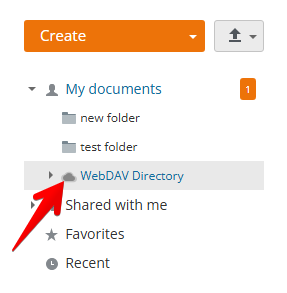
This scenario might be difficult. As far as I understand you want to implement saving Workspace data on two different location at the same time via config files. We haven’t tested such scenario and I cannot guarantee that it will work. However, there’s already ready-to-go solution for external storage. How about to connect WebDAV folder and save files there?
Dear Alexnadre,
Thank you very much for looking further into this issue, really appreciated ! I fully understand, no need to make things too complex if not really needed  . Yes, using WEBDAV is possibly a solution but it seems there are some other issues using it, as I reported already here : WebDav connected external cloud storage - issue to access lower hierarchy folders and their content - #3 by vessovassi
Thus, I am bit stuck for the moment trying to access my exiting large data archive ‘as is’ , without importing it into the OO workspace file structure …
Hope there might be a simple solution avoiding the need to write custom connectors
Many thanks again !
Best regards,
Vesso
1 Like
Dear @vessovassi
Thank you for kind words!
As for the other thread, @Nikolas has already taken up this case and is working on it, please await his reply there.
My understanding was you can’t use mount points in OO, with either the Windows or Linux versions.
Only official plugins are supported.
That’s what it was 2 years ago or so when I tried it and opened a ticket with OO support.
Hello @charles
Indeed, there were not enough tests with symlinks or NFS mounts, so we couldn’t recommend this approach.
If I misunderstood your comment, please clarify.
I tested it. I assure you it doesn’t work. There’s code in there somewhere that doesn’t honor symlinks and mounts from the linux world, or network shares and symbolic links from the windows world.
It’s quite a hassle as everything has to be stored on the root OR in an officially supported plugin. I pointed this out years ago.
Network shares in the windows world are understandable, as shares exist under certain windows credentials, and they likely aren’t the service credentials that OO run under. There should be a way to define the location of the data INCLUDING a network share, complete with credentials to access it.
I don’t think symbolic links are user specific, so those should work with proper coding (assuming of course the symbolic link doesn’t point to a user specific network share).
In linux land, symlinks and mounts should work? There’s nothing user specific there that I know of.
I signed up to the forum just to talk here. I’ve emailed support as well. This is possibly the most important feature that could be added. No local drive access, no OnlyOffice. Its as simple as that.
Hello @babcocca
Right now we suggest following this guide to change data location for Workspace: Workspace - Data Storage on Local Disk - #5 by Alexandre
To sum it up: the option to change file storage is available either by modifying the main directory via config files or by using external services through Documents > Connect (for example, via the WebDAV protocol).
Dear @charles
I do understand your desired scenario of using symlinks for external storage drive, but there were not enough tests to provide guidance on this matter. Currently, I suggest creating a post in Suggestion category to see if the community supports this idea. This will help us understand how much interest there is in this suggestion.