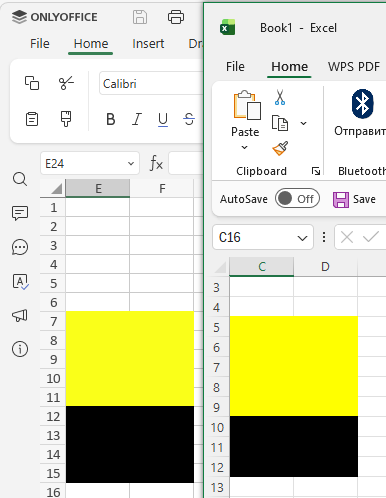
I have a spreadsheet with a black background. How do I make the gridlines visible? Under “View”, it’s ticked as show, but they do not appear… If I remove the background color, then yes, the gridlines are visible.
Are you telling me that the only way I can get gridlines to show up when having a black background for the spreadsheet is to use the “Borders”-functionality?!
How hard can it be to code that in so you can change the grid color and enable/disable the grid color, especially if they have managed to make all this? …
I love OnlyOffice, so I do not wish to reinstall either LibreOffice or MS**** because of this, hence why I am asking this.
Hi, @keyboardtypo!
Thank you for reporting this. We’ve forwarded the case to our QA team for verification and are currently checking this behavior. We’ll get back to you as soon as we have more information.
Thank you for your patience and for the detailed explanation.
We’ve checked this with our QA team. In the current version, what you see is expected behavior: if the cells are filled with a solid color and no Borders are applied, the default gridlines are not drawn over the fill, even if “Gridlines” are enabled in the View tab (this is similar to how it works in Excel as well). So right now the only way to have clearly visible lines on a fully colored background is to use cell borders with a contrasting color.
At the same time, we want to better understand what result you would ideally like to achieve.
Could you please describe more precisely what you have in mind, for example:
Do you want to be able to change the sheet background color (without manually filling all cells) while keeping the gridlines clearly visible on top of it?
Or would you like to have a dedicated dark mode for the spreadsheet editor that keeps the gridlines clearly visible on a dark background?
Or something else?
Once we understand your exact scenario, we’ll be able to register it correctly as a feature suggestion for our team to review.