I’m reading this: Document Editor - Use formulas in tables
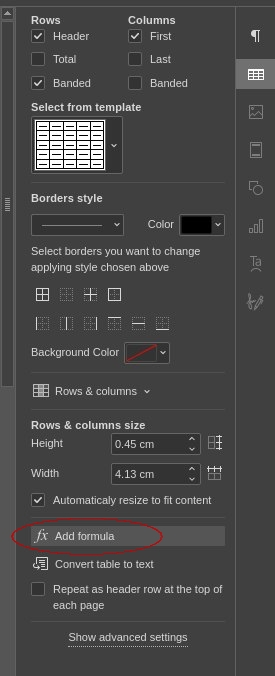
But I have difficulty to locate the “Add forumula” on the right sidebar. What does it look like? I only see this:

I’m reading this: Document Editor - Use formulas in tables
But I have difficulty to locate the “Add forumula” on the right sidebar. What does it look like? I only see this:
Hi!
The Add formula option is not a separate icon in the vertical toolbar you showed. It appears as a button inside the table settings on the right sidebar and opens the Formula Settings window.
Please do the following:
Place the cursor inside a table cell.
On the right sidebar, open Table settings.
You should see the Add formula button there—click it to open Formula Settings.