When I view a PDF file saved from a OFORM in Acrobat Reader and enter Japanese characters in the forms, the characters become garbled.
a portable.pdf (7.5 MB)
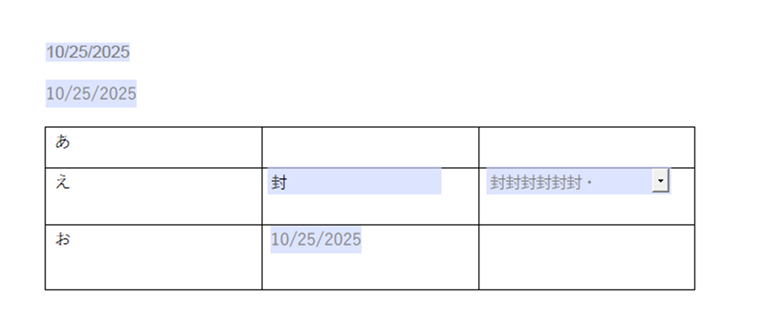
I use
desktop editors 9.1.0.167 (x64 exe)
windows 11 pro 24H2
When I view a PDF file saved from a OFORM in Acrobat Reader and enter Japanese characters in the forms, the characters become garbled.
a portable.pdf (7.5 MB)
I use
desktop editors 9.1.0.167 (x64 exe)
windows 11 pro 24H2
Hello @nishigaki
Since there is another topic for the same file that works for me, I have replied with samples in it, please check out the reply:
Hello @Constantine
Sorry, I thought a new PDF file created with Desktop Editors is called OFORM.
I want to correct the report. Should I create a new post?
Corrected as follows:
I created a new PDF file with Desktop Editors, and edited it in Acrobat Reader and enter Japanese characters in forms, but the characters become garbled.
There is no need.
I’ve tried reproducing the issue, but did not succeed. Can you record a video where the attached file is being filled?
Hello @Constantine
These are videos I’m inputting:
in desktop editors ONLYOFFICE
in acrobat reader ONLYOFFICE
Thank you for the videos. Can you also check Google Chrome or any other app that supports PDF files for opening? In my tests indeed the same behavior produces, however, I was unable to reproduce in anywhere else.
Thanks @Constantine
I have tried it in Acrobat Reader and Edge browser, and the issue is only occurring in Acrobat Reader.
Thank you for the reply. We’ll do some tests to make sure that there is no issue on our side.
Thanks @Constantine
I’m waiting for the verification results.
This issue has been registered as a bug. Thank you for the report.
Thanks @Constantine
I look forward to the fix.