I use
ONLYOFFICE: desktop editors: 9.0.4.50 (x64 exe)
OS: windows 10 Pro 22H2
When editing a text bubble in a PDF in the Desktop editors, I want to use the End and Home keys, but they don’t work.
I use
ONLYOFFICE: desktop editors: 9.0.4.50 (x64 exe)
OS: windows 10 Pro 22H2
When editing a text bubble in a PDF in the Desktop editors, I want to use the End and Home keys, but they don’t work.
Hello again @nishigaki,
We’ve noted this and will pass it to our development team for review.
I’ll keep you updated with any further information on this matter.
TY 
Thanks @Nikolas
I wait for it to work.
Hey @nishigaki,
Thank you for your patience. We’ve created a bug report for the bug
As it’s not a critical issue, I can’t provide a specific timeline for the fix, but I’ll notify you as soon as it’s resolved.
I appreciate your contribution! 
Thanks @Nikolas
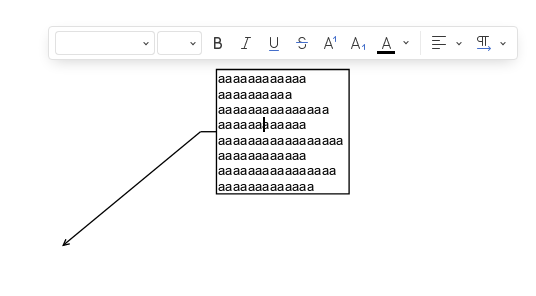
The problem is solved, but there’s one issue:
When I open a PDF containing a text bubble and double-click the text bubble to start editing, the font name is blank (see image below). Pressing the Home or End key changes the font to Arial, but the cursor position within the text bubble remains the same.