I am facing an issue while editing Word/Excel documents in the ONLYOFFICE type mobile editor.
Whenever I open a document, start editing, and then minimize the app (for example, to copy-paste content from another app),
I receive the following popup when returning to the editor:
“Version changed – The file version has been changed. The page will be reloaded.”
This causes the document to reload, and sometimes progress is interrupted.
Could you please help clarify
- Why this “Version changed” message occurs specifically in mobile/tablet scenarios?
- Is there a configuration or recommended practice to prevent reloads when switching between apps?
- Any workaround or upcoming fix to improve the mobile editing experience?
Hello @sugumar, 
Could you please clarify whether you’re using ONLYOFFICE DocSpace Cloud or a self-hosted installation of ONLYOFFICE DocSpace on your own server?
We are using a self-hosted installation of ONLYOFFICE DocSpace on our own server.
Hello @sugumar,
Thank you for clarifying that you’re using a self-hosted ONLYOFFICE DocSpace. To help us investigate the “Version changed” issue further, could you please provide the following:
- A short video demonstrating the behavior. If this issue occurs immediately and not after an hour, it seems unusual, and we’ll look into it.
- The version of ONLYOFFICE Docs installed on your DocSpace server.
- The version of the ONLYOFFICE Documents app on your phone.
- The operating system (and version) of your phone.
This information will greatly assist us in diagnosing the problem. Thank you for your valuable contribution!
Reproduction video: VersionChangeIssue – Google Drive
ONLYOFFICE Docs (Document Server) version : ONLYOFFICE Docs v24.04 Community Edition (Docker)
Client environment : Device/OS: iOS/Windows
What we see:
While editing the file embedded in the iframe, a “Version changed” message appears. This typically happens if we copy content to another application and switch to another app/window for about 30 seconds, then return to the editor.
Hello @sugumar,
Thank you for providing the video and details — it’s very helpful for understanding the “Version changed” issue. We have a hypothesis that the connection might be breaking when you minimize the app, causing the editor to assume the session has ended, which triggers a version update.
To investigate further, could you please clarify the following:
-
A screenshot of the output from the docker ps command on your server—this will help confirm the exact version and setup of ONLYOFFICE Docs Community Edition (v24.04, Docker).
-
More details on how you’re embedding the iframe in your application (mb configuration used for integration).
@sugumar
We suspect that minimizing the app may cause the editing session to terminate, triggering the version update.
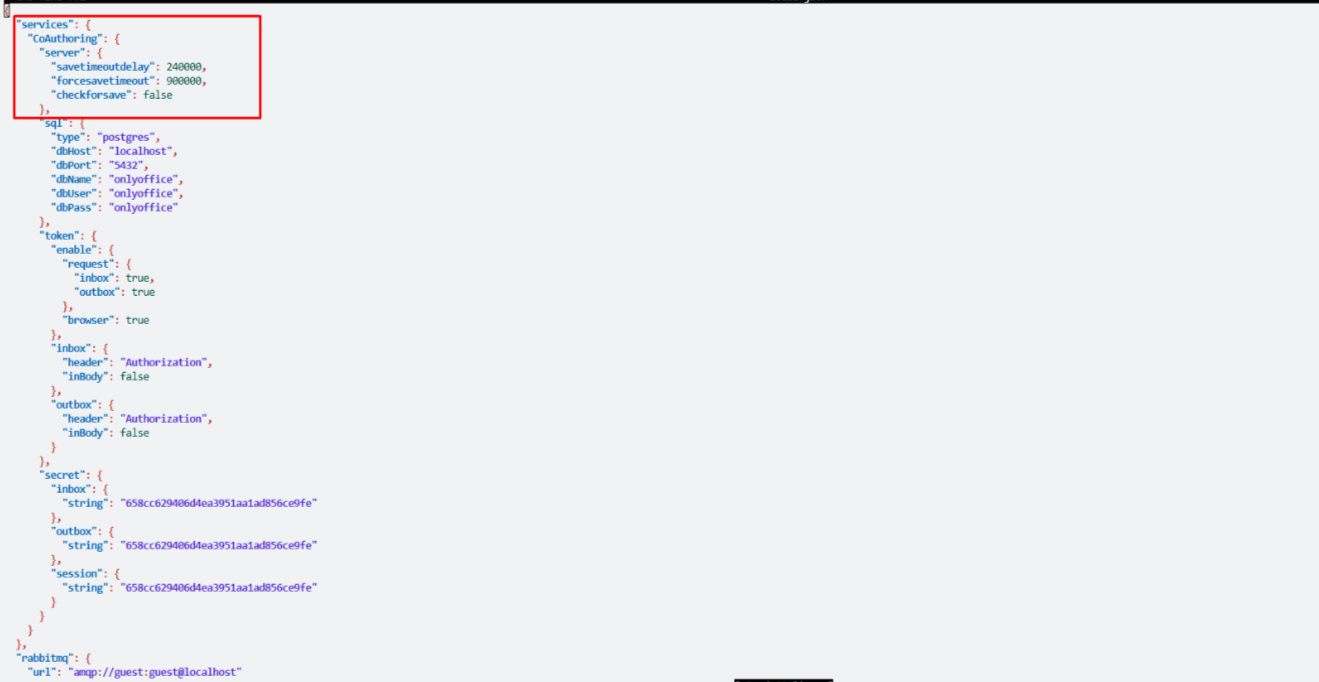
Please take a look at this section of our documentation: Saving File - Save Delay. To test our hypothesis, could you try adjusting the services.CoAuthoring.server.savetimeoutdelay parameter in your configuration and check if the issue persists?
services.CoAuthoring.server.savetimeoutdelay - Defines the conversion start delay time (measured in milliseconds) after the edited file is closed
I have applied the suggested configuration for
services.CoAuthoring.server.savetimeoutdelay in my setup as per the documentation. However, the issue still persists—the editing session still terminates when the app is minimized, and the version update is still triggered.
Please advise on the next steps or if there are any additional configurations needed to resolve this.
Hey @sugumar,
Thanks for the update. I’ll dig deeper into what else might be causing this session termination.
@sugumar
Could you clarify a few more things?
- Is the document URL static (generated once) or does it regenerate each time the editor initializes?
- Any errors in the browser console? (Open dev tools, reproduce the problem by minimizing/returning, and share what shows up.)
- Errors in ONLYOFFICE logs after reproducing? (Look for anything like VersionUpdate.)
(/var/log/onlyoffice/documentserver/)
Also, if possible, share your integration code snippet for the callback or forcesave setup — it might help spot something.