Someone created a google docx for me but when I download it and drop it into NextCloud, OnlyOffice only sees a dozen random styles. How can I either import the styles somehow or set up OnlyOffice so that all documents have at least a standard set of title, heading, list and table styles?
All styles are stored right inside a document, so ONLYOFFICE Docs just displays them as is. Do you see those styles in any other processor?
By the way, this is not the version of ONLYOFFICE Docs, but of the connector. What version of ONLYOFFICE Docs is used and what is the installation type (Docker, DEB/RPM packages)? You can find version by opening any file and looking for About tab on the left toolbar of the editor.
So those styles in the doc that I just uploaded to NextCloud are what came with the Google doc when I downloaded a copy?
I can’t import any styles into the doc on the cloud. Is there a work-around? Otherwise I’ll have to go through each style I need and set them all separately.
The version in the About page says 9.0.4.50
I don’t know how it’s installed. The web hosting service certainly uses some form of automation, but I don’t know if it’s docker.
Some of the styles are predefined by the editor, but any another style that is not default belongs to the document itself, thus to the original app that produced it.
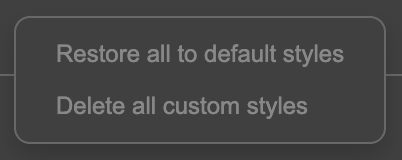
If you want to remove custom styles, i.e. the ones that do not belong to ONLYOFFICE Docs, or restore all styles to their original forms, then you can open a menu with styles and right click empty space and select either button. They are pretty much self-explanatory.
Hello @adam42
We’re currently working on a feature that will allow saving and reusing custom styles across all files. We will contact you once it has been implemented.