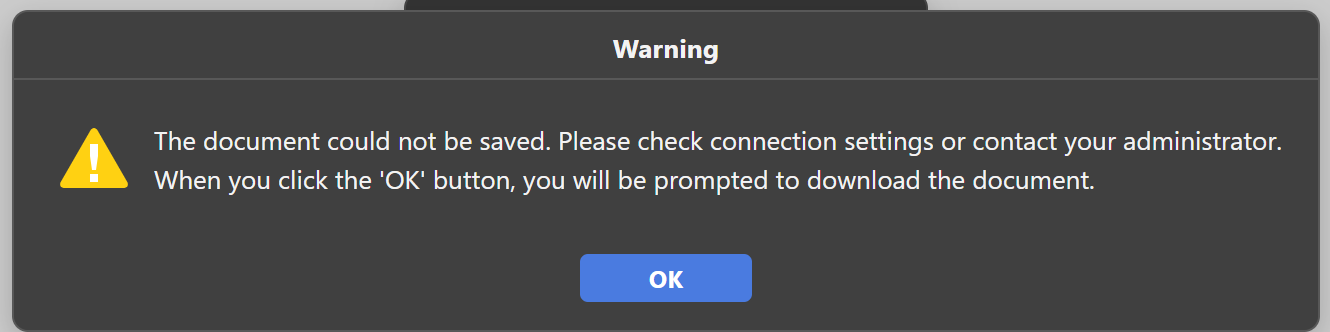
Following the instructions at Running ONLYOFFICE Docs using Docker Compose, I deployed the document server using Docker Compose. After running it, I tried accessing example, but the file wouldn’t open. The Docker logs show the following:
The error in your logs — connect ETIMEDOUT 192.168.50.10:9001 — means that the Document Server container cannot reach the example application at 192.168.50.10:9001. When a user closes a document, the Document Server sends a saving callback to the callbackUrl provided by the example app. If this callback request times out, the document cannot be saved and you see the warning in the screenshot.
The most common causes in a Docker Compose setup:
Host firewall blocking the connection – The host may be blocking incoming connections from the Docker bridge network to port 9001. Please check your firewall rules and make sure port 9001 is accessible from the Docker network range (you can find it by running docker network inspect <network_name>).
Incorrect network routing – The Document Server container is trying to reach 192.168.50.10 (your host IP), but depending on your Docker network configuration, the container may not be able to route directly to the host IP. Try using Docker’s internal gateway instead (typically 172.17.0.1 for the default bridge, or host-gateway in Compose).
Port not exposed for the example service – Verify that port 9001 is correctly mapped in your docker-compose.yml for the example service.
To investigate further, please provide:
Your full docker-compose.yml
Output of docker ps
Output of docker network inspect <your_network_name>
Document Server logs from inside the container: docker exec <container_name> cat /var/log/onlyoffice/documentserver/docservice/out.log