Hi,
I’m trying to make the Switch function to work, and I need help to understand what I have done wrong.
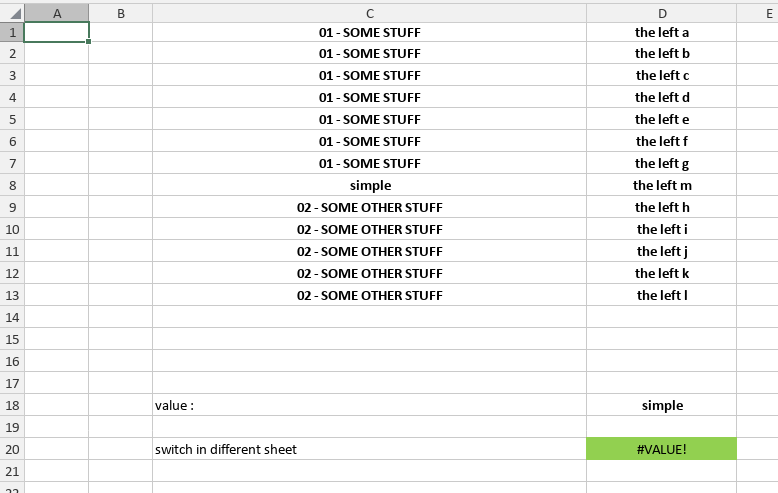
Here it is the following sheet
In D20, there is the following formula =SWITCH(D18,C1:C13,D1:D13)
I don’t understand why there is a #VALUE displayed in D20, and it’s still displayed if I put ’ 01 - SOME STUFF’ in D18.
How could I help to get feeback on my issue ? Do no hesitate to ask me to share more information ?
Hello @jeromeb,
Sorry for the delayed response, please provide the following:
The version of the Document Server;
The original file
Thanks for the reply.
I’m using desktop version.
Is it possible for an admin to move my message to proper category ?
also, as I’m a new user, I can’t upload example.
I’ve moved the topic accordingly.
And you should now be able to upload files.
Are you using the latest Desktop Editor version 9.0.3? Also, what is the installation type (snap, deb, exe, etc.)?
Thanks for the move and the help, anyway I found where I was wrong :
It seems that SWITCH function doesn’t not work with cell range.
I had to use XLOOKUP and then my formula is working :
=XLOOKUP(D18,C1:C13,D1:D13)
This issue is resolved.
1 Like