Hello all, I’m a spreadsheet power user attempting to move away from the Google Drive environment, and after finding the free version of Proton Drive to be too limited and unstable for my current project, I began using ONLYOFFICE to collaborate with my team.
The use case I’m posting about today is regarding a formula that I finally figured out the proper syntax for; it’s basically a TAKE formula that will grab information from the a tab’s cell based on the IF condition listed. IF the value in the column for that row is equal to APPROVED, then it will transpose the first tab’s data into my new tab; IF not, no data will appear in the new tab.
=IF(Participant_REVIEW!M2:M500="APPROVED",TAKE(Entry_RAW!H2:H500,500,1),"")
My desired result: When the value in the column is not equivalent to APPROVED, then the corresponding row is ignored and skipped. The next row from the first tab where the conditions are TRUE should appear on the next row in the new tab.
My issue: When the value in the column is not equivalent to APPROVED, the corresponding row in the new tab becomes a blank cell.
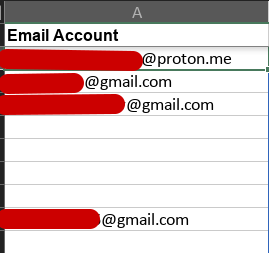
I’m used to the Google Drive environment where empty cells are automatically ignored, so for empty cells to have this behavior in other spreadsheet applications has been really weird to me to say the least, haha. Technically I can still use my last few MATH formulas to calculate things like the final number of approved participants, but it’s not very convenient while we’re doing our manual review process. I’m anticipating that we may receive close to 450 applications at the end of our submission period, so having to scroll down so much can become very cumbersome. If anyone has a solution to this problem, I’d like to know! Thank you in advance 
