This is a how-to-question about Macro Coding in OnlyOffice Spreadsheets.
Technical Background: OnlyOffice V. 9.4.0 on MacOS and Linux Mint.
Usage Background: I connected one universal Macro to different pictures located in different cells i an OnlyOffice Spreadsheet (way above 200 cells in total). When the universal Macro is started at any of its locations, it will start its work in relation of its actual cell location.
E.g.: Pictures are set into cells A1, B1, C1, … F1. One universal Macro is assigned to each of these pictures/cells. The Macro will copy the neighbour cell in the same row. So if the Macro in cell B1 is activated, cell B2 will be copied. Or if the Macro in cell F1 is activated, cell F2 will be copied.
    let sourceSheet = Api.GetActiveSheet();

    let activeCell = sourceSheet.GetActiveCell();

    let row = activeCell.GetRow();

    // Values from current sheet
    let value1 = sourceSheet.GetRange("B" + row).GetValue();
My Macro code is based on the location of the “active cell” (see code above). As a result I need to click on the actual cell where the Macro is attached to, so that this very cell is becoming the “active cell”. Then I may click on the picture in this cell to start the Macro.
Problem: The Macro is designed to work in relation to the “active cell” (the cell which is clicked on). But Macros can be started/clicked-on without making it’s current cell the active cell.
E.g.: Cell A1 is active. It is the cell where I clicked on the latest. When I start the Macro by pressing the picture in cell E1 this very cell E1 will not become the active cell. The active cell will stay cell A1. As a result the Macro will copy cell A2 instead of E2 because it is designed to do so by code (the code works with the “active cell”).
There is no problem as long as I make the intended cell of the Macro to the “active cell” first (simply by clicking on the cell) and then starting the Macro in this cell. But I am human and make mistakes. Often I forget to make the inteded cell the “active cell” and the results I am getting are not correct, of course.
Goal: I would like to activate a Macro so this Macro will start its task in relation to its current cell position without the need to click on the respective cell first (to make it the “active cell” manually).
Solutions:
Making the intended cell the “active cell” manually before starting the Macro (as describet above). Not the safest solution: I might forget to do this.
Coding Macros with defined cell references (the Macro in cell A1 will reference to it self by using the cell A1 as fixed position in the code; the Macro in cell B1 will be referenced to B1 as well etc.). This will require a specific Macro for every intended cell. Not very handy for larger spreadsheets.
Change the Macro Code in some beneficial way?
Any other solution I am not aware of…
Question: Does anybody see a solution for this topic?
Basically speaking, you want the macro to run in a reference to a cell the image visually located in, i.e. if an image in cell A1 is clicked, calculate the values in row 1.
I’m afraid this is true, because images are not tied to specific cells, but rather floating on top of them, thus it’s practically impossible to find where specific image is located and on top of what cell it is floating. Think of the image as a button, it just runs the code - if the code requires active cell, then you must click necessary cell before clicking the image and starting the code.
With that said, I’m afraid the this is the only solution for such design.
Thank you for clarification. I kind of expected this during my own trouble shooting.
One solution would be to include an additional code into the Macro, so that the Macro would prompt a custom pop-up message/warning if the Macro would be clicked on without its cell position is the active cell. But as far as I am aware of, OnlyOffice does not offer custom pop-up messages for a Spreadsheet, nor is there be a possible code do such a position-check of cells (active cell vs. cell position of the Macro/picture → I draw this conclusion as a result of your technical explenation). Would you agree?
There cannot be no active cell, also macro cannot be assigned to a specific cell directly. Assigning a macro to a picture doesn’t make it tied to a cell since images are floating above the cells.
Basically, you cannot get range in terms of a cell of the image and compare it to range returned by GetActiveCell() method or get images’ range as active cell.
This is all about the design. Images in your case are just buttons to start a macro, the logic must be executable as macro directly from the Macros window. If you want to get specific values, macro must know which ones or where are they (activeCell in your case), this is why an approach with activeCell mandatory requires selection of the necessary cell before executing the code.
This is the only approach to go if you want to have multiple images dedicated to each row/column.
I understand. Thank you. It would be nice if “OnlyOffice Spreadsheets” would improve it’s Macro abilities in the aspect of buttons and make the software even more powerfull.
As a side note: Offering “on-off” buttons to toggle an action out of the box would be brilliant (as “MS Excel” does). Today the user needs to create such a “of-off” button by himself/herself.
To come to a conclusion: Working with pictures as buttons the way I intend to do (see posts above) is possible. But there is no perfect solution (see below).
Solutions:
Make the intended cell the “active cell” manually before starting the Macro. Not the safest solution: I might forget to do this.
I decided for a workaround to reduce the risk of pressing on a picture/button without its cell being the active cell: see solution nr. 3 below.
Coding Macros with defined cell references (e.g. the Macro in cell A1 will reference to it self by using the cell A1 as fixed position in the code; the Macro in cell B1 will be referenced to B1 as well etc.). This will require a specific Macro for every intended cell. Not very handy for larger spreadsheets.
Change the Macro code in some beneficial way? Yes, kind of. To reduce the risk of clicking on the picture/button without its cell beeing the active cell/row/columne, I decided to go for a visual help.
I added an additional command into the Macro Code to set a value into the same cell in which the picture/button is placed.
I use a neighbour cell of the picture/button and configure it with the option of “conditional formatting”. The neighbour cell will change its colour when the “Macro cell” has the value defined in “step 1” above. Changing its colour will give me the visual reminder that the Macro works in reference of the intended cell/row/columne. If it will not change its colour I should hopefully recognize that I didn’t set the picture/button to the active cell before I activated the Macro.
Cell “D2” = active cell. I press the picture/button in cell “E1”.
The cell/row “D1” will not change its colour (this is expected since it is not the “active cell”). Instead the cell/row of the “active cell” will change its colour, which is “D2” (again expected).
The fact that not the neigbourcell of my pressed picture/button (“D1”) changed its colour should remind me about the fact that it is not the “active cell”. So I undue my step to clear the Macro action, then I set the intended picture/button to the “active cell” (“E1”) and push on the picture/button again (“E1”), which should change the colour of the neighbour cell “D1”.
Of course, after using a Macro the visual warning on the neighbour cell will stay on as long the activation value is present in the used cell of the picture/button (in my case the value is behind the picture in cell “E1”). Clear the value eighter manually or at the end of a session with an other Macro so that the neigbour cell becomes again its original colour and so that it is ready for the next visual help.
This method is by far not perfect but might be helpfull in some cases. At least it suitable for me to some degree.
 Change the Macro code in some beneficial way? Yes, kind of. To reduce the risk of clicking on the picture/button without its cell beeing the active cell/row/columne, I decided to go for a visual help.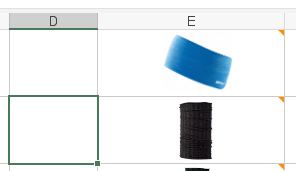
 This method is by far not perfect but might be helpfull in some cases. At least it suitable for me to some degree.