Document templates are generally stored in a subdirectory “converter”. If you know where to find it in the different operating systems, fine. Yet, and this happened to me today, a new version of ONLYOFFICE Desktop Editor installed on macOS (version 9.2.0) swept my templates (a bunch of MS-Office templates I created in the past) out of the templates folder.
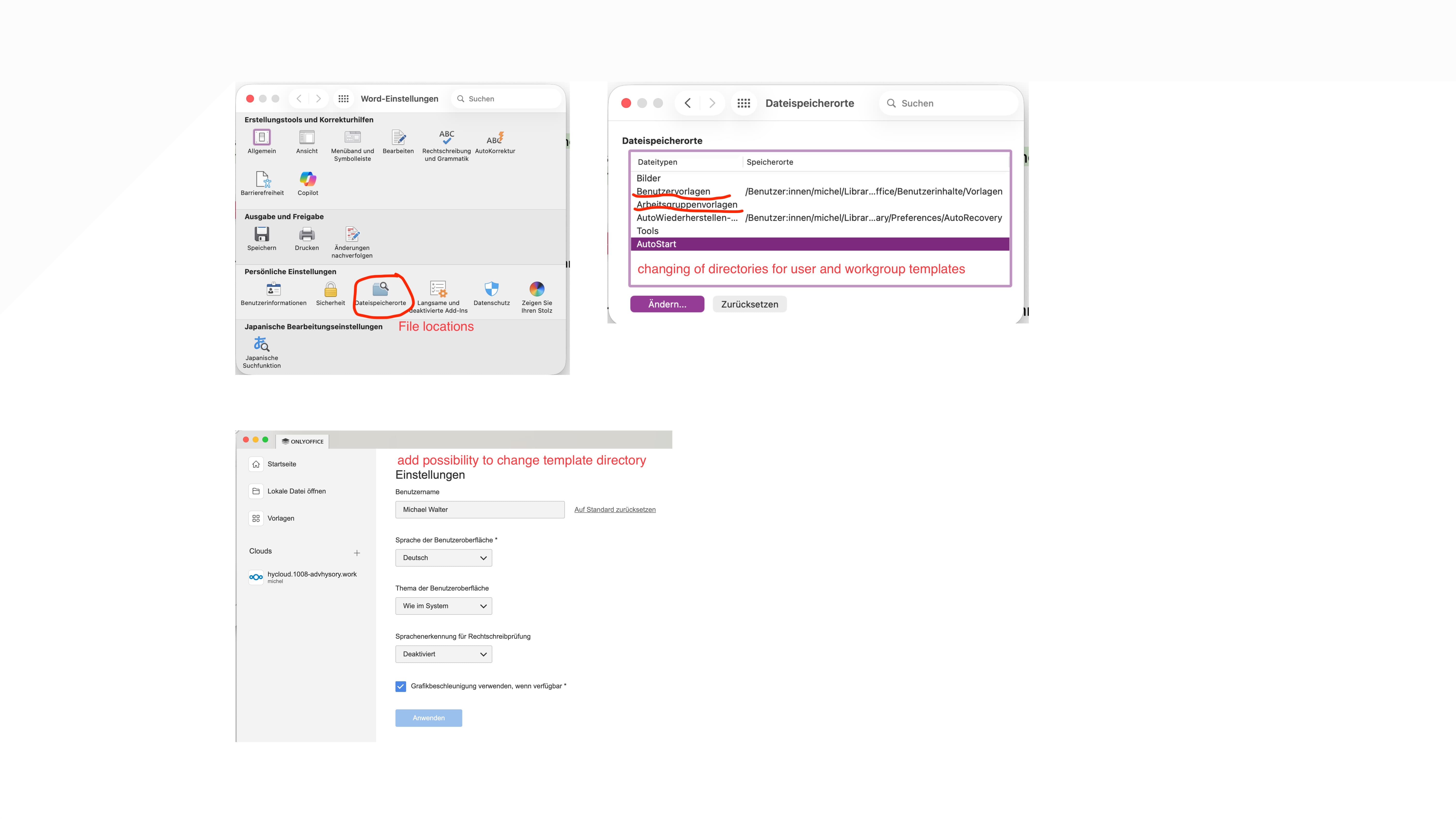
It would be quite handy to have a separate folder or directory, which can be added to the general settings of ONLYOFFICE. Similar to Microsoft Word. Here, I can define two additional locations for user templates: the user templates themselves (the personal ones) and the working group templates. In case of an ONLYOFFICE update, these folders will be kept untouched and, if the general settings are kept, accessible by ONLYOFFICE. If the settings are emptied (did not happen, yet), the re-entry of the template locations would be a minor work.
Well, I try to explain it with screenshots from MS Word and OnlyOffice. A separate directory to keep the own templates would improve the work experience with OnlyOffice.
That’s interesting. Is custom directory displayed separately in the app itself?
By the way, you can always use Create from template option in File when creating a new empty document. That way you can always choose necessary folder, etc.
Unfortunately, I don’t have any good news regarding timelines yet — the feature to specify a custom/external templates folder is still under consideration, but we don’t have a concrete release date at the moment.
We’ll keep this request in mind and I’ll update the thread as soon as there’s any progress or when it moves forward in the roadmap.
Here is a bash (terminal) script that copies the new or modified templates into the ONLYOFFICE.app after making a backup copy of the originals. Please update the lines with the folders appropriately and don’t forget to change the language codes. The script should reside in the same folder as the templates.
Hope this helps someone.
#!/bin/bash

# Konfiguration
TEMPLATES_DIR="/Applications/Office/Templates for ONLYOFFICE"
OFFICE_APP="/Applications/Office"
BASE_TEMPLATES="$OFFICE_APP/ONLYOFFICE.app/Contents/Resources/converter/empty/de-DE"
USER_TEMPLATES="$OFFICE_APP/ONLYOFFICE.app/Contents/Resources/converter/templates/DE/Document"

# Unterstützte Vorlagen-Dateitypen
TEMPLATE_PATTERNS="*.docx *.xlsx *.pptx *.pdf *.odt *.ods *.odp *.dotx *.xltx *.potx *.dotm"

echo "🔄 ONLYOFFICE-Vorlagen-Update gestartet..."
echo "Quelle: $TEMPLATES_DIR"
echo "Basisvorlagen: $BASE_TEMPLATES"
echo "Benutzervorlagen: $USER_TEMPLATES"

# Prüfe Quellordner
if [ ! -d "$TEMPLATES_DIR" ]; then
    echo "❌ Fehler: $TEMPLATES_DIR nicht gefunden"
    exit 1
fi

# Backup-Ordner
BACKUP_DIR="$TEMPLATES_DIR/backup_$(date +%Y%m%d_%H%M%S)"
mkdir -p "$BACKUP_DIR"
echo "📁 Backup: $BACKUP_DIR"

# 1. BASISVORLAGEN (new.* → empty/de-DE/)
BASE_COPIED=0
if [ -d "$BASE_TEMPLATES" ]; then
    mkdir -p "$BACKUP_DIR/base"
    cp "$BASE_TEMPLATES"/*.doc* "$BASE_TEMPLATES"/*.xls* "$BASE_TEMPLATES"/*.ppt* "$BACKUP_DIR/base/" 2>/dev/null

    for base_template in "$TEMPLATES_DIR"/new.*; do
        if [ -f "$base_template" ]; then
            cp "$base_template" "$BASE_TEMPLATES/"
            echo "✅ Basis: $(basename "$base_template") → $BASE_TEMPLATES/"
            ((BASE_COPIED++))
        fi
    done
else
    echo "⚠️ Basisvorlagen-Ordner nicht gefunden: $BASE_TEMPLATES"
fi

# 2. BENUTZERVORLAGEN (alle anderen → templates/DE/Document/)
USER_COPIED=0
if [ -d "$USER_TEMPLATES" ]; then
    mkdir -p "$BACKUP_DIR/user"
    cp "$USER_TEMPLATES"/* "$BACKUP_DIR/user/" 2>/dev/null

    for pattern in $TEMPLATE_PATTERNS; do
        for template in "$TEMPLATES_DIR"/$pattern; do
            if [ -f "$template" ]; then
                basename=$(basename "$template")
                if [[ "$basename" == new.* || "$basename" == *Normal.dotm* ]]; then
                    continue
                fi
                cp "$template" "$USER_TEMPLATES/"
                echo "✅ User: $basename → $USER_TEMPLATES/"
                ((USER_COPIED++))
            fi
        done
    done
else
    echo "⚠️ Benutzervorlagen-Ordner nicht gefunden: $USER_TEMPLATES"
fi

echo ""
echo "✅ Fertig! $BASE_COPIED Basis + $USER_COPIED User-Vorlagen"
echo "💡 ONLYOFFICE neu starten. Backup: $BACKUP_DIR"
Well, thank you very much for this workaround. It helps people who understand ICT to a certain extent. Yet, it is not the solution I asked for. The real solution should be implemented by OnlyOffice. So typical users can change the template directory by a „simple“ click.
Of course there should be a solution available inside OnlyOffice. I was pretty much surprised that there is none.
I prepared this script to make life a bit easier and hope it helps someone until a final solution is available.