Hello,
I am having an issue with the SMTP settings in DocSpace community edition.
I have a fresh docker install on a Ubuntu 24.04 VM using the provided .sh
It’s currently running on a virtual 8 core CPU, which is half of my server core count and 16gb of ram.
Docspace Ver: v.3.6.1.8536
Docs Ver: v.9.3.1.10
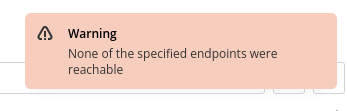
Everything works great except for some SMTP issues. I had configured the SMTP server to work with gmail first and was able to verify my account and a second account. Since then any time I use anything that requests SMTP like new users / password changes I get this error:
“None of the specified endpoints were reachable”
I tried resending the test email, it works fine, I have also tried reconfiguring to a Proton SMTP server, it also sends the test email correctly but fails on new users and password changes.
Being somewhat new to this I went through the container logs but don’t really have a clue what to look for. Most of the searches for this error showed issues with rabbitmq but I only see an error for high memory watermark in there, I’ve since allocated another 16gb of ram to the VM but no change.
Appreciate any help in guiding me to where I need to go. Thanks!
Hello @mrobinson
Since you moved to using external SMTP service, please make sure that the port 25 is open. By the way, do you host the server with DocSpace with a specific provider? Asking this, because certain providers have strict policies about the port 25 and its usage.
Hi Constantine,
I actually haven’t tried it without an external SMTP, I tried Gmail first and Proton second, both were with SSL and on ports 465 or 587. Both have their specific logins and tokens that I had to use. Gmail worked for the first couple days to join myself and one other user; now the test emails work in the integration menu, but give the above error on everything else. Proton behaves the same.
I haven’t actually tried port 25 and local SMTP since I assumed my residential ISP would have it blocked, but I will try that next.
I have docspace in my house on a 14th gen Dell server. I wanted to test out the community edition before purchasing your family package. So far very pleased with how it works.
Really appreciate the help,
Thanks!
Let me know the result.
In addition to that, in case the issues continues to occur, please share the output of docker ps and logs of DocSpace to check. For Docker logs are located in /var/lib/docker/volumes/onlyoffice_log_data/_data/ on host.