Hello @dragos_h
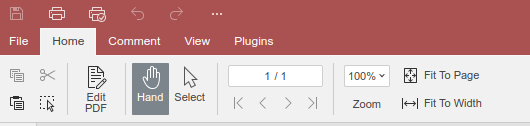
We implemented password protection for PDF files (File > Protect). However, this is only one option, so there was no point in moving it to a separate tab as it is implemented for docx\xlsx files.
Do I understand it right that you are looking for the signature feature?
As @Alexandre mentioned, currently you can only protect PDF with password via File tab > Protection. Full featured Protection tab will be added in future releases of Desktop Editor, as of now it is planned for version 8.2, but time frames may shift as it is quite complicated task.
Thank you for your interest, we will notify you once this suggestion is implemented.
It is my understanding that dragos_h is trying to digitally sign a document, not “protect the PDF with a password”.
When creating a new blank document with OnlyOffice, there is a “Protection” ribbon. This ribbon is missing when opening existing documents as per his screenshot.
Hello @altered-ego
Thank you for pointing us to this situation, it seems to be a bug, since there’s no e-sign functionality for PDF files. We need some time to check it out, I will contact you shortly.
Hello @altered-ego
Thank you again for notifying us! We have added the bug to our internal tracking system and have started working on it. The persistence of the ‘Signature’ button in the Protection tab of the PDF editor doesn’t meet expectations, as the corresponding functionality has not yet been implemented.
Hello @Vincent.D
Unfortunately, timeline may change. We’re still working on the mentioned feature (digitally signature for PDF) and we will update this thread once we have something to share.
Hello,
We have released Document server v.9.1. In this release we removed ‘Protection’ tab from PDF editor since this this functionality has not been yet implemented.