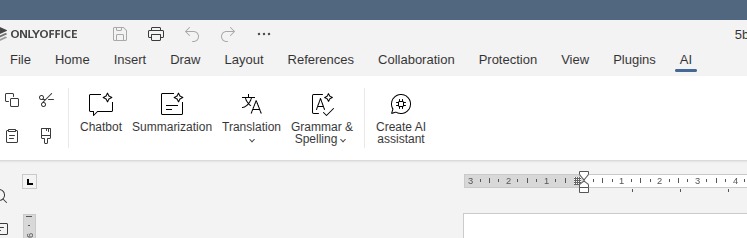
Hi, I have the necessity to add some custom plugin in a standard onlyoffice docker image.
In my dockerfile I copy my plugins folder under sdkjs-plugins folder and update plugin-list-default.json keeping only ootb plugin I want to keep (in my case AI)
FROM onlyoffice/documentserver:9.3.0.1
# RUN rm -rf /var/www/onlyoffice/documentserver/sdkjs-plugins/marketplace
COPY ./plugins/customPlugin /var/www/onlyoffice/documentserver/sdkjs-plugins/customPlugin
COPY ./plugins/plugin-list-default.json /var/www/onlyoffice/documentserver/sdkjs-plugins/plugin-list-default.json


##### plugin-list-default.json
[
    "ai",
    "customPlugin"
]
first question, is this the right approach?
Secondly, in the ribbon I have two buttons, “Plugin Manager” and “Background plugins”.
I want to keep the second one and hide the plugin manager but it seems that it’s not possible. If I remove the marketplace folder under sdkjs-plugins both button disappear.
Another option could be remove the marketplace functionality on “plugin manager” and only show local plugin. It’s that possible?
Last question is related to AI tab. I have the ootb plugin but I’m missing the settings button so I’m not able to configure any model.
There is anything I could do or check to restore the button? I remember in old build I was able to set model information (not from settings but from a dialog) but now I’m not able to do it anymore.
Thanks
1 Like
Hey @dadokkio, 
Unfortunately, at the moment there’s no built-in way to selectively hide the “Plugin Manager” button.
I’ll clarify this exact situation with the team (how to hide Plugin Manager without killing Background plugins, and restore AI settings button). Will get back to you with any workarounds or confirmation soon.
Thanks again !
Thanks for the feedback.
Regarding the missing settings in the AI tab you have any feedback? Or do you have any link on how to proper configure aiSettings section in local.json file? I was not able to found an example with this part filled in.
EDIT: trying to execute one of the AI command from the ribbon show now the config dialog. And the settings button is now available again.
1 Like
Hey @dadokkio, 
Here’s what we can recommend:
1. Adding a custom plugin
The approach is generally correct:
- Copy your plugin folder to:
/var/www/onlyoffice/documentserver/sdkjs-plugins/
After that, run:
supervisorctl restart all
This will force Document Server to reload the plugin list. The custom plugin should then appear in the Plugins tab.
2. Hiding the Plugin Manager button
To remove the Plugin Manager (marketplace) while keeping Background plugins:
After this, the Plugin Manager button should disappear from the ribbon, while Background plugins (if any are installed) will remain.
Note: If no background plugins are installed, the tab itself won’t appear.
3. AI plugin – missing Settings button
The example configuration can be found inside the AI plugin itself:
ai/scripts/engine/providers/preinstall-example.json
We were unable to reproduce the issue with the missing Settings button on a clean 9.3.0.1 installation. It usually appears immediately. It’s possible that some modification to the AI plugin caused this behavior.
Important: After any changes to plugins on the Document Server, please do a full cache clear in your browser (Ctrl + Shift + R or hard refresh). Otherwise plugins may not work correctly.
One more important note:
All modifications you make to the Document Server are done at your own risk.
We cannot guarantee stable operation of the editors and plugins after your custom changes.
Let me know how it goes!