Hello,
Please provide an option in desktop editor document footer for page numbering such as “page 1 of 2” and in roman number formats.
Thanks,
MK
Hello,
Please provide an option in desktop editor document footer for page numbering such as “page 1 of 2” and in roman number formats.
Thanks,
MK
Hello @MKVRC
We are taking closer look at your suggestion. I will inform you when we come up with something.
Hi Constantine,
Thank you for your response. This feature is already available in Mac Pages and in Softmaker Office…
Will wait to hear from you.
We have registered two enhancement suggestions:
At the moment I cannot provide any approximate dates when these enhancements would be implemented but once they are introduced, we will notify you.
thank you for the update and consideration.
will wait for an update.
Hello again @MKVRC
We have released new version of the editors where suggestion to add Roman number formats as well as many other types was implemented:
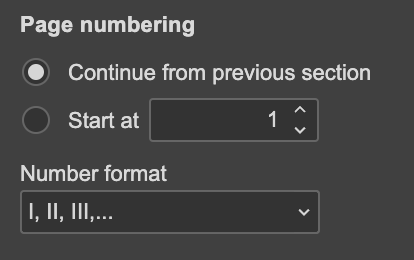
Update for Desktop Editors will be available very soon, please update the app and check out new functionality.
As for the second suggestion to add “Page X of Y” numbering: we are still working on it.
Suggestion
Document Server version: 9.3.1.8
OS: Linux
Browser version: Fedora 43
Additional information:
Suggestion to include in the list of page numbering when editing header/footers, to include:
“page x of y pages” and continuing, for example: (“page 1 of 5”, “page 2 of 5”, “page 3 of 5”, etc.).
This can be done manually quite easily with the header/footer editor, but it just is not in the page numbering list, nor could I figure out whether I am able to add to the list.
I am not not sure if editing/adding to the list myself is possible, or if it is, how what I want would stay there for future documents, so another suggestion might be for the person editing the document to be able to add to that nice list already there, if that is not already possible.
If personal editing of the numbering of list is not possible, I understand. If it is, I would love instruction in how to do so. (I am not an expert in Linux or Fedora at all, however.)
If this has been requested or suggested in the past, please forgive me, but I did not see it in the community notes.
Love OnlyOffice and appreciate all you do for others keeping this open source!
Hey @siberkat, 
Thanks for the suggestion — page numbering with “Page X of Y” is a really common and useful format, and you’re right that it’s currently missing from the quick dropdown list in headers/footers.
This exact request has already been logged before, so I’ve added your voice to the existing thread Please provide an option in footer for page numbering
For now, you can achieve exactly what you want manually using field codes — it’s a bit more steps, but it works perfectly and stays saved in the document:
PAGE → for current page numberNUMPAGES → for total pagesFull guide with examples here:
I agree it would be much more convenient to have “Page X of Y” as a ready-made option in the numbering dropdown — we’ll keep pushing it forward.
Thanks again for the feedback and for loving ONLYOFFICE — we really appreciate users like you!