ONLYOFFICE Mobile: Documents
Do you want to: Suggest a feature Navigator (Left Panel) & Sidebar (Right Panel)
Device:Samsung Galaxy S24 Ultra
OS version:Android
App version: 9.4.1
Mode: On Device
Additional information:
So, this suggestion is needed, and yet I know not a small thing. Right in Collabora Office help document, it says it will adapt to the view area including phone screens. That being said, it has both a left panel (Navigator) and a right panel (Sidebar) in their mobile app. I use Collabora Office because they are a free competitor too. With Android Desktop like Samsung DeX, Smart Connect and now Google’s Android desktop in the Pixel line, OnlyOffice mobile app needs to grow with the rest of apps or you might be left behind. Then there is the coming Gooblebook.
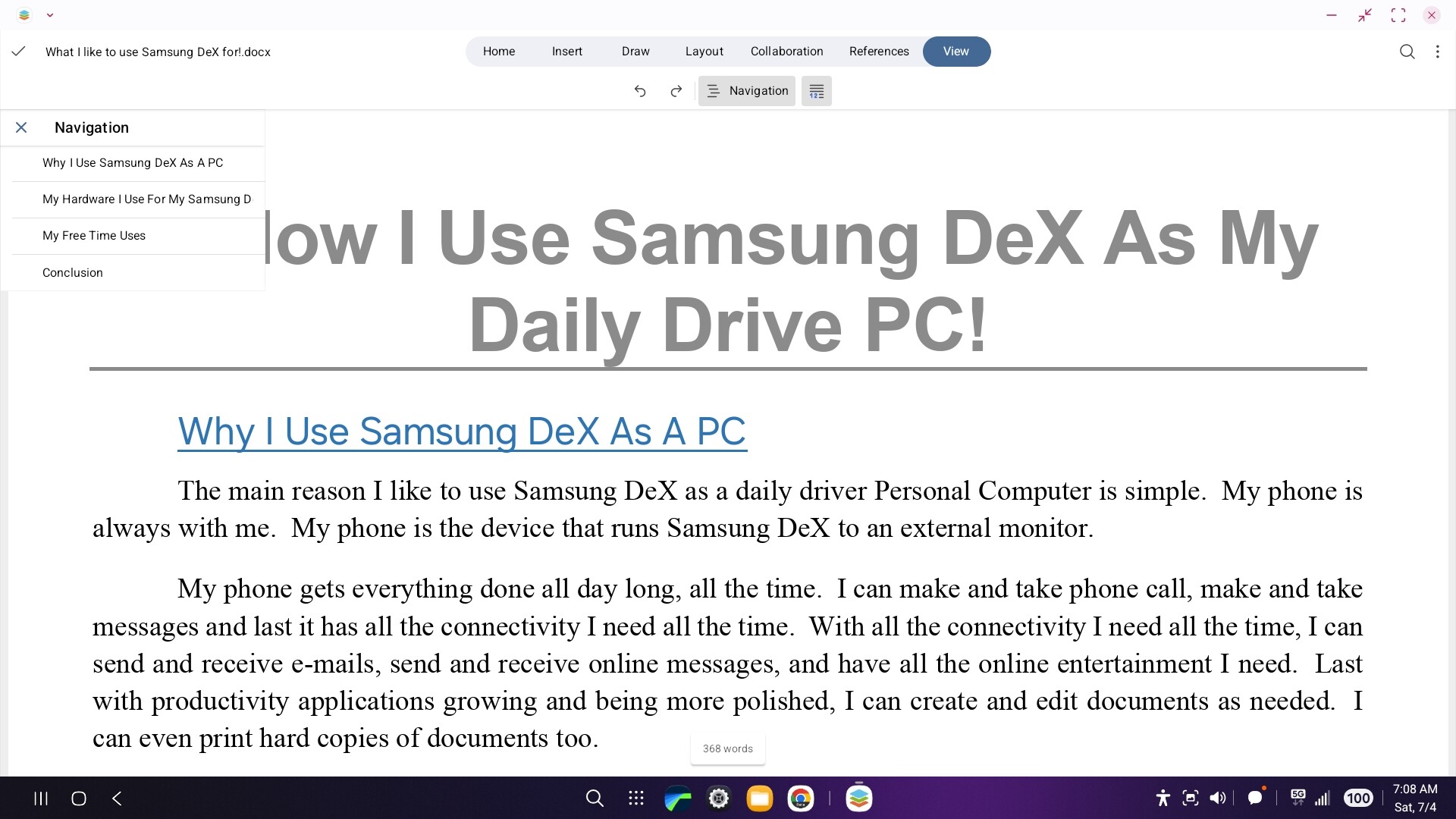
For your navigation or left panel in the current Android sucks. You click on it and it covers the document. As a docked Navigator (Left Panel) like in Collabora Office is much more polished and pleasing while working a document. As for the Sidebar (right panel) as in Collabora Office, I say that would be more preferable. I say it would be more Preferable because I like your current toolbar with; Home Insert Draw Layout Collaboration References View. The current toolbar is compact (the view I tend to use in Collabora Office) and simple single line of menu under the toolbar. So, this brings me back to the Sidebar (right panel;) that it would contain Paragraph Styles editing as well as Font and editing as in Collabora Office.
The Navigator and Sidebar offers much ease of use and more function to the application if caught offline but you still need to work on and document. As of now, lot of features are gone, that cannot be done with out being online. Like in your current Android 9.4.1 can not edit a current Paragraph Styles or create a new Paragraph Style, but the online version can. OnlyOffice mobile should not be an extension of the web version of OnlyOffice.
This is the screen shot of the current Navigation covering the current document being work on. This is bad, needs to be a docked left panel (Navigator), same being suggest for the right panel (Sidebar).