In Excel when switching between sheets within the same document, it is not the top of the sheet that is displayed, but a section well below it. This means I have to scroll back to the top of the sheet every time. Why does the first sheet display from the very first cell, but not the subsequent sheets when switching between them? Thanks a lot for your answer.
Hello @cointe
I’ve tried to reproduce it on desktop app v.9.4, but failed. Could you please record a video file with demonstration and provide a test file?
Hello, I don’t know how to record and post a video or provide a test file, sorry. What is a desktop app v.9.4? The problem is easy to describe. When switching from one sheet to another in Excel, the new sheet doesn’t open at the top (the first row) but somewhere else on the sheet. I have to scroll back to the top every time. I just wanted to know why the first sheet displays correctly from the top, while this isn’t the case for the subsequent ones. Is it possible to fix this problem? Thank you very much if you have a solution.
Ah, Docspace, understood.
However, I cannot reproduce the described behavior using a new file. here’s my video test:
I need your assistance to figure out the exact steps if I understood the situation correctly.As you can see, when using a new file (creating a new file), the default selected cell is A1.
However, the spreadsheet keeps the previously selected cell when switching between sheets.
Hello
I have taken a screenshot of the four sheets and here is the message I received : “ An error occurred: Sorry, new users can only put one embedded media item in a post” so let me explain the problem. The first and fourth sheets open on line 1, whereas the second opens on line 24 and the third opens on line 55, when they should also open on line 1. If I select cell A1 on Sheet 1 before opening the others, it doesn’t make any difference to the problem.How can I fix this?
Hello, @cointe
I’ve increased your trust level, so now you should be able to attach files and videos directly here.
Could you please confirm whether this behavior happens only with one specific file or with any spreadsheet file?
Please attach a sample file so we can check it on our side.
Your description is clear, but we still kindly ask you to record a short video showing this behavior, because so far we have not been able to reproduce it and we need the exact details to verify the issue.
If you run into any upload limit, you can upload the video to any cloud storage and share the link here.
How do I insert a video into my reply, like Alexandre did in his first reply? In other words, how do I upload a file from my computer to the reply box on the forum?
To upload a file or a video to your reply, please click the Upload button in the editor toolbar — it is the icon highlighted in the screenshot. Then select the file from your computer and wait until it is attached to your reply.
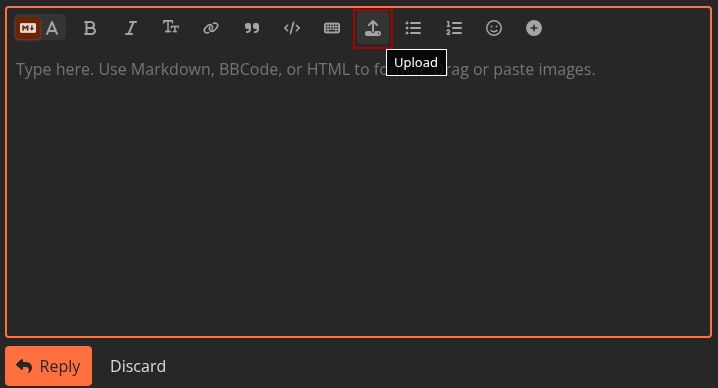
You can also try dragging and dropping the file directly into the reply box. Once the upload is complete, the attachment will appear in your message, and you can post the reply as usual.
This is the video mp4
1 Like
@cointe Thank you for the video, it was very helpful.
Could you please attach the spreadsheet file where this behavior occurs, so we can test it directly on our side? Also, please let us know where this file was originally created and edited (for example, DocSpace, Microsoft Excel, LibreOffice, etc.).
Additionally, could you create a brand-new spreadsheet directly in DocSpace, reproduce the same steps there, and check whether the same behavior with the scroll position appears on the new file as well?
I originally created this file in DocSpace. I’d prefer that you not edit it directly in case that changes it (I spent a lot of time on it, and creating a new one, as you’ve asked, would take just as long). If, despite all the descriptions I’ve posted and the video, the problem isn’t identified, I don’t see how you could resolve it by editing the file yourself. I think this is a system bug. I’ll try to work around it by scrolling back to the top of the page every time I open a sheet. Thank you very much for your interest in this issue
Hello,
Thank you for the detailed explanation and for your patience.
If you are willing, you can simply download a copy of your spreadsheet from DocSpace and send us that copy, so your original document stored in DocSpace will remain completely unchanged by us. Unfortunately, reproducing and analyzing such cases usually requires working with the actual file, even if we only open a copy of it in an internal testing environment, which is why we asked for it earlier.
Regarding the test with a new file: you do not need to recreate your whole table with all the data. It is enough to create a small test spreadsheet directly in DocSpace with a few sheets and check if the same behavior appears there:
- create a new spreadsheet in your DocSpace room
- add, for example, 3–4 sheets
- scroll each sheet down and then switch between them to see whether the focus also jumps to the bottom instead of the top (row 1).
Could you also please tell us the exact versions of your DocSpace and ONLYOFFICE Docs (Document Server)? You can find this information on your portal in the About section. This will help us check whether the issue might be related to a specific version.
If you prefer not to share the real file even as a copy, please let us know — in that case we will try to reproduce the issue based only on your video and description, but it may be harder to pinpoint the exact cause.
Hello,
Here are the versions:
ONLYOFFICE Docspace 3.7.0.1052
ONLYOFFICE Docs 9.4.0.129
Operating system: Linux Mint 20.2
Browser: Firefox 139.0.1
I’m attaching a downloaded copy. New issue: my document now opens on sheet 3 in Docspace, whereas it opens on sheet 1 in the downloaded copy. You’ll see in the copy that the focus on sheet 2 isn’t positioned at the top. In fact, the display configuration changes almost every time I connect.
I tested this on a new sheet by opening several pages and scrolling down. When I then return to each of them, the focus does not open on line 1 but on the line that was at the top after scrolling down the page.
Planning prévisionnel 2026-2027.xlsx (23.3 KB)
1 Like
Hello Marix
I think the developers must have made some changes to the software since I reported the issue I was having when opening pages in a Docspace spreadsheet, because those display errors no longer appear. Thanks to them, and thank you for your interest in this issue!
Hello,
Thank you for the update, for sharing the versions, and for attaching the file copy.
I’m glad to hear that the issue no longer appears in your DocSpace.
If the same behavior occurs again, please let us know so that we can help identify the root cause and suggest possible solutions.
Best regards!