I have an Open WebUI instance with several available models. Open WebUI comes with an OpenAI compatible API. This endpoint is available at https://ai-chat.SomeDomain.de/api/ such that I can, e.g., call https://ai-chat.SomeDomain.de/api/models to get my models listed.
I tried to integrate it as OpenAI provider in Only Office (using the above mentioned API-URL and my API-Key), but it doesn’t work. Only Office doesn’t load any models.
I took a look at the network traffic. It looks like Only Office is trying to get the model list using OPTIONS instead of GET:
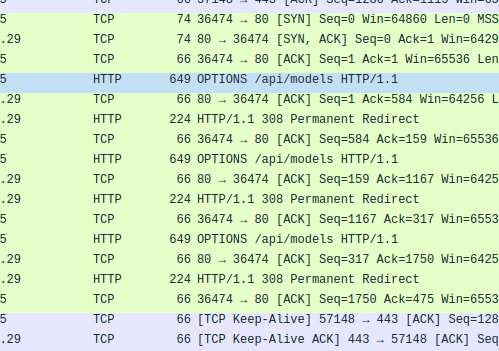
However, the Official OpenAI API documentation describes the retrieval of models with GET.
I assume that this is the reason why the integration with Open WebUI doesn’t work.
I tested with Only Office 9.2.1.43 (Community-Version) with the new built-in AI-Agent menu as well es with the AI-Plugin.
Thanks a lot in advance for your support!
Hello @markusw
Since OpenAI provider uses different template in AI plugin, I suggest creating a custom provider for your instance of Open WebUI. For more information about custom providers please refer to the article: How to add a custom provider to the ONLYOFFICE AI plugin | ONLYOFFICE Blog
Hi @Constantine,
Thanks for your replay. I’ll give it a try and report here. Unfortunately, my next weeks will be very busy, so it may take a while till I find the time to work on the custom provider.
1 Like
Hi @Constantine,
the custom provider was not the solution. But I ran Only Office in debug mode an got this error, which points out the problem:
Access to fetch at ‘``http://localhost:8787/v1/models``’ from origin ‘onlyoffice://plugin’ has been blocked by CORS policy: Response to preflight request doesn’t pass access control check: It does not have HTTP ok status.
Hence, you need to allow onlyoffice://plugin as origin. Depending on the setup (e.g. docker with traefik) it’s something like:
“traefik.http.middlewares.openwebui-cors.headers.accessControlAllowOriginList=onlyoffice://plugin”
In my opinion it’s technically not wrong to send onlyoffice://plugin as origin, but it’s probably not the best choice, since it provokes CORS problems in custom AI provider setups.
My problem is solved. Maybe my notes help others running into the same issue.
1 Like
Hello @markusw
If you don’t mind, I will join this thread as well.
Thank you for the provided workaround, we’re checking the situation.
Hi @Alexandre,
Thank you for looking into this. I’m happy to help with further testing etc. if necessary.
I think at least a clear error message would be helpful. Something like:
CORS error: Make sure your LLM provider allows requests from ‘onlyoffice://plugin‘
We’re going to add valuable information to this guide Adding custom providers | ONLYOFFICE including notes about the onlyoffice://plugin situation.
Thank you one more time!