For bug reports, provide the steps to reproduce and if possible a minimal demo of the problem:
Open OnlyOffice Workspace in Chrome/Chromium Canary.
Use any Workspace portal with existing folders/files.
Open the File Manager section.
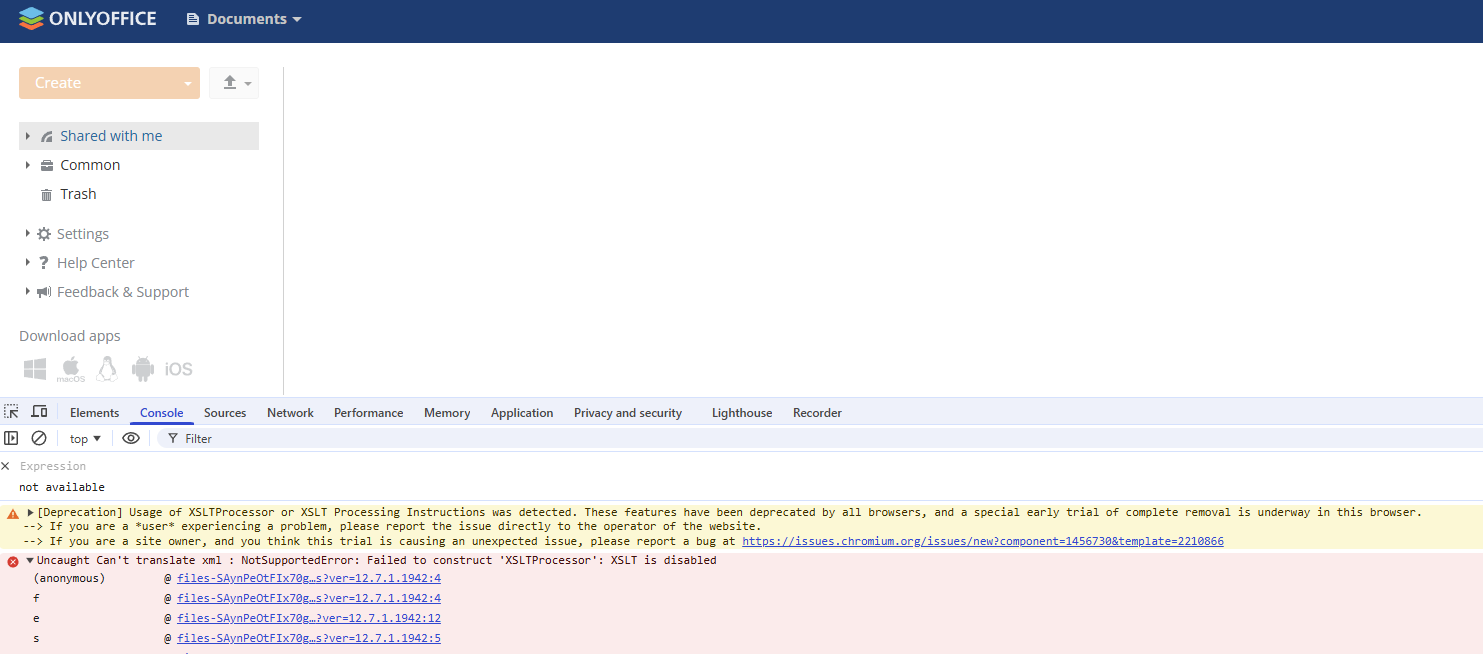
In Chrome 144+ (e.g. Chrome Canary 144.0.7559.4), the file list does not load — the folder appears empty.
Open Developer Tools → Console.
The following error appears:
files-SAynPeOtFIx70gcybZV3uA2.js?ver=12.7.1.1942:4
Uncaught Can't translate xml : NotSupportedError:
Failed to construct 'XSLTProcessor': XSLT is disabled
The problem does not occur in Chrome 143.0.7499.41 (works correctly there).
This issue occurs because Chrome/Chromium has started removing XSLT support (XSLTProcessor API) in versions 144+.
OnlyOffice Workspace relies on XSLT transformations to render the file manager UI. When XSLT support is removed or disabled in the browser engine, the interface cannot display files or folders.
I tested the Chrome extension “XSLT Polyfill”, which removes the console error message but does not restore actual functionality, because the polyfill cannot handle the complex XSLT transformations used by Workspace.
Once Chrome 144 reaches the stable channel, the Workspace file manager will stop working for all users of Chromium-based browsers (Chrome, Edge, Opera, etc.), which makes this issue critical.
Since Chrome 144 will eventually reach Stable, this will affect all Chromium-based browsers (Chrome, Edge, Opera, etc.). It would be helpful if the OnlyOffice development team could confirm whether the transition away from XSLT-based UI rendering is planned.
The recent breakage of XSLT is the result of an experiment on pre-stable channels only, e.g. Chrome Beta, Dev, and Canary. So it should not affect most users. (It is intended to find exactly the sort of bugs like https://crbug.com/465491619.)
The pre-stable experiment has been temporarily halted due to the above bug, but once I get that fixed (next week or so), I plan to restart the experiment. So pre-stable Chrome users might again experience breakage on OnlyOffice.
If you need advice or assistance in migrating off of XSLT, feel free to check in with me.
 not working
 working