OnlyOffice 9.3.1 on Linux Mint 22.2 does not respect desktop themes

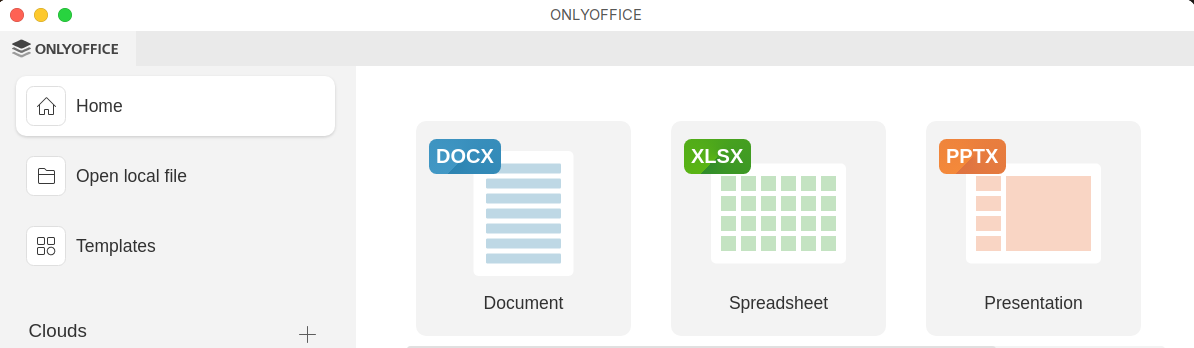
I have OnlyOffice 9.3.1 installed on my Linux Mint 22.2 system, installed using Software Manager. Although the software operates as expected, it does not respect the Cinnamon Desktop window themes.

Within the OnlyOffice settings there are options to select alternative themes, but these are .json based, which is not used by Linux Mint.

OnlyOffice is the only application that does not follow the Linux Desktop themes that I have installed.

Although this is a cosmetic issue, it can be confusing for new users or users that have changed their desktop theme, for example moving the window buttons to the top left of windows, rather then the default top right, which is what OnlyOffice shows.

1 Like

Hello, thank you for reaching out.

To better understand this behavior, could you please send us a few screenshots:

  • your Linux Mint/Cinnamon desktop theme settings,
  • how a native Cinnamon application window looks with your current theme,
  • how ONLYOFFICE looks when the Same as system option is selected in its settings.

Please also let us know a few more details about the theme itself:

  • what type/format of theme you are using,
  • whether it is a standard system theme or a third-party/custom one.
1 Like

Hi, thanks for the response. To answer your questions.

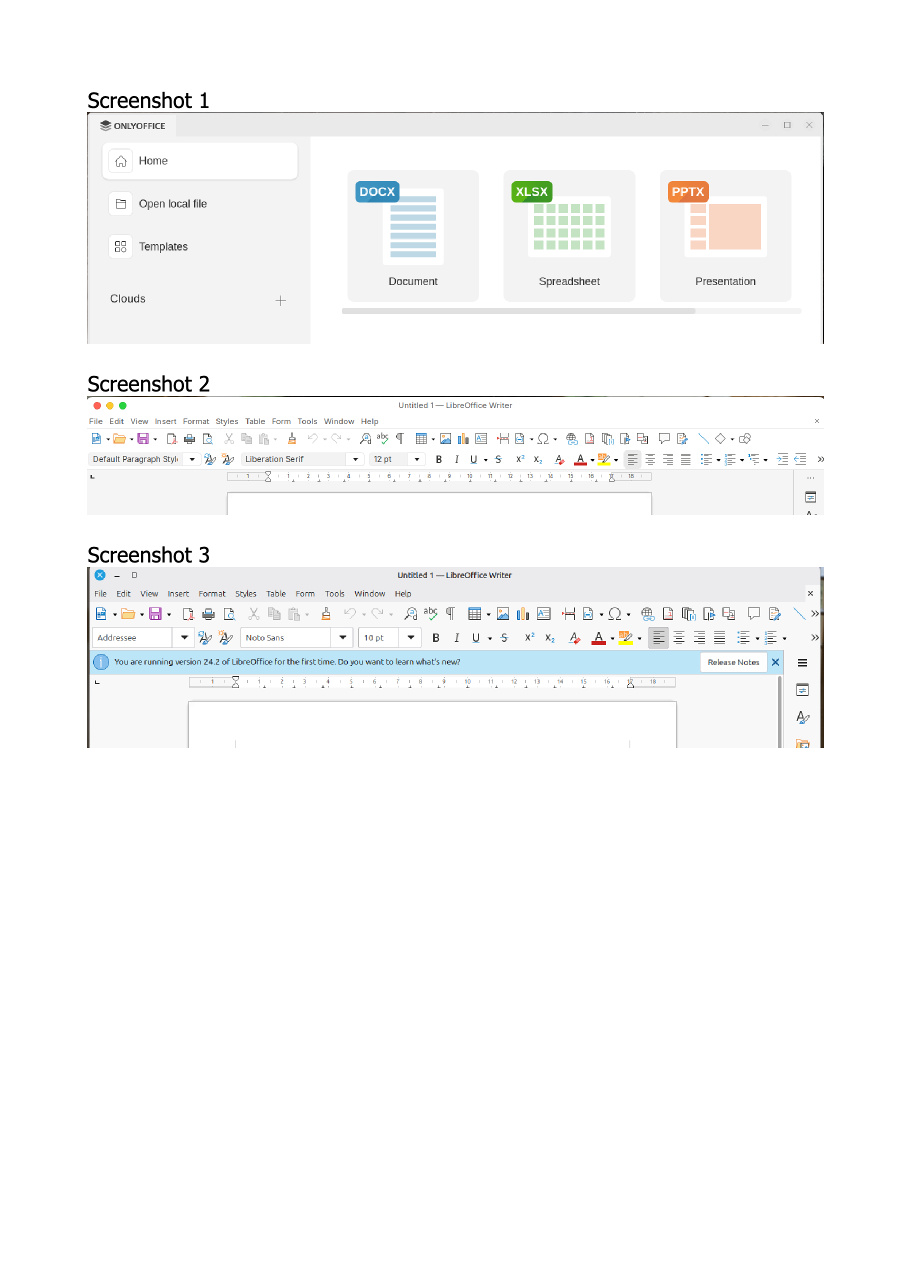
Screenshot 1 below shows what the OnlyOffice window looks like on both my desktop, which has a custom theme applied (to make it look more like MacOS), and also a test desktop, which is using the standard Cinnamon Mint desktop theme. It is the same in both instances.

The theme that I’m using is called WhiteSur-Light. The icon pack is called BigSur. More details of the theme and icon pack that I’m using can be found on GitHub.

Screenshot 2 below shows what LibreOffice looks like on my themed desktop.

Screenshot 3 below shows what LibreOffice looks like on the test desktop.

You will note that the window buttons in both Screenshot 2 and 3 have been moved to the left hand side of the window. It’s possible to do this in the standard Cinnamon Mint settings. The button order however has been changed using dconf-editor so that it follows the MacOS button order. This is intentional, as I use Macs as my main computing systems.

Note that on the test user account (screenshot 3), I have yet to apply the WhiteSur-Light theme.

OnlyOffice should follow the installed Window theme. It does not. It appears to be hard-coded to resemble the standard Cinnamon Mint desktops, or others, such as KDE.

Apologies for the poor quality, but I’m only permitted to upload one screenshot per post at present, so had to merge the images. I can provide the separate images if required.

1 Like

Thank you for the detailed explanation and screenshots.

At this stage, we would like to check whether the behavior is related to the window mode used by the application. Could you please clarify which package format was installed from Linux Mint Software Manager: Flatpak or .deb/repository package?

Please also try launching ONLYOFFICE Desktop Editors in a system window and let us know the result:

  • For Flatpak: flatpak run org.onlyoffice.desktopeditors --system-title-bar
  • For .deb/repository installation: /usr/bin/desktopeditors --system-title-bar

    After that, please let us know whether the window decorations start following your theme, including the title bar style and the window buttons position.

Hi Marix, thanks for the update.

OO was installed via flatpak, so I used the instructions that you mentioned above. I saw the following messages when I launched OO from a terminal window:

~$ flatpak run org.onlyoffice.desktopeditors --system-title-bar
Gtk-Message: 12:55:27.690: Failed to load module “xapp-gtk3-module”
Qt: Session management error: None of the authentication protocols specified are supported

(DesktopEditors:2): Gtk-WARNING **: 12:55:28.040: gtk_disable_setlocale() must be called before gtk_init()

Although I didn’t use OO, the desktop window now appears to be correct:

I presume that it’s now a case of creating/modifying a .desktop file to incorporate the extra arguments, unless something needs to be done to address the start-up errors above.

I took a look, and I can find two relevant .desktop files:

/var/lib/flatpak/app/org.onlyoffice.desktopeditors/x86_64/stable/141a88e75e9ea2a1bfaf3724affa5c055005882e1e7f8f7ee4c64271b712b93f/export/share/applications/org.onlyoffice.desktopeditors.desktop

/var/lib/flatpak/app/org.onlyoffice.desktopeditors/x86_64/stable/141a88e75e9ea2a1bfaf3724affa5c055005882e1e7f8f7ee4c64271b712b93f/files/share/applications/org.onlyoffice.desktopeditors.desktop

However, these are different. I presume that if I modified one of these, at any further update, they would be replaced.

I did contemplate creating my own .desktop file just to launch OO, but the OO .desktop files look significantly more complicated than those that I’ve written thus far. However, I’m not sure which file version I should use as a basis. Placing the .desktop file in directory ~.local/bin/share (from memory) should override the system-based versions in any event, I believe.

So, to sum-up: nearly there, just the .desktop file changes to work through.

I look forward to seeing your kind reply in due course.
Hi Marix, I had a go at creating a new .desktop file incorporating the changes that you kindly supplied. Here’s what I currently have in situ.

#!/usr/bin/env xdg-open
[Desktop Entry]
Version=1.0
Name=ONLYOFFICE
GenericName=Document Editor
Comment=Edit office documents
Type=Application
# Exec=/usr/bin/flatpak run --branch=stable --arch=x86_64 --command=desktopeditors --file-forwarding org.onlyoffice.desktopeditors @@u %U @@
Exec=/usr/bin/flatpak run org.onlyoffice.desktopeditors --system-title-bar @@u %U @@
Terminal=false
Icon=org.onlyoffice.desktopeditors
Keywords=Text;Document;OpenDocument Text;Microsoft Word;Microsoft Works;odt;doc;docx;rtf;
Categories=Office;WordProcessor;Spreadsheet;Presentation;
MimeType=application/msword;application/msword-template;application/vnd.ms-word.document.macroEnabled.12;application/vnd.ms-word.template.macroEnabled.12;application/vnd.ms-xpsdocument;application/vnd.ms-excel;application/vnd.ms-excel.sheet.macroEnabled.12;application/vnd.ms-excel.sheet.binary.macroEnabled.12;application/vnd.ms-excel.template.macroEnabled.12;application/vnd.ms-powerpoint;application/vnd.ms-powerpoint.presentation.macroEnabled.12;application/vnd.ms-powerpoint.slideshow.macroEnabled.12;application/vnd.ms-powerpoint.template.macroEnabled.12;application/vnd.ms-visio.drawing.main+xml;application/vnd.ms-visio.drawing.macroEnabled.main+xml;application/vnd.ms-visio.stencil.main+xml;application/vnd.ms-visio.stencil.macroEnabled.main+xml;application/vnd.ms-visio.template.main+xml;application/vnd.ms-visio.template.macroEnabled.main+xml;application/vnd.openxmlformats-officedocument.wordprocessingml.document;application/vnd.openxmlformats-officedocument.wordprocessingml.template;application/vnd.openxmlformats-officedocument.spreadsheetml.sheet;application/vnd.openxmlformats-officedocument.spreadsheetml.template;application/vnd.openxmlformats-officedocument.presentationml.presentation;application/vnd.openxmlformats-officedocument.presentationml.slideshow;application/vnd.openxmlformats-officedocument.presentationml.template;application/vnd.apple.pages;application/vnd.apple.numbers;application/vnd.apple.keynote;application/vnd.oasis.opendocument.text;application/vnd.oasis.opendocument.text-flat-xml;application/vnd.oasis.opendocument.text-template;application/vnd.oasis.opendocument.spreadsheet;application/vnd.oasis.opendocument.spreadsheet-flat-xml;application/vnd.oasis.opendocument.spreadsheet-template;application/vnd.oasis.opendocument.presentation;application/vnd.oasis.opendocument.presentation-flat-xml;application/vnd.oasis.opendocument.presentation-template;application/vnd.oasis.opendocument.graphics;application/vnd.sun.xml.writer;application/vnd.sun.xml.writer.template;application/vnd.sun.xml.calc;application/vnd.sun.xml.impress;application/wps-office.wps;application/wps-office.wpt;application/wps-office.et;application/wps-office.ett;application/wps-office.dps;application/wps-office.dpt;application/x-hwp;application/epub+zip;application/oxps;application/pdf;application/rtf;application/x-fictionbook+xml;image/vnd.djvu;text/csv;text/markdown;text/plain;text/tab-separated-values;x-scheme-handler/oo-office;
Actions=NewDocument;NewSpreadsheet;NewPresentation;NewForm;
StartupWMClass=ONLYOFFICE
X-Flatpak=org.onlyoffice.desktopeditors

[Desktop Action NewDocument]
Name=New document
#Exec=/usr/bin/flatpak run --branch=stable --arch=x86_64 --command=desktopeditors org.onlyoffice.desktopeditors --system-title-bar --new:word
Exec=/usr/bin/flatpak run org.onlyoffice.desktopeditors --system-title-bar --new:word

[Desktop Action NewSpreadsheet]
Name=New spreadsheet
#Exec=/usr/bin/flatpak run --branch=stable --arch=x86_64 --command=desktopeditors org.onlyoffice.desktopeditors --system-title-bar --new:cell
Exec=/usr/bin/flatpak run org.onlyoffice.desktopeditors --system-title-bar --new:cell

[Desktop Action NewPresentation]
Name=New presentation
#Exec=/usr/bin/flatpak run --branch=stable --arch=x86_64 --command=desktopeditors org.onlyoffice.desktopeditors --system-title-bar --new:slide
Exec=/usr/bin/flatpak run org.onlyoffice.desktopeditors --system-title-bar --new:slide

[Desktop Action NewForm]
Name=New PDF
#Exec=/usr/bin/flatpak run --branch=stable --arch=x86_64 --command=desktopeditors org.onlyoffice.desktopeditors --system-title-bar --new:form
Exec=/usr/bin/flatpak run org.onlyoffice.desktopeditors --system-title-bar --new:form

I took the larger of the two OO .desktop files, modified it as above, then copied it into directory ~.local/share/applications and now when ONLYOFFICE launches it inherits the correct desktop look and feel, as this .desktop file overrides those installed. I wasn’t sure where to put the ’ --system-title-bar’ argument on the Exec= string. I did try a couple of places but got odd results.

I’d rather stick with the official .desktop file where possible. What I have does work but if there’s a better, correct way of doing things then that’s obviously the preferred solution.

Thank you for the detailed follow-up and for testing the --system-title-bar option.

You are indeed using the standard launch flag described in our documentation: --system-title-bar is an official parameter for running ONLYOFFICE Desktop Editors in a system window on Linux.

Everything on your side has been done correctly — the flag is valid, and the way you added it to the Flatpak command line is appropriate. That’s why the window decorations now match your Cinnamon theme.

Regarding the custom .desktop file in ~/.local/share/applications: this is your own launcher override on the user side. It’s a common Linux practice, but we cannot officially guarantee that such a custom file will always persist after future updates, since these modifications are outside ONLYOFFICE’s own configuration.

If you want to verify how it behaves in your specific environment, you can test it by temporarily removing and reinstalling the Flatpak package, then checking whether your .desktop file in ~/.local/share/applications remains intact and still works afterward.

As for long-term behavior, we already have a registered feature request to make this option available directly in the Desktop Editors UI, and I’ve added your case to it.

While I can’t share an exact ETA, for now the solution you’ve set up is the recommended way to ensure ONLYOFFICE follows your Cinnamon window theme.

Marix:

Thanks for the detailed reply.

In my experience, if an application is removed, any user configuration files, such as those stored in the ~.local directory tree, are not removed. In any event, I keep backups of all of my configuration data, so restoration is not a problem should files be deleted when an application is removed.

I’m glad that I got things correct with my version of the .desktop file for OO! Thanks for confirming.

I’ll be happy to test the new feature that you mentioned regarding the change to the Editors UI. Just let me know when it’s going to be released and I’ll make time to test it.

Thanks very much for your help with this issue.

Hi and thank you for the follow-up!

Regarding the UI change for the system title bar: at this moment we do not have a release date to share. Your case is already linked to the internal ticket, and once we have any news about exposing this option directly in the Editors UI, we will post an update in this thread so you can try it out.

Thank you again for your detailed investigation, for sharing your solution, and for your willingness to test new improvements—it is very helpful for us!