Hi,
New user. First of all, MANY thanks for offering us this suite. It’s fantastic in terms of performance and usability, and the help is really useful. For this last alone, you deserve to be in heaven. I wish you all the best, truly.
I have a problem. Maybe I’m doing something wrong, but I’ve tried and tried. No matter what I do, the ‘Table settings’ button/icon does not appear in the right sidebar. This is with the active cell inside the table I want to configure, of course.
From your own help:
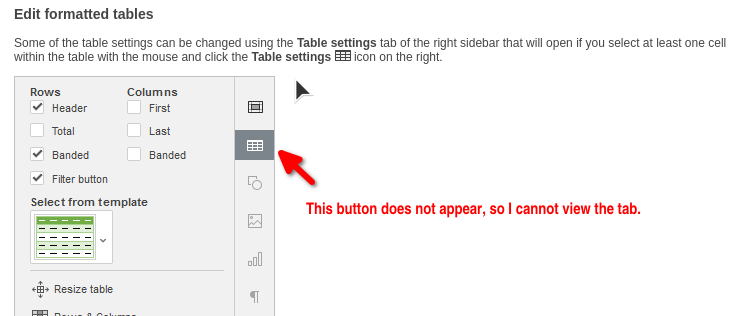
This happens in all the cases I have tested. The simplest: open OnlyOffice from the Cinnamon menu, create a new spreadsheet, and then create a table in an empty range.
I would greatly appreciate any guidance on this.
Best regards,
Ivaneck
OS version: Linux Mint 22.2 Cinnamon
App version: ONLYOFFICE Desktop Editors, Community version 9.1.0.173 (flatpak)
Downloaded from: https://flathub.org/en/apps/org.onlyoffice.desktopeditors, via ONLYOFFICE desktop and mobile apps | ONLYOFFICE