hello, you’re right, when I change arial to another font, it works great thanks
Hi, I’ve the same version and your file is working fine, with accent and arial on my side
Please provide the original Arial font file from Windows\Fonts
I can’t send zip or rar files on forum, so I cannot send a zip file with Arial font from my desktop.
I tried the zoom on OnlyOffice with 100%, 80% and 110%.
Longer screen recording is hard, because the file size limit
And what do you means with “detaching”? Sorry I’m not too good in English.
Arial FR
here is arial fonts
I fogot that we can share in a link way
Well, so I can try to share longer videos in this way.
Video starting the onlyoffice
I tried both fonts, my and your, on my Linux laptop and in both the file broke.
My laptop use OnlyOffice on flatpak version, on 9.0.4.50.
I tried in local file and local server and both don’t work fine.
Maybe, next time, I will try again restarting the laptop each time I change the Arial fonts (my and your).
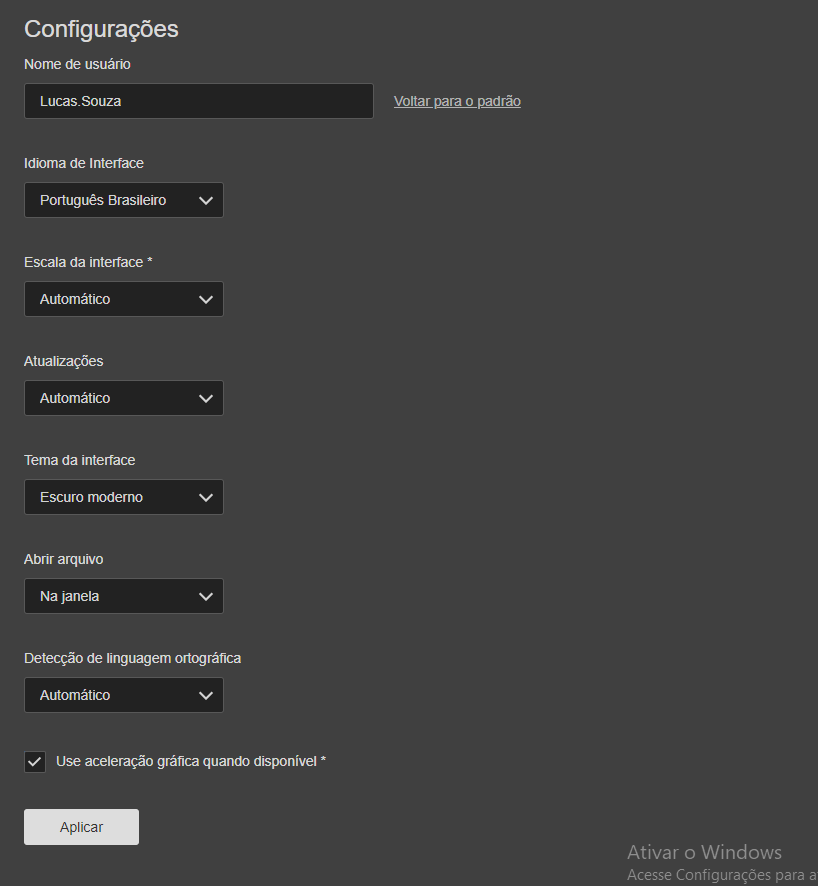
@lsw And what is your Interface Scaling in settings?
By detaching I mean that a tab with the edited document can be moved away from the main Editor frame
The fonts were received, we are checking
Hello @lsw
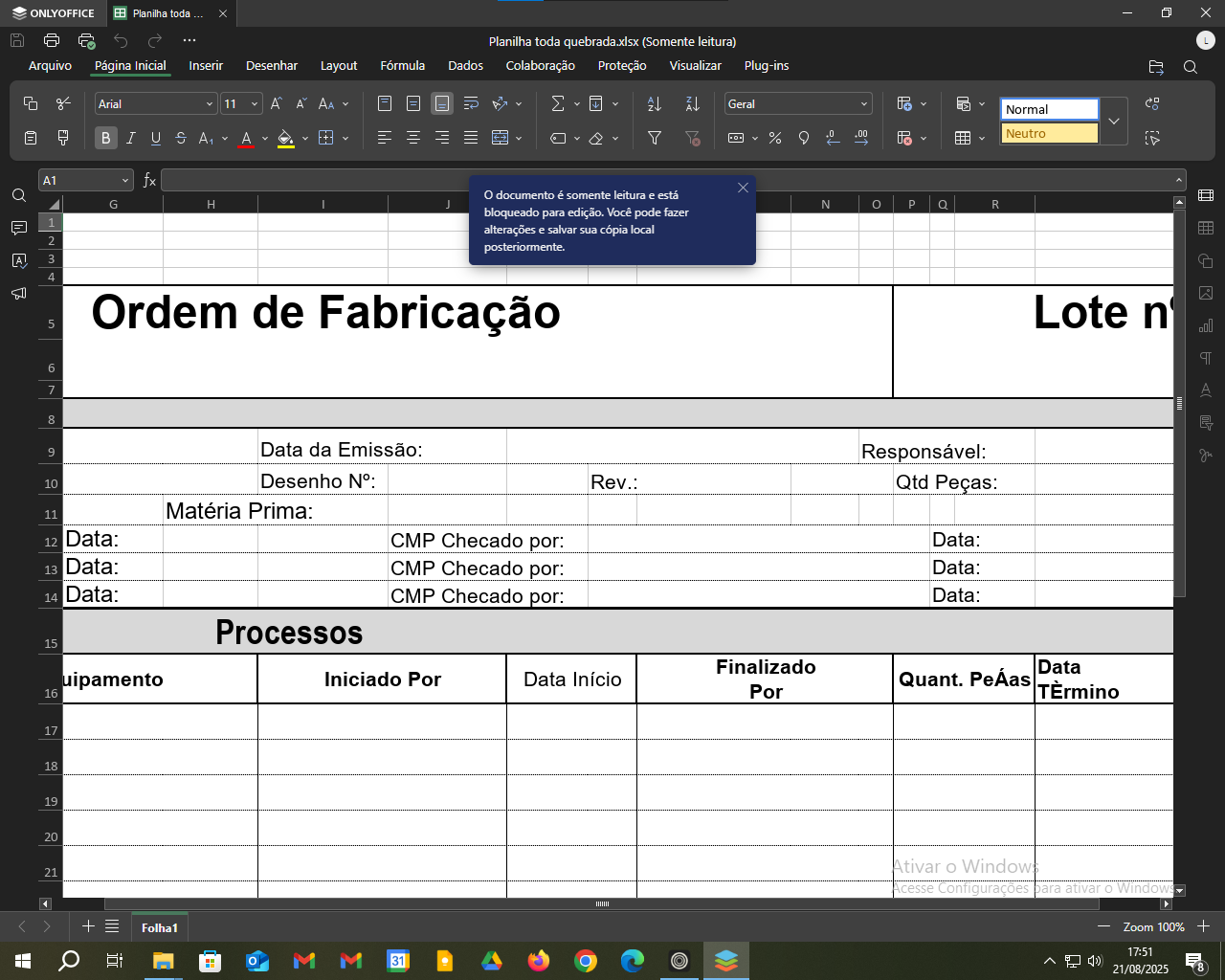
On the second screenshot the tab with the file is in the main window of Desktop Editors, but on the previous recordings this tab was dragged from the main window, i.e. was in a separate window. Please try not dragging the tab with the file, will it produce the same behavior? Also, please try disabling graphics acceleration in Desktop Editors settings.
In tab mode or window mode happens same issue
I disabled the graphics acceleration, same issue
Here a video after change to tab mode and disable graphics acceleration:
https://upload.disroot.org/r/51ZrTDww#s67fHnEj3ndt8jnWQx7lVM7VbQgUcNvXkSHmDquNffE=
1 Like
Hey @lsw, 
We were able to reproduce the issue with accented letters not displaying correctly in Desktop Editors (v9.1.0.79 test version) on a Windows 11 Pro 23H2 device (OS build 22631.5768, Experience Pack 1000.22700.1106.0). However, it doesn’t happen on Windows 11 Pro 24H2, and swapping in custom fonts didn’t change the behavior.
This makes me think the problem might be tied to Windows 11 23H2 specifically. From your screenshots, it looks like you’re on Windows 10 — could you confirm the exact version and build (e.g., via Settings > System > About)? If you haven’t updated in a while, that could be a factor too. If possible, testing the file on a more recent Windows setup would help confirm.
If anyone else in the thread (@PJO25, @JR10) has Windows 11 23H2 still installed, it’d be great to check if you see the same thing!
Uuuhh, I’m using:
| Edição | Windows 10 Pro |
|---|---|
| Versão | 22H2 |
| Build SO | 19045.6282 |
And with Desktop Editors from Release ONLYOFFICE-DesktopEditors-8.3.3 · ONLYOFFICE/DesktopEditors · GitHub work pretty good in this Windows version
I am using Desktop Editors (v9.0.4.50) on a Windows 11 Pro 24H2 device (OS build 26100.5074)
And the problem is still remaining with Arial Font
Best regards
Philippe
I reproduce this on linux laptop with desktop editors Community version 9.0.4.50 (flatpak), I used
arial fonts here on topic
System Details Report
Report details
- Date generated: 2025-09-14 10:32:21
Hardware Information:
- Hardware Model: Lenovo IdeaPad 3 15ALC6
- Memory: 20.0 GiB
- Processor: AMD Ryzen™ 5 5500U with Radeon™ Graphics × 12
- Graphics: AMD Radeon™ Graphics
- Disk Capacity: 1.3 TB
Software Information:
- Firmware Version: GLCN42WW
- OS Name: Fedora Linux 42 (Workstation Edition)
- OS Build: (null)
- OS Type: 64-bit
- GNOME Version: 48
- Windowing System: Wayland
- Kernel Version: Linux 6.15.10-200.fc42.x86_64
Big thanks to all of you for the detailed reports and system info about the issue with French accented letters not displaying correctly in Arial font in ONLYOFFICE Desktop Editors! We’ve logged this as a bug: “Incorrect display of letters with diacritical marks in French using Arial font.”
Unfortunately, I can’t provide a timeline for a fix just yet, but we’re actively looking into it.
If anyone else encounters this issue, please chime in on this thread to keep the discussion centralized.
Appreciate your help!
Having the same issue with Portuguese here (pt-PT)
On Windows 11 24H2
Hello @Pedrocas
Please specify the version of editor that is being used. If possible, please share a sample file for analysis too.
Hi! Just in case you are working in parallel at the same kind of issue without knowing it…