I have a docker installed workspace on Digital Ocean with a Ubuntu server.
I have added a email address via the mail section for a email address hosted offsite by using IMAP credentials. We are able to see and receive all the emails on that account, as well as send new ones.
But, unlike other mail clients, the changes (eg. read/unread status) are not being pushed to the IMAP server to be shared with other email clients elsewhere. It is also not syncing with the IMAP server to mark them read on our end.
The problem this creates is that there is a email address we are using that is shared by multiple users. We added it to our mail modules/clients separately and will open and link emails to various CRMs. But we are duplicating efforts every day because the other mail clients are not showing when a email has been linked or read already.
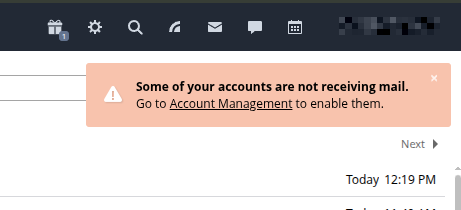
I also have had an error at the top of the mail module for almost 2 years because the mail module client lost access to some outlook accounts when they switched to 0Auth logins. I am not able to remove those accounts or stop the error. See below:
As for Microsoft/Outlook accounts, OAuth2 support for mailboxes is currently still under implementation, and unfortunately, we cannot provide an ETA yet.
Could you please clarify what exactly happens when you try to remove or disable these accounts via Mail → Settings → Account Management ? Please also send us a screenshot of the error message and screenshots from your browser developer tools (Console and Network tabs) taken while reproducing the issue.
As for IMAP, to investigate further, could you please clarify the exact ONLYOFFICE Workspace version you are currently using?
Please note that ImapSync works only for mailboxes created after updating to v12.0, and currently, synchronization is available only for the Inbox, Sent, Drafts, and Spam folders.
I know about the 0Auth issue. But I wanted to remove the accounts. I just tried again and it is working now. I deleted them and transferred the emails to the other inboxes/accounts. I dont know what changed, but it used to say that it couldnt connect when I tried to delete.
I am using workspace/community version 12.8.0.1971. The accounts that are not imap syncing were added in fall 2024, and last week. So they both should have been on v12. Neith inbox’s sync. 3 users have the same email account added to the CRM mail area and it doesnt even sync read status or when we link to CRM deals.
For context, these are offsite hosted (Bluehost) email addresses. They are not being hosted inside the mail module. IMAP syncing confirmed working when using these emails in a client like thunderbird and outlook.
Unfortunately, full IMAP synchronization for external mail accounts is not available in ONLYOFFICE Workspace Mail at the moment, so the behavior you described is a current limitation. The Mail Server feature has not seen much development recently, and I am not aware of any planned updates. However, your ideas are valuable, and I have forwarded them to our development team for consideration.
Thank you for sharing your feedback and your use case. We understand that full synchronization of shared mailboxes would be helpful.
At the moment, we cannot offer a workaround for this in Workspace Mail.