OS: Windows Server 2019 - Tested on Windows Server 2025 as well.
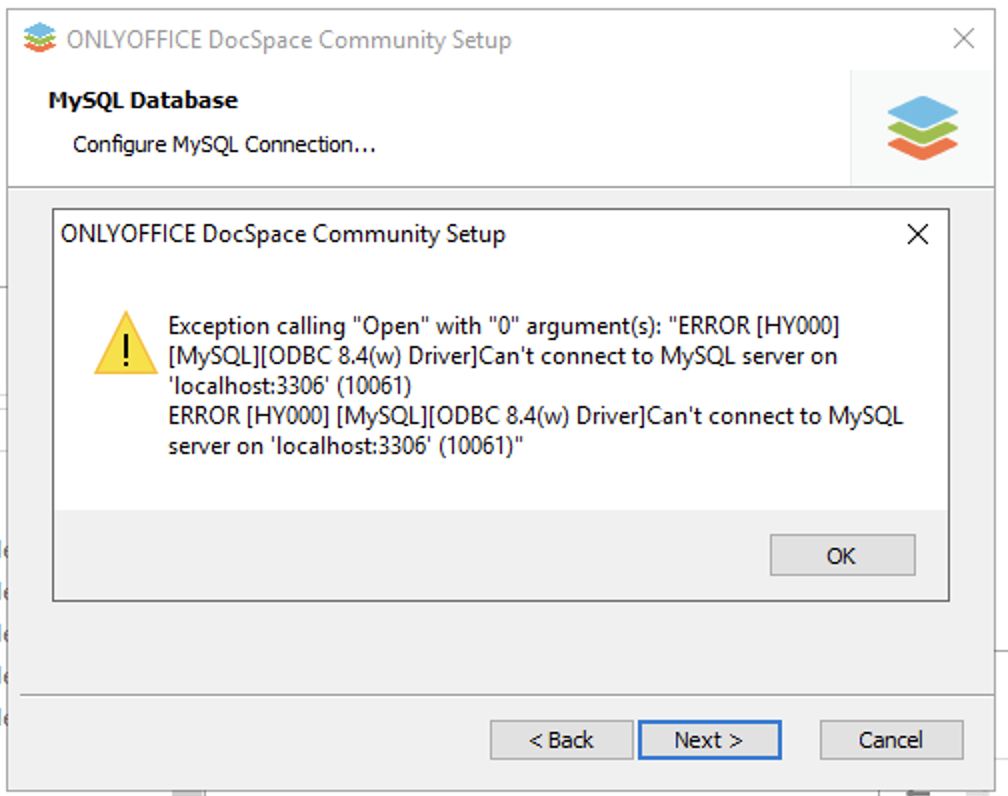
The windows version of the community installer doesn’t work. It fails to download mysql-8.4.3-winx64.msi as it no longer is available for download. If the msi file is downloaded from other sources and then installed and configured, the installation of Docspace Community still fails with the following error message:
When tracing the installation it appears as if the installer fails co configure the MySQL database properly.
1 Like
Hello @ahogrelius
Is ports 3306 opened in your system?
Yes, it is open and I can connect with mysql -u root -p from the command prompt.
The same problem occur with the Enterprise installer. I managed to get the Community version installed by installing ONLYOFFICE_DocSpace_Prerequisites_Win-install.latest.exe first, but the Enterprise version still doesn’t install properly. For the Enterprise version the RabbitMQ fails to install properly. It can be installed from the command prompt, but the installer still fails at the end when launching the Onlyoffice services.
-Pretty bad that the installers haven’t been updated with the proper path for MySQL and that you need to run a prerequisites installer first. Come on, it can’t be that difficult to update the released installers to contain proper code!
Please provide a link to the guide that you are using to install DocSpace. Also, let me know if your server has access to the Internet or not.
I’m using the instructions that are available on the same page where the installer is on the onlyoffice.com website. The server has working internet as well. The problem is that the URL to the MySQL installer that is hardcoded in the installer no longer works as the file has been removed from the server. I can also add that the Enterprise version of the installer has the same issue.
It is the same problem that is described in this post (Thank you Google Translate)
Please share direct link. As I can see, poster from referenced topic tries offline installation, but it is not how you are installing DocSpace, at least according to the provided description. In their case, MySQL cannot be downloaded, but on your screenshot connection cannot be established. Is it installed in the list of app from Control Panel of your system?
I’ve encountered this error too.
MySQL server version is 9.3.0, MySQL Connector version is 9.3.0.
This error also appear in another server which runs MySQL 8.4.5 (connector 8.4.0).
Hello @Heartless
Are you also installing DocSpace on a machine with access to the Internet?
Yes, it is conencted and can access the internet. The problem is that the MySQL files are not available for download at the URL coded into the installer. If you try to download the installation files manually using the link used by the installer you get a 404 error as the file no longer is there.
My environment is:
- OS: Windows Server 2022
- Internet Access: Yes, my server has full internet access, similar to
ahogrelius’s setup.
I can confirm the following:
- MySQL Download Failure: The installer consistently fails because it attempts to download
mysql-8.4.3-winx64.msi, which is unavailable, resulting in a download error. This confirms ahogrelius’s observation about the hardcoded, non-existent URL.
- Manual MySQL Installation Fails DocSpace Installation: Even after manually downloading and installing “MySQL 8.4.5 (64-bit)” from an alternative source, the DocSpace installer still fails.
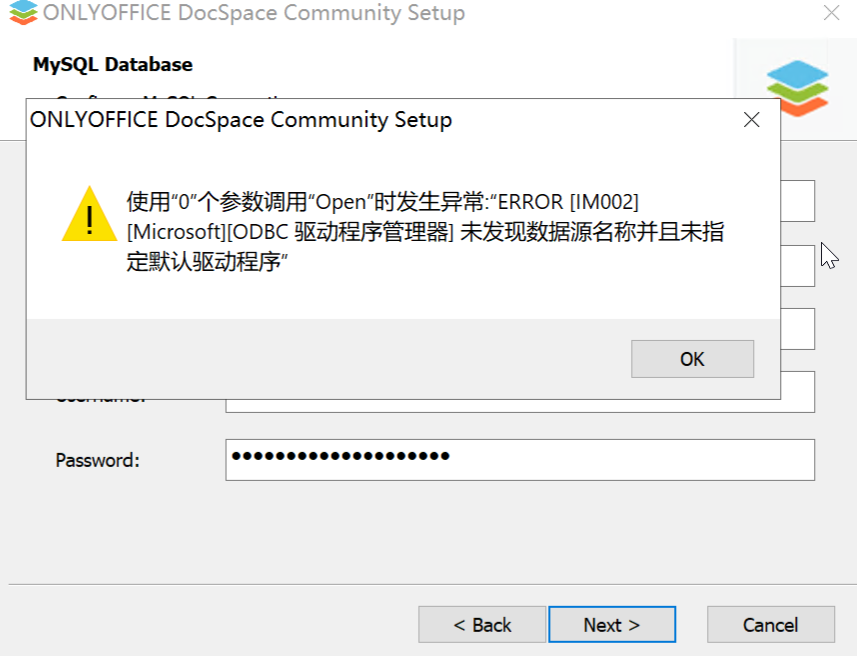
- Specific ODBC Error: When the DocSpace installer attempts to configure the database, it produces the same error
Heartless reported: ERROR [IM002] [Microsoft][ODBC Driver Manager] Data source name not found and no default driver specified. My MySQL Server version is 8.4.5 and MySQL Connector version is 8.4.5
This suggests that even with MySQL present, the DocSpace installer has a problem either finding or correctly configuring the ODBC connection to it.
This seems to be a widespread issue preventing many users from deploying DocSpace. Any assistance in resolving these core installer problems would be greatly appreciated.
Thank you
1 Like
Hello @psiiota
I may only assume that the link to the installer is not available in your region, because in our tests we did not face such issues.
In such case you can download prerequisites for DocSpace installation separately from the guide:
For offline installation, download prerequisites separately.
Basically, you will need to install prerequisites first, then run installation of DocSpace without installing these dependencies during the installation.
No, the URL in your installer is definitely wrong. I can only assume that you are located behind a caching proxy that still allows you to use the wrong URL. Oracle has removed the installer from the path that is hardcoded in the installer and has moved it to the archived section. The correct URL is https://cdn.mysql.com/archives/mysql-8.4/mysql-8.4.3-winx64.msi
Observe the “archive” part of the URL. It has nothing to do with the installer not being available in different regions.
Thanks for the reply. I will check the situation, please await for my feedback.
Yes, of course. In Chinese GFW env, I turn the VPN on. That’s why I can download and run the docspace setup program.
Hello @ahogrelius, @psiiota, @Heartless
May I know if its a clean installation in your case? Meaning installation without prior installs of DocSpace and any other programs? Also, I’d like to see following screenshots:
- Versions of MySQL and MySQL ODBC;
- Check whether MySQL is up and running;
- If it was an update, then make a screenshot of following registry entry:
Computer\HKEY_LOCAL_MACHINE\SOFTWARE\Wow6432Node\Ascensio System SIA\ONLYOFFICE DocSpace.
Of course it’s a clean installation.
Thank you. Can you check if MySQL is running in services.msc?
For me, MySQL was not running and would not install correctly even when using the separately installed prerequisites. This was on Windows Server 2025. Everything installed correctly on Windows Server 2019, though I still needed to download and install the prerequisites as the hardcoded URL to the MySQL installer is wrong.
Use this prerequisites installer, it will run MySQL Runner, which will configure MySQL for DocSpace.