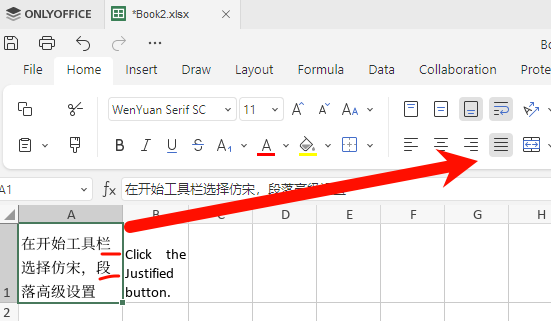
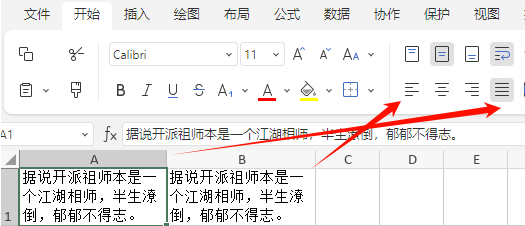
Hello, when I use a spreadsheet, after entering Chinese text and clicking the Justified and Wrap Text buttons, the Chinese text cannot be fully justified.
Reproduction Steps
1.Open a spreadsheet
2.Select a cell and enter Chinese
3.Click the Justified button.
G’day @atxbcai,
Welcome to the OnlyOffice forum! 

You have a bit of an interesting situation here.
OnlyOffice, is at best, a word-processor, so the only way Justification appears to function is by stretching spaces between words.
I am not going to profess any skill in East Asian pictographic languages, but it seems that a “space” only occurs between sentences, or as in your case, after some punctuation.
Your first line in cell A1 breaks where the next phoneme doesn’t fit on the line; and as there are no spaces, the first line does not stretch.
The second line does have a space, but is not stretching.  Maybe the gap after the comma is not a regular space, but something else; a non-breaking space maybe?
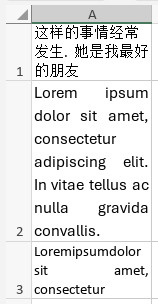
In the screen-shot above; I copied some similar looking text, and pasted it into the cell, replacing this terminator “。” with a full-stop and space.
You can see in cell A1, that line 1 is not justified as there are no spaces, but line 2 is justified via a space stretch.
As you can see in cell A2, using pseudo-latin, it is fully justified using the space stretch, but creates what a called rivers, huge gaps flowing downward. These are discouraged. Publishing software can deal with this by employing discrete inner-word spacing, but that is a whole new level of software.
In cell A3, you can really see justification at its worse.
What can be done?
As justification at this level only deals with regular space characters, your options may be limited. OnlyOffice support may be able to do inner-word spacing for certain languages, but do not be surprised if that is considered “out of scope”.
I’m not sure if you could add your own spaces between phonemes to help with justification, without compromising readability.
I did achieve this result;
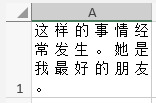
from this text “这 样 的 事 情 经 常 发 生 。 她 是 我 最 好 的 朋 友 。” which is adding a regular space between each phoneme. Not exactly a smooth experience, but it gets results.
… the end result will be to see what OnlyOffice support come up with. And if there is no option, you may consider the scenario I outlined above.
2 Likes
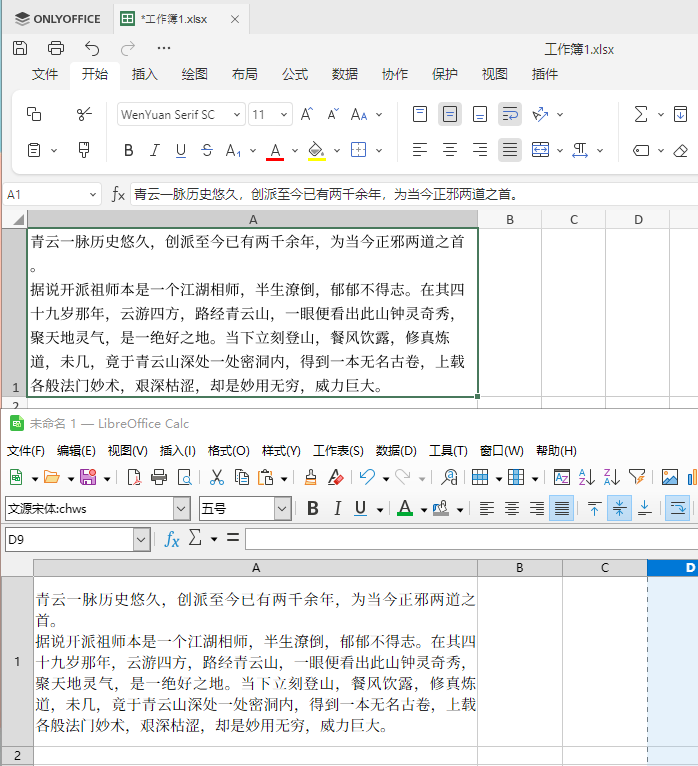
Thank you very much for your reply. Adding spaces between characters is indeed a method. It depends on the needs: you can use OnlyOffice for data, and LibreOffice for Chinese characters that need to be printed.
Hey @atxbcai, 
Thanks for the follow-up and the screenshot.
To help us investigate further and see if there’s a better fix or improvement possible, could you please upload the sample .xlsx file you used in your screenshot? (You can attach it directly here or share via ONLYOFFICE DocSpace/kDrive.)
We’ll take a close look at how justification behaves with Chinese text in that file. Thanks in advance!
Thank you very much. This document uses left alignment and justified alignment; I don’t know if it will be useful.
工作簿1.xlsx (8.6 KB)
Hey @atxbcai,
Thanks a lot for the file and screenshot!
We’re already looking into this issue. Your example is now with the team for testing.
I’ll keep you updated as soon as there’s progress. Thank you again for the great feedback! 
1 Like
We’ve logged this as a bug and passed it to the team. Unfortunately, I can’t give an exact timeline for the fix yet, but I’ll notify you right here as soon as a version with the fix is released.
Appreciate your help and patience! 
Okay, thank you very much. I’ll look forward to your good news.