ONLYOFFICE Mobile: Documents
Do you want to: Report a bug
Device: iPhone 13 Mini
OS version: iOS 18.7.2
App version: 9.2
Mode: Connect to Cloud
Additional information: after upgrading to this release, Nextcloud connection stops working… the 1st level of directories keeps showing, but entering a subdir raises an “unexpected error” (see the attached screenshot). Reinstalling and reconfiguring the app didn’t solve the problem. Even connecting via WebDAV to Nextcloud returns the same error! 
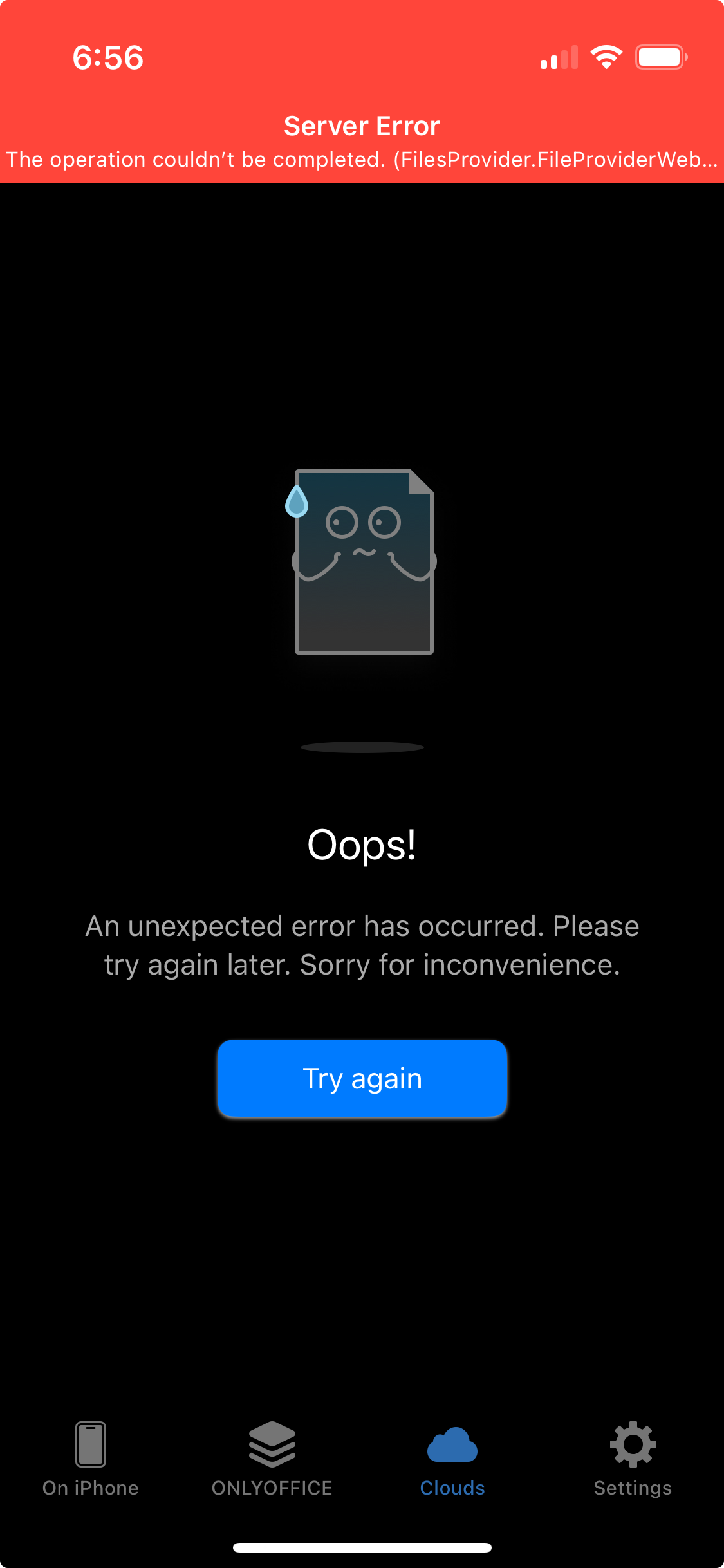
Hello @andrewhotlab
I’ve checked the situation with my portal, but all things are OK.
Device: iPhone 15, iOS 26.1
app version: 9.2
The Nextcloud: Nextcloud Hub 25 Autumn (32.0.0)
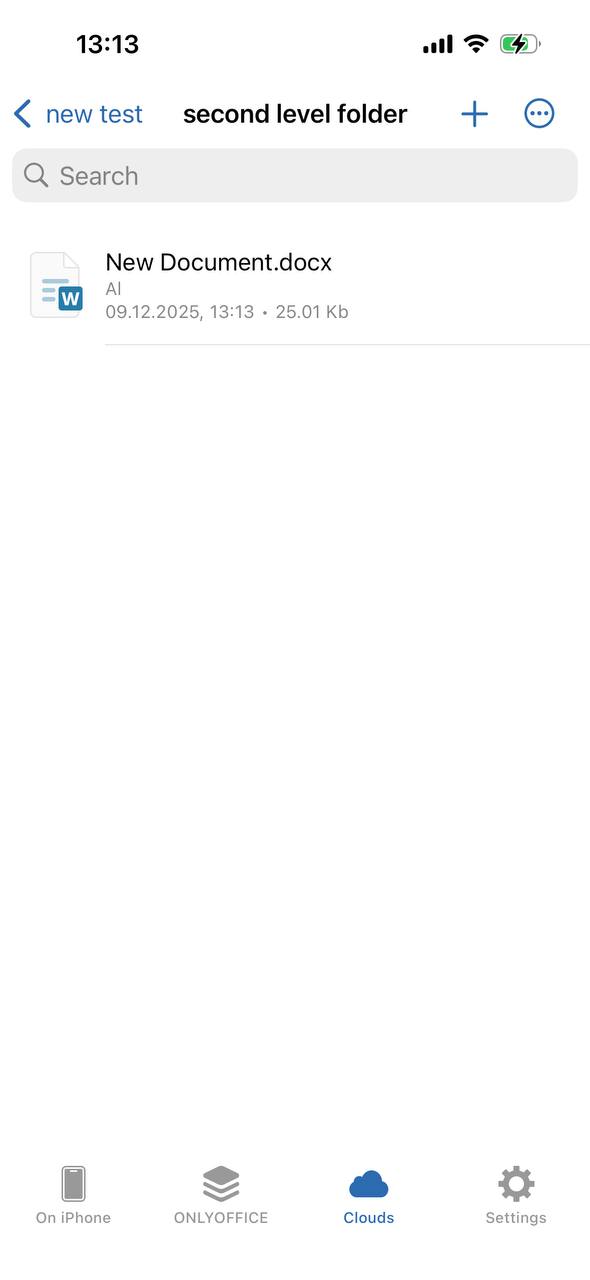
Please try to remove and re-add the connection to your Nextcloud portal again or reinstall the app completely. If it doesn’t help, please collect the app logs while you’re reproducing the situation, we will take a look at them:
Go to the Settings > About page > quickly tap on our logo several times > wait for the device to emit a characteristic vibration > go back to Settings menu > you will see a new Console option appear > go to Logs tab and check the latest logs.
Thank you @Alexandre . As I wrote, I already uninstalled an reinstalled the app. I also tried to connect with different Nextcloud instances (all of them in the 30.x branch), obtaining the same error. In the log I can see the “PROPFIND” request which remain in the pending state. Here it is:
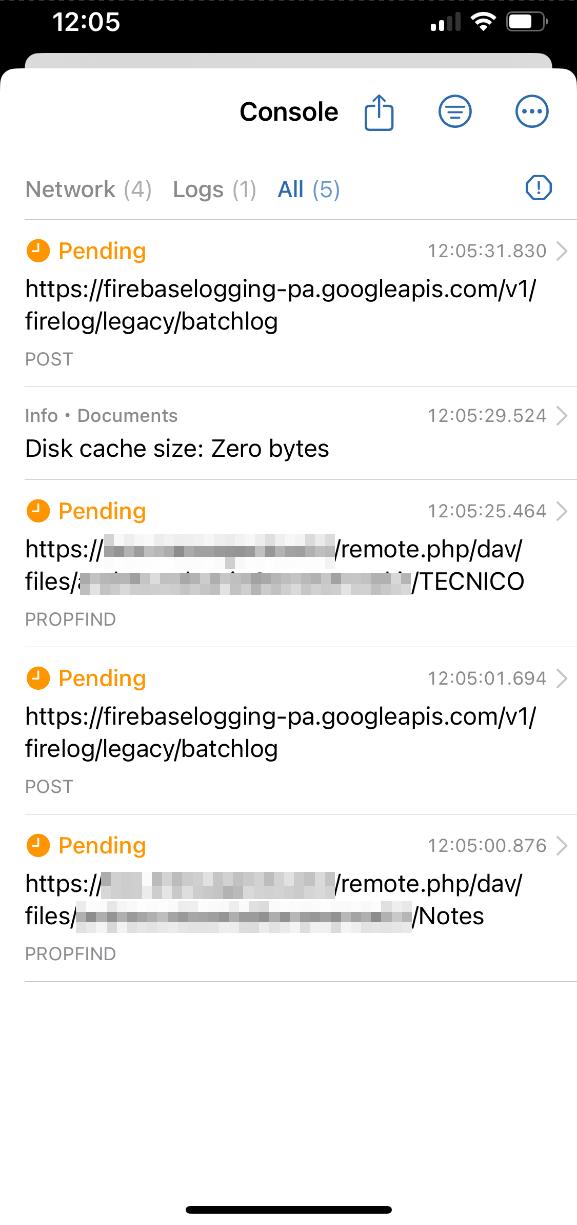
A few more info: we have a dozen of NC 30 production instances. The latest version (9.2) of iOS app show this problem with 50% of them. I have hard time to understand what might be the cause… I was not able to “match a pattern” in NC configuration yet! 
For sure the problem shows only with the latest iOS app.
Another info which I hope help to troubleshoot the issue. Here are the linse from the nextcloud.log file when a v9.2 iOS app tries to list a subdirectory content, just after it logged in successfully and opened without problem a file in the root path:
{"reqId":"0pw23JZ8L9esQ9VM9RuK","level":3,"time":"2025-12-11T09:52:47+00:00","remoteAddr":"172.21.3.251","user":"--","app":"core","method":"PROPFIND","url":"/remote.php/dav/files/admin/Documents","message":"App token login name does not match","userAgent":"Documents/1168 CFNetwork/3826.600.41 Darwin/24.6.0","version":"30.0.17.2","data":{"tokenLoginName":"admin","sessionLoginName":"Admin","app":"core","user":"admin"}}
{"reqId":"0pw23JZ8L9esQ9VM9RuK","level":2,"time":"2025-12-11T09:52:47+00:00","remoteAddr":"172.21.3.251","user":"--","app":"core","method":"PROPFIND","url":"/remote.php/dav/files/admin/Documents","message":"Login failed: 'Admin' (Remote IP: '172.21.3.251')","userAgent":"Documents/1168 CFNetwork/3826.600.41 Darwin/24.6.0","version":"30.0.17.2","data":{"app":"core"}}
{"reqId":"CwIqd38VGBYHCedP0HAp","level":3,"time":"2025-12-11T09:52:47+00:00","remoteAddr":"172.21.3.251","user":"--","app":"core","method":"PROPFIND","url":"/remote.php/dav/files/admin/Documents","message":"App token login name does not match","userAgent":"Documents/1168 CFNetwork/3826.600.41 Darwin/24.6.0","version":"30.0.17.2","data":{"tokenLoginName":"admin","sessionLoginName":"Admin","app":"core","user":"admin"}}
{"reqId":"CwIqd38VGBYHCedP0HAp","level":2,"time":"2025-12-11T09:52:47+00:00","remoteAddr":"172.21.3.251","user":"--","app":"core","method":"PROPFIND","url":"/remote.php/dav/files/admin/Documents","message":"Login failed: 'Admin' (Remote IP: '172.21.3.251')","userAgent":"Documents/1168 CFNetwork/3826.600.41 Darwin/24.6.0","version":"30.0.17.2","data":{"app":"core"}}
{"reqId":"JEFEheY1RD5hTGWyCh0n","level":3,"time":"2025-12-11T09:52:47+00:00","remoteAddr":"172.21.3.251","user":"--","app":"core","method":"PROPFIND","url":"/remote.php/dav/files/admin/Documents","message":"App token login name does not match","userAgent":"Documents/1168 CFNetwork/3826.600.41 Darwin/24.6.0","version":"30.0.17.2","data":{"tokenLoginName":"admin","sessionLoginName":"Admin","app":"core","user":"admin"}}
{"reqId":"JEFEheY1RD5hTGWyCh0n","level":2,"time":"2025-12-11T09:52:47+00:00","remoteAddr":"172.21.3.251","user":"--","app":"core","method":"PROPFIND","url":"/remote.php/dav/files/admin/Documents","message":"Login failed: 'Admin' (Remote IP: '172.21.3.251')","userAgent":"Documents/1168 CFNetwork/3826.600.41 Darwin/24.6.0","version":"30.0.17.2","data":{"app":"core"}}
{"reqId":"gtXZ5EKKqFDI6jzNvNOL","level":3,"time":"2025-12-11T09:52:47+00:00","remoteAddr":"172.21.3.251","user":"--","app":"core","method":"PROPFIND","url":"/remote.php/dav/files/admin/Documents","message":"App token login name does not match","userAgent":"Documents/1168 CFNetwork/3826.600.41 Darwin/24.6.0","version":"30.0.17.2","data":{"tokenLoginName":"admin","sessionLoginName":"Admin","app":"core","user":"admin"}}
{"reqId":"gtXZ5EKKqFDI6jzNvNOL","level":2,"time":"2025-12-11T09:52:48+00:00","remoteAddr":"172.21.3.251","user":"--","app":"core","method":"PROPFIND","url":"/remote.php/dav/files/admin/Documents","message":"Login failed: 'Admin' (Remote IP: '172.21.3.251')","userAgent":"Documents/1168 CFNetwork/3826.600.41 Darwin/24.6.0","version":"30.0.17.2","data":{"app":"core"}}
I’ll check the same log with other NC instances ASAP, and I let you know if they produce similar errors.
Wow, I guess I found the cause… is awkward, but it looks like the problem is that the latest version of the iOS app uses the “Full name” valute of the account instead of the username when it tries to login! :S
In fact I found this error just at the time the app logs in:
{"reqId":"WXp0mQO7En8diPVTZMNj","level":3,"time":"2025-12-11T10:04:44+00:00","remoteAddr":"172.21.3.251","user":"--","app":"core","method":"GET","url":"/ocs/v2.php/cloud/user","message":"Renewing session token failed: Token does not exist: token does not exist","userAgent":"Documents/9.2.0 (com.onlyoffice.Documents; build:1168; iOS 18.7.2) Alamofire/5.10.2","version":"30.0.17.2","exception":{"Exception":"OC\\Authentication\\Exceptions\\InvalidTokenException","Message":"Token does not exist: token does not exist","Code":0,"Trace":[{"file":"/usr/local/www/apache24/data/box/lib/private/Authentication/Token/PublicKeyTokenProvider.php","line":232,"function":"getToken","class":"OC\\Authentication\\Token\\PublicKeyTokenProvider","type":"->","args":["*** sensitive parameters replaced ***"]},{"file":"/usr/local/www/apache24/data/box/lib/public/AppFramework/Db/TTransactional.php","line":45,"function":"OC\\Authentication\\Token\\{closure}","class":"OC\\Authentication\\Token\\PublicKeyTokenProvider","type":"->","args":["*** sensitive parameters replaced ***"]},{"file":"/usr/local/www/apache24/data/box/lib/private/Authentication/Token/PublicKeyTokenProvider.php","line":231,"function":"atomic","class":"OC\\Authentication\\Token\\PublicKeyTokenProvider","type":"->"},{"file":"/usr/local/www/apache24/data/box/lib/private/Authentication/Token/Manager.php","line":158,"function":"renewSessionToken","class":"OC\\Authentication\\Token\\PublicKeyTokenProvider","type":"->"},{"file":"/usr/local/www/apache24/data/box/lib/private/User/Session.php","line":883,"function":"renewSessionToken","class":"OC\\Authentication\\Token\\Manager","type":"->"},{"file":"/usr/local/www/apache24/data/box/lib/base.php","line":1114,"function":"loginWithCookie","class":"OC\\User\\Session","type":"->","args":["*** sensitive parameters replaced ***"]},{"file":"/usr/local/www/apache24/data/box/ocs/v1.php","line":41,"function":"handleLogin","class":"OC","type":"::"},{"file":"/usr/local/www/apache24/data/box/ocs/v2.php","line":8,"args":["/usr/local/www/apache24/data/box/ocs/v1.php"],"function":"require_once"}],"File":"/usr/local/www/apache24/data/box/lib/private/Authentication/Token/PublicKeyTokenProvider.php","Line":165,"Previous":{"Exception":"OCP\\AppFramework\\Db\\DoesNotExistException","Message":"token does not exist","Code":0,"Trace":[{"file":"/usr/local/www/apache24/data/box/lib/private/Authentication/Token/PublicKeyTokenProvider.php","line":157,"function":"getToken","class":"OC\\Authentication\\Token\\PublicKeyTokenMapper","type":"->","args":["*** sensitive parameters replaced ***"]},{"file":"/usr/local/www/apache24/data/box/lib/private/Authentication/Token/PublicKeyTokenProvider.php","line":232,"function":"getToken","class":"OC\\Authentication\\Token\\PublicKeyTokenProvider","type":"->","args":["*** sensitive parameters replaced ***"]},{"file":"/usr/local/www/apache24/data/box/lib/public/AppFramework/Db/TTransactional.php","line":45,"function":"OC\\Authentication\\Token\\{closure}","class":"OC\\Authentication\\Token\\PublicKeyTokenProvider","type":"->","args":["*** sensitive parameters replaced ***"]},{"file":"/usr/local/www/apache24/data/box/lib/private/Authentication/Token/PublicKeyTokenProvider.php","line":231,"function":"atomic","class":"OC\\Authentication\\Token\\PublicKeyTokenProvider","type":"->"},{"file":"/usr/local/www/apache24/data/box/lib/private/Authentication/Token/Manager.php","line":158,"function":"renewSessionToken","class":"OC\\Authentication\\Token\\PublicKeyTokenProvider","type":"->"},{"file":"/usr/local/www/apache24/data/box/lib/private/User/Session.php","line":883,"function":"renewSessionToken","class":"OC\\Authentication\\Token\\Manager","type":"->"},{"file":"/usr/local/www/apache24/data/box/lib/base.php","line":1114,"function":"loginWithCookie","class":"OC\\User\\Session","type":"->","args":["*** sensitive parameters replaced ***"]},{"file":"/usr/local/www/apache24/data/box/ocs/v1.php","line":41,"function":"handleLogin","class":"OC","type":"::"},{"file":"/usr/local/www/apache24/data/box/ocs/v2.php","line":8,"args":["/usr/local/www/apache24/data/box/ocs/v1.php"],"function":"require_once"}],"File":"/usr/local/www/apache24/data/box/lib/private/Authentication/Token/PublicKeyTokenMapper.php","Line":81},"message":"Renewing session token failed: Token does not exist: token does not exist","user":"ncadmin","exception":{},"CustomMessage":"Renewing session token failed: Token does not exist: token does not exist"}}
In the previous and in this log excerpt, the “ncadmin” account has “Admin” set as its Full name in Nextcloud’s personal info section. Setting it to “NCAdmin” solves the problem.
Please fix this ASAP… in the meantime we can workaround the bug by suggesting our users to temporary change the full name in their profile pages.
TIA.
Thank you @andrewhotlab
We’re looking into it. I will contact you shortly.
Dear @andrewhotlab
We have found a bug in the described scenario, and we have started on it.
We will update this thread once we have something to share.
Thank you for pointing us to this situation!
Thank you @Alexandre, I’m not a developer thus unfortunately I can’t contribute in a more effective way. The only thing I found clueless searching in the code is the change I noted in this commit (see the attached screenshot).
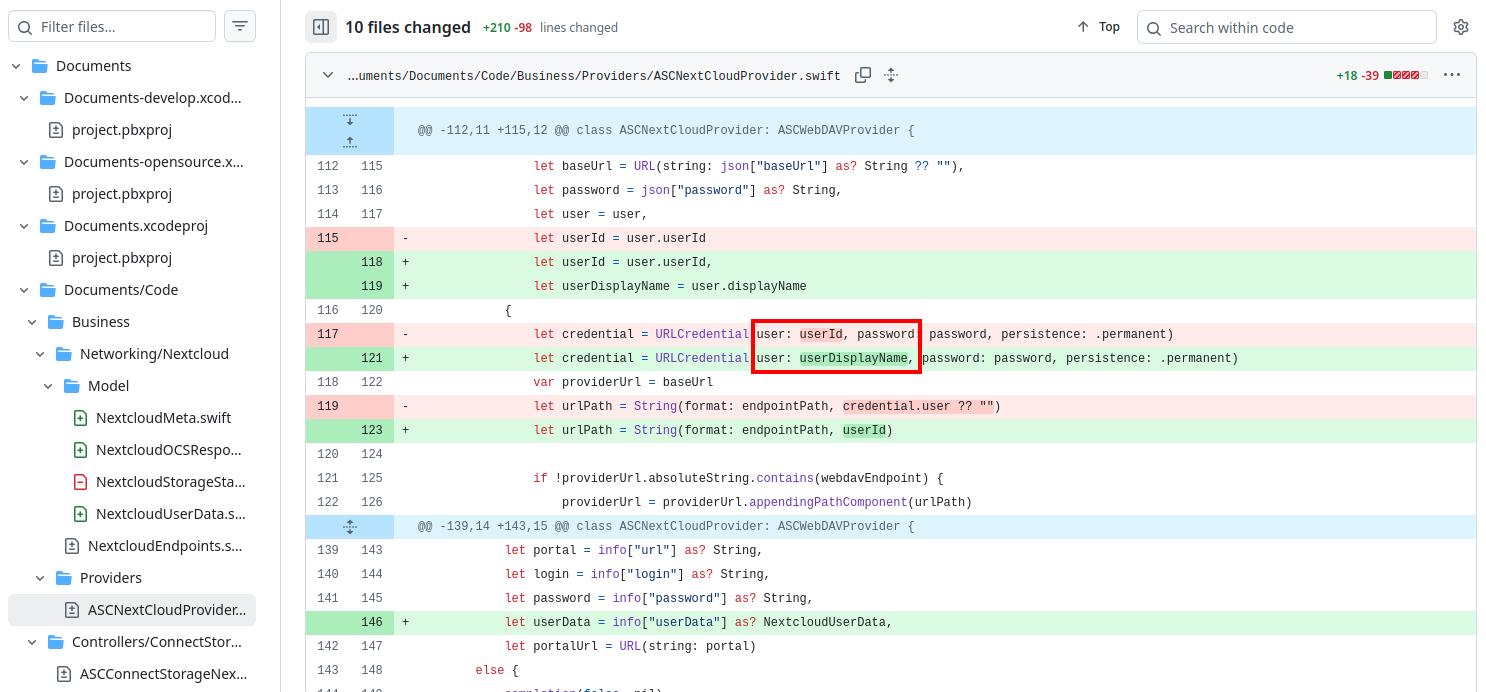
Thanks for your support.
I’ve got the same problem in the mobile office apps, if I try to open an existing xlsx file. If I create a new one it works. But once the connection to nextcloud break by opening and changing the existing xlsx file, it cannot recovery and I need to reconnect nextcloud in the mobile app again.
App Version 9.2
iOS Version: 26.1
Thank you @andrewhotlab, we’re working on it already. We will update this thread as soon as possible.
Dear @sloelk, your scenario seems to be different from topicstarter’s one. Please create a separate topic and provide us with details there. If it’s possible, collect the app logs and record a videofile of the issue itself.
Thank you @Alexandre . I just updated to the latest version you released (9.2.1), which still suffers the same problem.
I wish you good work, and… Merry Christmas! 
1 Like
Dear @andrewhotlab
v.9.2.1 of iOS app should resolve the situation. Please try removing Nextcloud portal from the ‘Clouds’ tab and add it again. Please let us know the result.
That’s what I did yesterday just after upgrading the app, but if the user’s full name in Nextcloud differs from its account name, auth does not work yet:
{"reqId":"a5PriOtXwYZs1zKSBW07","level":3,"time":"2025-12-23T18:40:25+00:00","remoteAddr":"172.21.3.131","user":"--","app":"core","method":"PROPFIND","url":"/remote.php/dav/files/demo/Desktop","message":"App token login name does not match","userAgent":"Documents/1173 CFNetwork/3826.600.41 Darwin/24.6.0","version":"31.0.12.3","data":{"tokenLoginName":"andreav","sessionLoginName":"Demo User","app":"core","user":"demo"}}
{"reqId":"a5PriOtXwYZs1zKSBW07","level":2,"time":"2025-12-23T18:40:25+00:00","remoteAddr":"172.21.3.131","user":"--","app":"core","method":"PROPFIND","url":"/remote.php/dav/files/demo/Desktop","message":"Login failed: 'Demo User' (Remote IP: '172.21.3.131')","userAgent":"Documents/1173 CFNetwork/3826.600.41 Darwin/24.6.0","version":"31.0.12.3","data":{"app":"core"}}
Dear @andrewhotlab
Could you please update your portal to v.32?
v.30 is no longer supported, however we’ve re-checked the situation on v.32 and all things are OK.
Unfortunately we cannot migrate to NC 32 yet: a couple of apps in use are not yet been ported. But we’ve migrated to NC 31 a few days ago, and we use the ONLYOFFICE apps (v9.12.0), even if I do not know if/how it is relevant for the iOS app behavior.
Hello! Do I understand it right that the issue reproduces on the NC 31?
Yes, the log lines i posted on Dec 24th are from a NC 31 instance. We moved almost all NC instances managed by us to this branch during the latest weeks.
Understood, we’re checking the situation.
Dear @andrewhotlab
We have deployed NC 31, but all things are OK.
Please show us the situation step-by-step (please record a video file).