I’m able to connect to the onlyoffice workspace webdav server by following this guide. However, trying to upload any file greater than 5MB returns “HTTP Error: Request Entity Too Large”, suggesting it is limiting the upload size. This occurs on both windows with the registry key changes, and linux. There are no issues uploading any file greater than 5MB directly to the portal. Any ideas why the webdav server might be using a different limit?
Adding that I am running Community Workspace v12.7.1.1942 on Ubuntu.
Hey @ltcptgeneral, 
Thanks for the issue in ONLYOFFICE Workspace — and for clarifying it’s specific to WebDAV!
Are you using any proxy like Nginx in front of Workspace? If so, the problem might be the client_max_body_size directive.
I am using nginx, but I have already set client_max_body_size to 0 (which should disable it).
Quick update, I tried to add client_max_body_size 0 to the community-server container’s nginx config. This allowed me to upload files up to around 500MB. However, trying to upload files larger than about 500MB eventually result in a http 500 internal server error. The nginx access logs only show these lines:
10.0.1.2 - alu [14/Oct/2025:19:38:43 +0000] "PROPFIND /webdav/My%20documents/large_file.mp4 HTTP/1.1" 404 5 "-" "gvfs/1.54.4" "169.232.72.178"
10.0.1.2 - - [14/Oct/2025:19:39:34 +0000] "PROPFIND /webdav HTTP/1.1" 301 178 "-" "gvfs/1.54.4" "169.232.72.178"
10.0.1.2 - alu [14/Oct/2025:19:39:34 +0000] "PROPFIND /webdav/ HTTP/1.1" 207 387 "-" "gvfs/1.54.4" "169.232.72.178"
10.0.1.2 - - [14/Oct/2025:19:39:43 +0000] "PROPFIND /webdav HTTP/1.1" 301 178 "-" "gvfs/1.54.4" "169.232.72.178"
10.0.1.2 - alu [14/Oct/2025:19:39:43 +0000] "PROPFIND /webdav/ HTTP/1.1" 207 387 "-" "gvfs/1.54.4" "169.232.72.178"
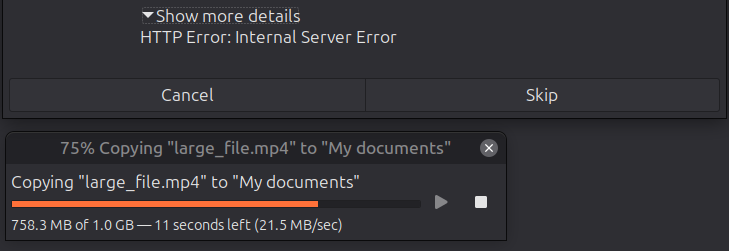
I realized the nginx reverse proxy was buffering the request, which was causing the error. Adding proxy_request_buffering off; (or adding more storage) fixed it. I’ve tested uploading about 1GB without issue.
Still wondering if setting client_max_body_size 0 in the community-server container is the right way to do this, but it is working now.
2 Likes