Do you want to: Suggest a feature / Report a bug / Ask a how-to question
For feature suggestions, describe the result you would like to achieve in detail.
For bug reports, provide the steps to reproduce and if possible a minimal demo of the problem.
OS version:
App version:
Downloaded from: ONLYOFFICE website / Other (specify). Please point us to the installation guide that you used as well.
Additional information:
Any relevant details about the situation. You can also attach images and videofile to the post (or to place them to external storage).strong text
Hi @E.P
We tried to reproduce the issue on both Windows 11 23H2 and 24H2, but were unsuccessful. The icon is visible, as expected.
I increased your community level so you can attach screenshots or videos to help us proceed with the investigation.
They are visible, but they are not very visible, mostly white with a little bit of blue. On a laptop without dark colour scheme they are not very visible. See screen shot.
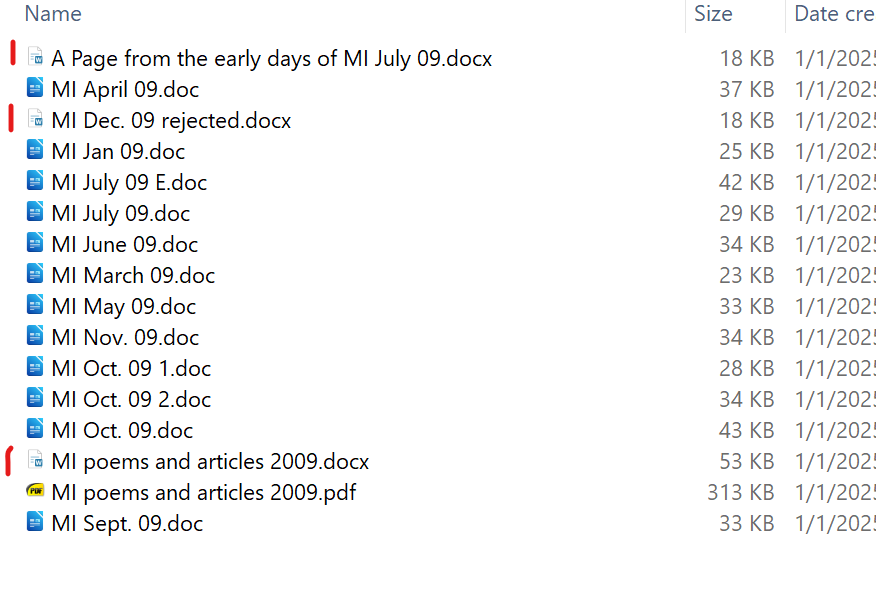
The doc files have LibreOffice icons, docx = OnlyOffice icons.
Don’t they deserve to be more prominent than they are?
I am not complaining, just wondering. OO has become very good and the compatibility is FAR better than Libre Office.
Thanks for your good work.
Hey @E.P
Now everything is clearer. Thank you for the suggestion. We will consider adding adaptive icons in the future.
Good. You have revamped the welcome page in desktop editors. A “new” icon for docx etc documents would be really nice to have.
1 Like
Thank you for your feedback.
Hello,
This thread has been moved to the Suggestions category.
Dear users, if you support the idea of changing the current icon design, please use the Vote button in the first post.
Your votes will help us understand how much interest there is in this suggestion.
1 Like