Hi everyone,
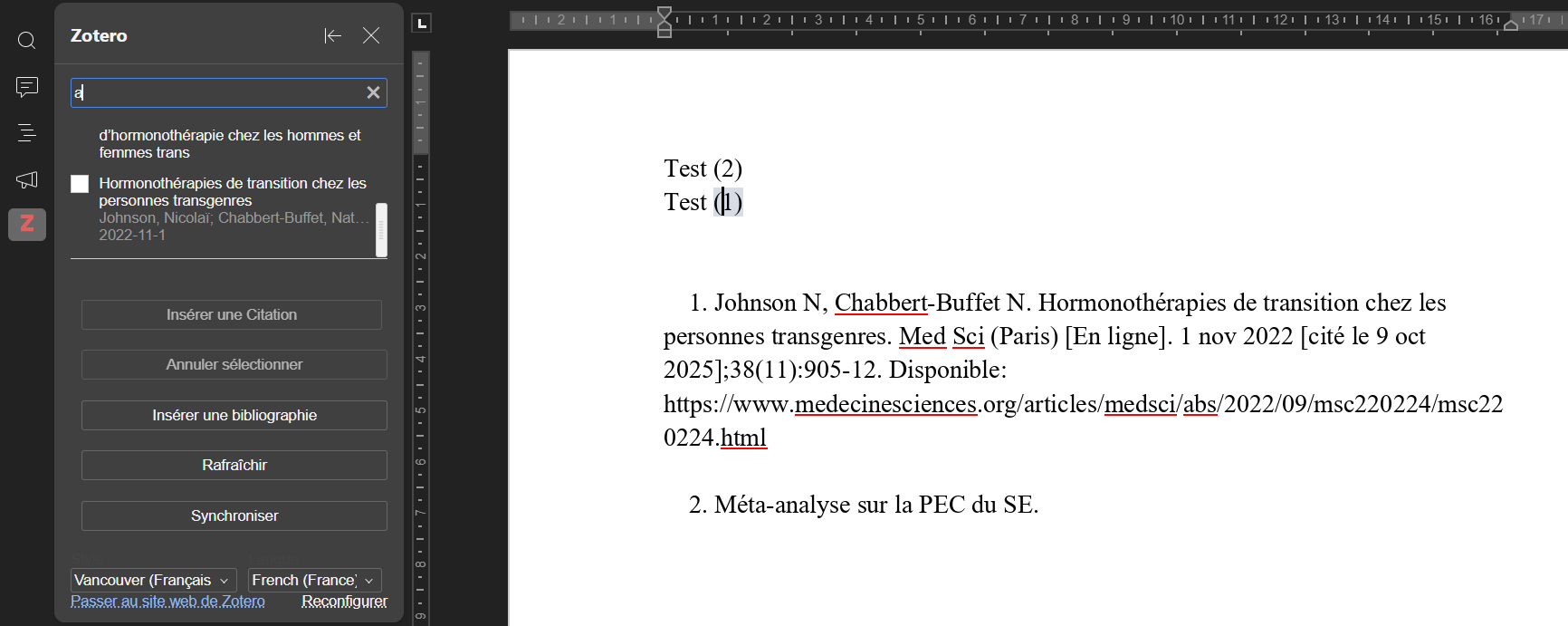
All my quotes (numbers) inserted in my thesis are in the order I inserted them, but I need to have them now in the same order they appear in the text. How can I update or rearrange the order of the quote-numbers automatically? If the option exists. (Actualize / Synchronize / Reorganize didn’t work). I added an example in picture : When i change the order of my text, the order of the bibliography doesn’t change
If i doesn’t exist, i would like to suggest that you add the option to automatically reorganize the bibliography in the same order as the quotes. It would be much easier than reorganizing it by hand.
(Just in case, i’m on the desktop app, on windows 11 family)
Thank you in advance !
Hey @bananecarpe, 
Thanks for the detailed description and screenshot!
The plugin doesn’t yet support dynamic renumbering when the order of citations in the document changes.
The good news: we recently fixed a related issue (bibliography not sorting alphabetically in APA style), and that fix will be in the next plugin release. Your case is different (numeric style + renumbering), so we’re treating it as a separate bug/feature request. I’ve passed it to the team for review.
We’ll keep you updated here as soon as we have progress or a new plugin version.
Thanks for the clear report — it really helps! 
1 Like
Thank you for your answer and for the teams job on the app ! I’m looking forward to seeing the update 
1 Like
Hey @bananecarpe,
This should be fixed in Bug 67682 (“Citation numbering not updating in Zotero plugin”).
From your screenshot, it looks like you’re on an older version of the plugin. The current one is v1.0.7 — try updating it:
- Go to Plugins tab → Plugin Manager → Zotero → Update (or check for updates).
Once updated, refresh the document or reinsert a citation — the numbering should now follow the order in the text automatically.
If it still doesn’t work after the update, just let me know and we’ll dig deeper!