How to prevent table from splitting over two pages - paragraph "Keep with next"

Hi,
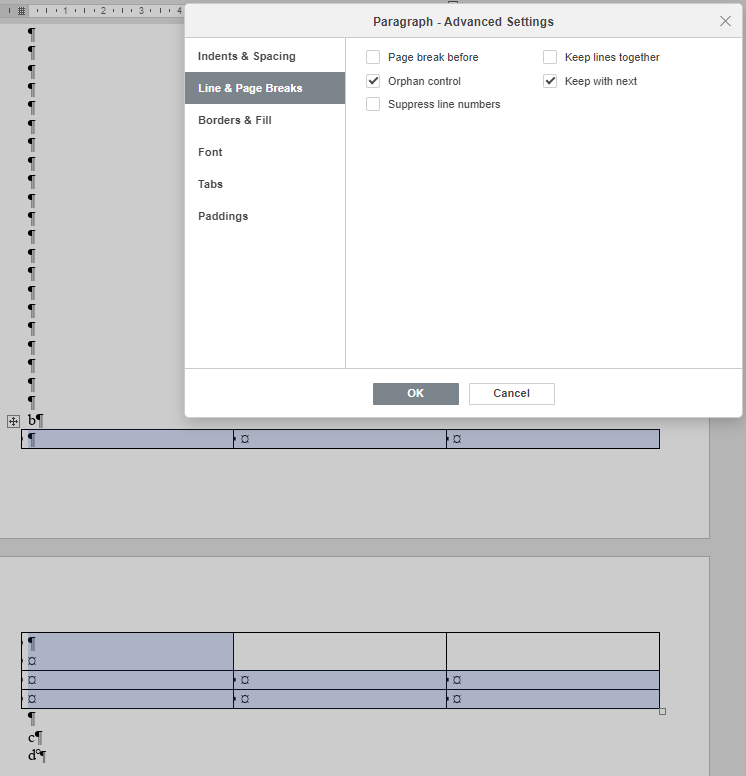
I’m trying to add a table in such a way that it doesn’t get split in two around a page break, using paragraph setting “Keep with next” like this:

But as you can see, the table still gets split over the two pages.
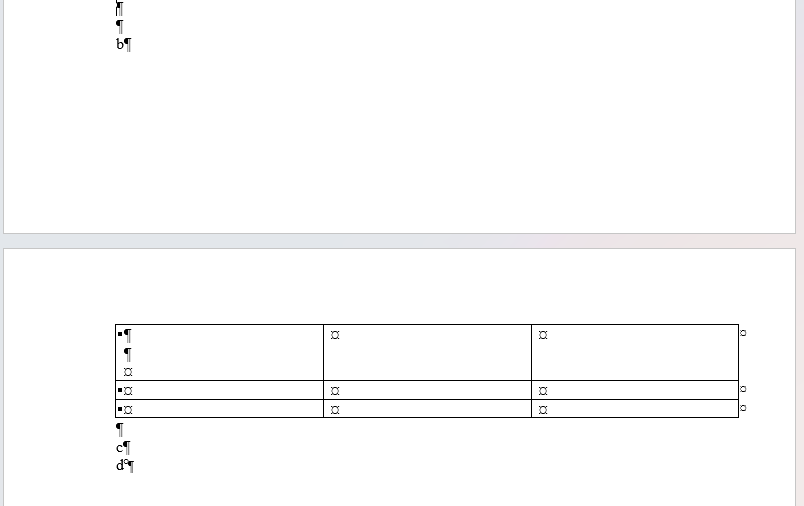
The same file in MS Word shows the expected behavior:

Is this a bug or am I doing something wrong…?
Thanks :slight_smile:

Hello @ips-ad
We are checking provided scenario. I will notify you when we have any news.

Hello @ips-ad
Thank you for pointing us to this situation. We have added a bug to internal tracksystem (59363).
We have started working in it.

Hi, I just tested again using version 7.5.1.23 and still couldn’t find a way to prevent a table from splitting over two pages. Am I doing something wrong or is the bug still unresolved?

Hello @ips-ad
The mentioned situation hasn’t yet been fixed. We are still working on it and I will update this thread when we have something to share.

Hello @Alexandre

Any news on this? Or perhpas a workaround?

Ideally, a table cell would never continue across to the next page, and instead break the cell over as described 3 years ago. Pretty crucial feature for important documents.

Thanks,
Scott

Dear @4siteScott
Please accept our sincere apologies for the length of the situation. We’re still working on the mentioned bug, and we will update this thread once we have something to share.

it would be great if this was fixed.

Hello @elnino
The fix will be included in the next version, which is expected to be released this fall.

Hello,
We have released v10. The mentioned issue has been fixed in this release. Please update ONLYOFFICE Docs and check whether the issue still occurs.