Hello,
How to change the default ports 443 and 80 for docspace ? Please
Thanks,
Hello,
How to change the default ports 443 and 80 for docspace ? Please
Thanks,
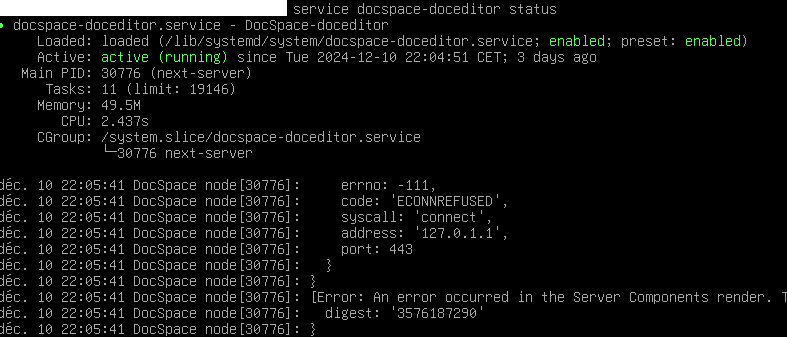
I have find how change 443 port to 4434 (Change /usr/local/openresty/nginx/conf/conf.d/onlyoffice-proxy.conf), but when i go to my web docspace interface i got this error:
Digest: 3576187290
This error comes from the docspace-doceditor service it wants to start on port 443 too
How to change the port of the docspace-doceditor service please?
Hello @Ludovici ,
Could you please provide the following information:
1.The OS where Docspace is installed.
2.The installation type of Docsspace (.exe, DEB/RPM package, Docker, etc.).
Hello @Roman ,
My OS is debian 12 and it’s an installation with the installation script with deb package.
Hello @Ludovici,
You can change the port configuration by modifying the file located at:
/etc/openresty/conf.d/onlyoffice-proxy.conf
Update the ports in this file to the desired values.
And after reboot openresty service.
Note:
During an update, the parameters will revert to their default values. To prevent this, you need to replace the ports in debconf.
echo "docspace docspace/port string 80" | debconf-set-selections
Hello @Roman
Thank you for your help, but the problem persists on the docspace-doceditor service:
Hello @Ludovici,
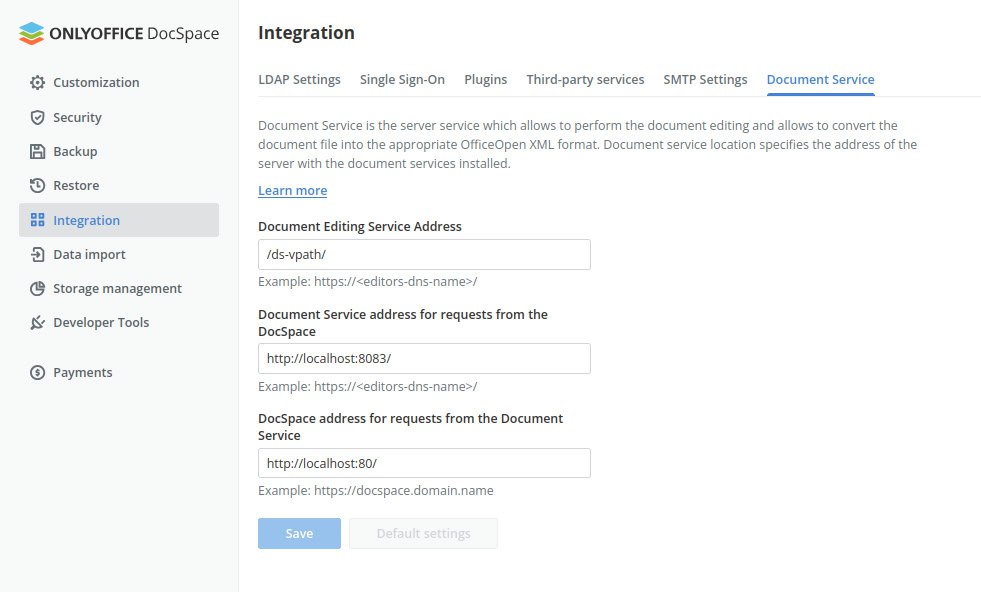
Could you please send a screenshot with the integration setup parameters, as shown in the example screenshot?
thank you @roman, I looked at the integration setup parameters, changing the parameters so that they stick to my configuration. But the same problem always comes back: the docspace-doceditor service always wants to start on port 443. Even using a functional ONLYOFFICE Docs Community, it is impossible to connect to it. I can’t find any logs that could direct me to this or that problem.
Hello @Ludovici,
Please provide a screenshot of the integration parameters, as we requested earlier, to proceed with further diagnostics.
Hi! Sorry if necroposting, but I’m facing the exact same issue as the OP.
I installed OnlyOffice Docserver from DEB on a clean, fresh Debian 12 server. My intention is to also install Nextcloud and integrate both. However, even after changing the ports like it’s suggested here, I have no luck.
Docserver loads almost fine (with some minor CSS glitches here and there), but I cannot edit any file.
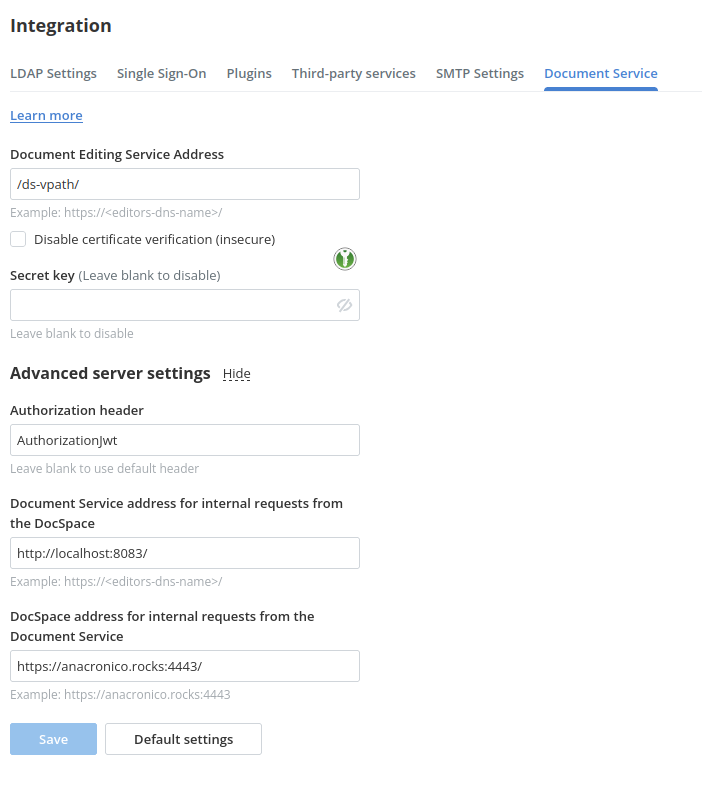
This is how my integrations looks.
Also, I set up ports 89/4443 on /etc/openresty/conf.d/onlyoffice-proxy.conf (showing only the relevant sections):
## HTTP host
server {
	listen 0.0.0.0:89;
	listen [::]:89 default_server;
	server_name _;

 	## Redirects all traffic to the HTTPS host
	root /nowhere; ## root doesn't have to be a valid path since we are redirecting
	rewrite ^ https://$host$request_uri? permanent;
}
server {
	# Enable HTTP/2
	listen 0.0.0.0:4443 ssl;
	listen [::]:4443 ssl default_server;
This is what I get when I try to open a document:
Something went wrong.
An error occurred in the Server Components render. The specific message is omitted in production builds to avoid leaking sensitive details. A digest property is included on this error instance which may provide additional details about the nature of the error.
Is there any way to have both OnlyOffice Docserver and Nextcloud on the same VPS? Would love to also have the chance to run a couple of blogs via nginx, but at least I need to have those two operating asap.
Hello @beckermatic
Is there any way to have both OnlyOffice Docserver and Nextcloud on the same VPS?
To be frank, I believe this is not a good idea. We always recommend to install DocSpace on the separate clean server to avoid dependencies and ports conflicts… If it’s possible, please use different VPS and set up communication between them via external IP addresses\domain names.
If it’s not possible, please go Nextcloud portal > connector app > click Save button and show us the result. Additionally, make a screenshot of the issue itself and collect Document server logs folder (once the issue has been reproduced).
Also please let us know the DocSpace, Nextcloud, the connector app versions.
Hello, personnaly i change the file in /etc/onlyoffice/documentserver/nginx/ds.conf (or /etc/nginx/conf.d/ds.conf it’s the same file) and not /etc/openresty/conf.d/onlyoffice-proxy.conf
Is the same for Docs? I mean, if I would install Docs instead of DocServer, would the same principle of installing it alone on an entire VPS apply?
I have DocServer
It’s the same recommendation for Document Server, we reccomend using standalone server to avoid dependencies and port conflicts. However, we have a test deployment of the DocServer+Nextcloud on the same server: GitHub - ONLYOFFICE/docker-onlyoffice-nextcloud
I hope this will be useful for your research if you cannot move the components to separate servers.
Anyway, please keep in mind that this test deployment is “only distributed for testing purposes and cannot be used in any production environment.”