Do you want to: Report a bug
OS version: Linux Mint
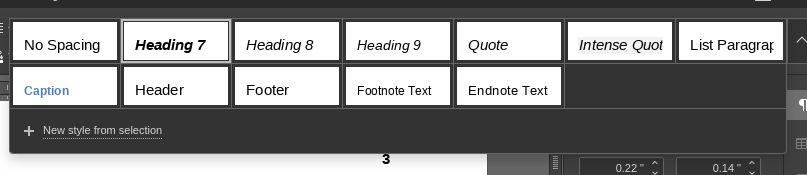
I know I’ve seen Heading 1, Heading 2, etc. before, but they seem to be missing now. Headings 7-9 (and other buttons) appear now.
I’ll try to include a partial screenshot below.
Do you want to: Report a bug
OS version: Linux Mint
I know I’ve seen Heading 1, Heading 2, etc. before, but they seem to be missing now. Headings 7-9 (and other buttons) appear now.
I’ll try to include a partial screenshot below.
Hello @Glsonn
Please let us know the exact version of your OS and version of Desktop Editors. Did you try to reinstall the app?
Linux Mint 20.3 (with Cinnamon desktop)
Desktop Editors 6.3.1.56
No, I have not tried reinstalling.
This problem is quite limited in scope. I just discovered that, when starting a new document, all the Headings are available.
The missing Headings are only missing in a document that was originally a Google doc.
Here is what I see in the new document.
Could you please try to update your Desktop Editors to v.7.0. If the issue still persists with that specific file after an update, please provide us with this file. We will check it out.
It turns out that I had been using the Flatpak v6 edition. I also had the “regular” v7 edition on my machine.
Unfortunately, v7 shows the same problem with the file in question.
I can’t see a way to attach the file. I would think you could test this by creating your own Google doc, downloading it as a docx, and opening it in OnlyOffice.
Thank you for pointing us to this situation. We reproduced it and we added a bug to internal tracklist (55708). We have started working on it.
well, its been two years. Any progress? this exact issue still persists on the latest version v8.2.2.22. im on ubuntu
Dear @Tjeerdvandijk
Please accept our sincere apologies for the length of the situation. We are still working on the mentioned issue, and we will update this thread once we have something to share.
Hello. I have the same problem with the latest version of Onlyoffice desktop.
When exporting a Google Docs document as .docx file and opening it with Only Office I cannot access the Heading 1, 2, 3… as well as Normal styles.
Even though they are present since they are recognized as headings in the left pane “Headings”. Moreover, when I select a heading, right click, select “Formatting as style”, I see “Update Heading 1 style”, meaning the piece of text is actually identified as Heading 1. But I cannot access it from the list of styles at the top of the screen.
Hello @GillesM
Unfortunately, we’re still working on the mentioned bug. We will update this thread once we have something to share.
Sorry for the inconvenience.
OS version: Ubuntu 24.04 LTS
App version: Community version 9.3.1.8 (x64 snap)
Downloaded from: ONLYOFFICE Ubuntu App Store
Additional information:
If I open a new doc, there is no problem. However, if I open an existing docx file from outside sources the style Headings 1, 2, 3 and Title are gone or become empty blanks.
Please review video below for more information.
Missing styles after open xyz.docx file
Thanks,
Force
Hello, @force !
Thank you for reaching out and for the video.
This issue has already been registered in our internal tracker, so I’ve added your report to the existing thread.
Unfortunately, we don’t have an exact ETA for the fix yet.
We’ll update the thread as soon as we have any news to share!
Good that you have it on your tracker. This is one of the inconveniences which prevent me from migrating from Google docs to OnlyOffice.
Hello @green_sparrow!
Thank you for your feedback and for sharing how this issue affects your migration plans.
I’ve added your comment to the existing internal report as well so the team can see that this behavior is also affecting migration decisions.
We’ll update this thread as soon as we have any news!