Do you want to: Suggest a feature / Report a bug / Ask a how-to question
For feature suggestions, describe the result you would like to achieve in detail.
For bug reports, provide the steps to reproduce and if possible a minimal demo of the problem.
OS version:
App version:
Downloaded from: ONLYOFFICE website / Other (specify). Please point us to the installation guide that you used as well.
Additional information:
Any relevant details about the situation. You can also attach images and videofile to the post (or to place them to external storage).
[UPDATED]
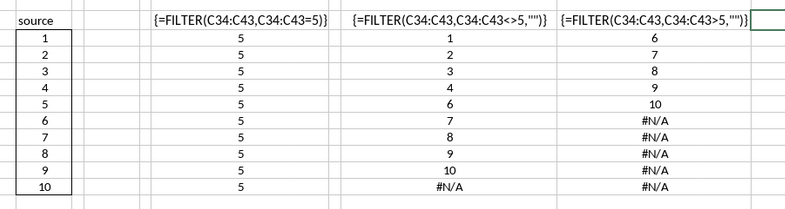
according to the documentation, the Filter() function is an array operation that requires us to select a fixed target range and use the ctrl-shift+enter sequence.
when the instructions for arrays are applied, the FILTER function sometimes produces an error.
if the results of the filter only contain a single row, that row will be repeated across the entire destination range. text strings produced the same error.
Hey @anthony_c 
Thank you for your detailed explanation and for providing the examples.
We have checked the described behavior, and we can confirm that the FILTER() function in ONLYOFFICE currently works as a classic array formula (similar to Excel before Dynamic Arrays were introduced).
At the moment:
- ONLYOFFICE does not yet support dynamic (spilled) arrays.
Because of this, FILTER cannot automatically expand its output range based on the number of results.
- The user must manually select a fixed output range before confirming the formula with Ctrl+Shift+Enter.
- When the selected output area is larger than the actual number of filtered values, the spreadsheet engine fills the remaining cells according to the rules of traditional array formulas:
- a single-row result may be repeated to fill the entire array, or
- unused cells may display
#N/A.
This is expected behavior in the current implementation and not an error in the FILTER() function itself.
The good news: 
Dynamic arrays are planned for future versions of ONLYOFFICE
the implementation of dynamic arrays would be a very welcome addition, and not a moment too soon!
while the static arrays are “functioning as designed”, they are difficult to work with and produce many errors. the work-arounds have already consumed a few weeks worth of effort just to re-tool a single spreadsheet.
i still feel that repeating rows when there is only one array element qualifies as a defect. that does not happen when there are only 2 array elements.
thanks in advance,
ac
1 Like