In MS Excel, you have a feature that is great for improving your productivity: if you copy one or several lines, you can right-click a line number where you want to insert a copy of the lines, and then choose “insert the copied lines”.
New lines are at once created and filled with copied content.
This would be a great feature to have in OO.
Thanks.
Hello @arcqus
Almost the same scenario works for Desktop Editors, but only instead of Insert the Copied Lines you use Paste:
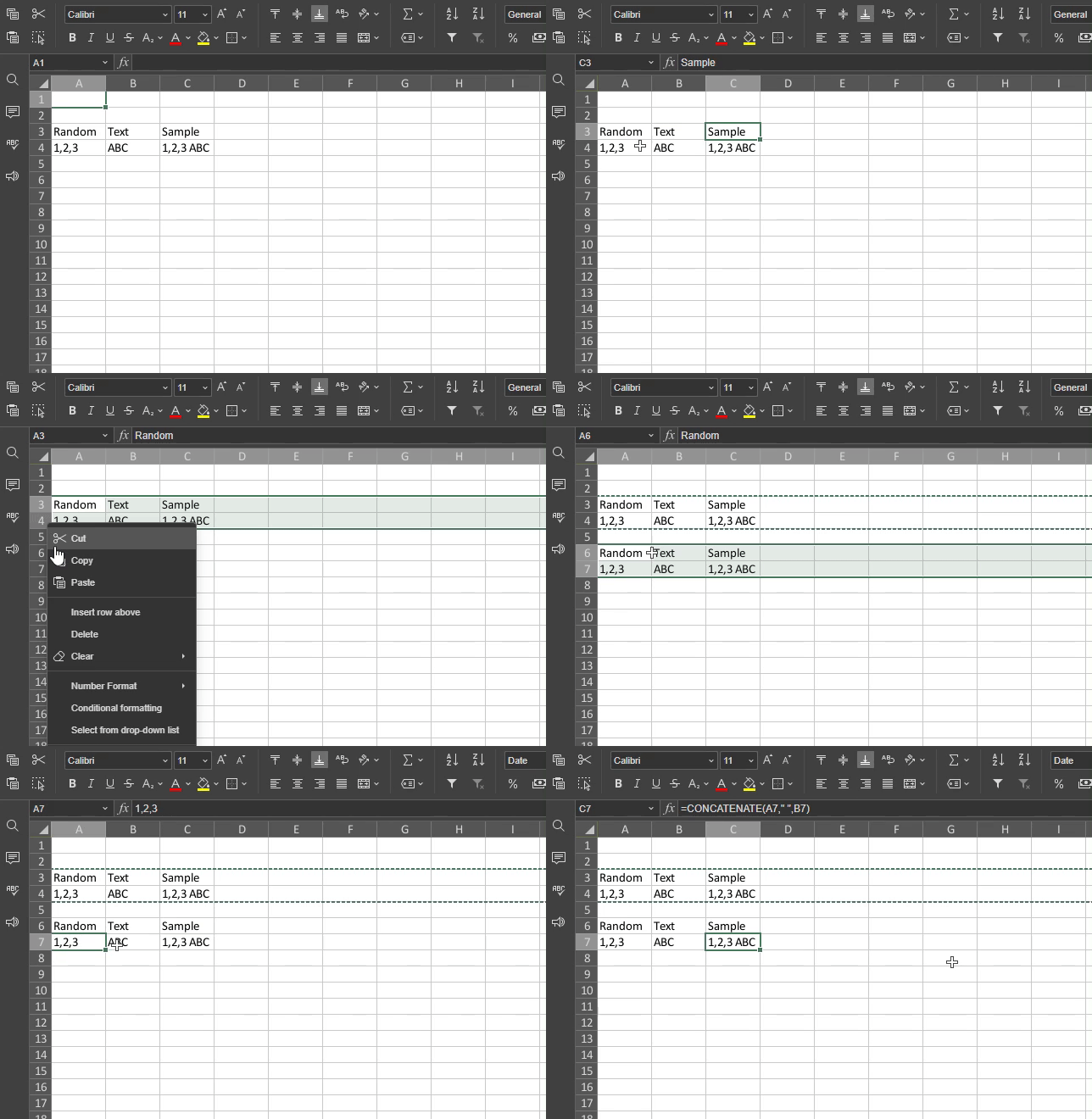
Please elaborate if I’m misunderstanding something.
hi @Constantine
Please check what I have in mind (no need to specify where it’s from  :
:
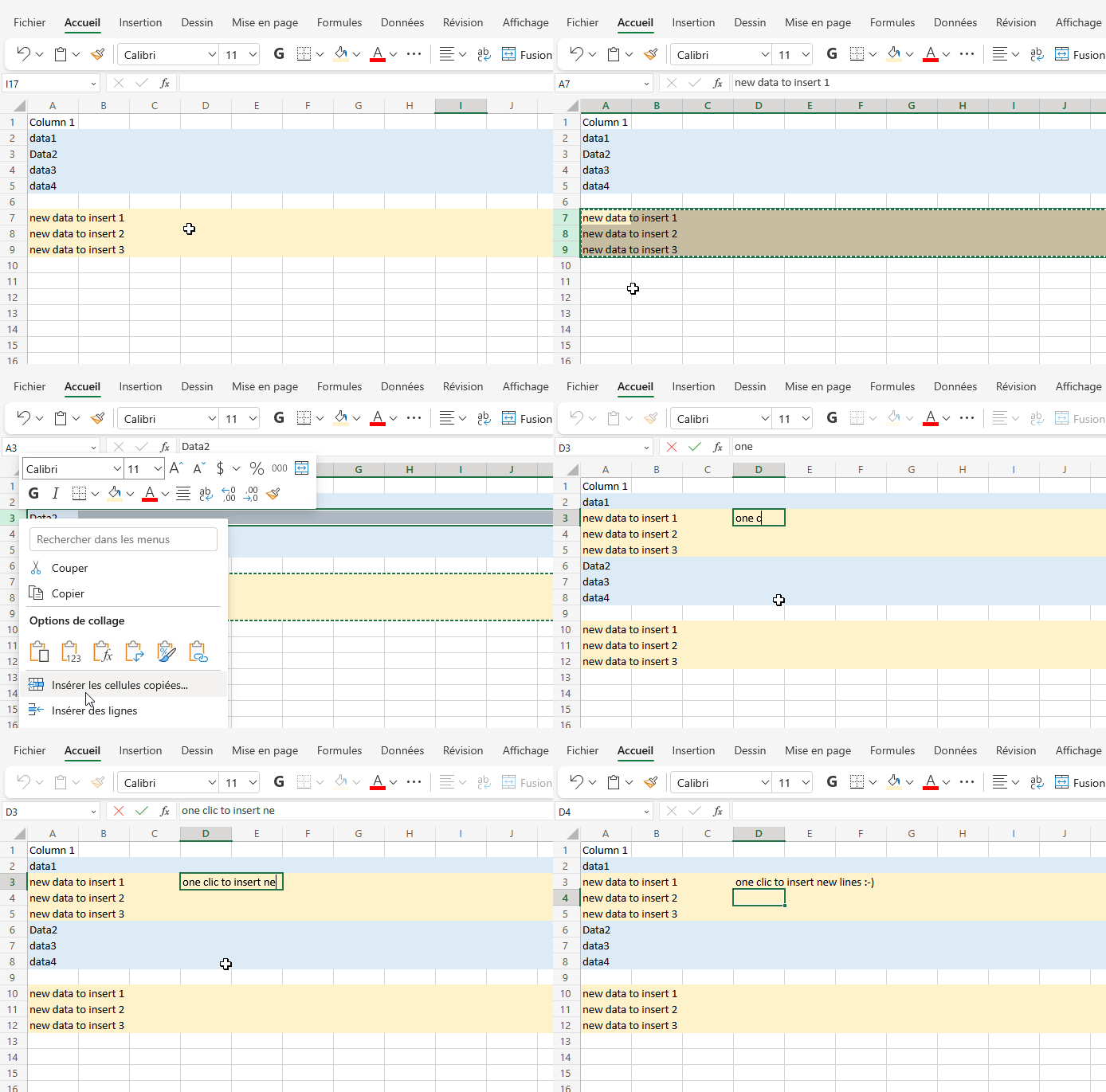
Thank you very much for clarification.
This suggestion is registered in our internal tracker under the number 46275. This feature will be implemented in one of the future releases.
A small question : when you say it is registered, was it already in there or you added it ?
Thanks.
In this particular case it was already registered in our system.
I have to admit I obsessed over this very issue for a good minute. What you have to do is:
- Highlight the rows you want to insert from the rows header with mouse clicks and/or Shift.
- Move the mouse cursor over any of the highlighted headers to prompt the “drag and drop” feature…the cursor becomes a little hand.
- While pressing Shift, click and hold the mouse button. Once the clock activated the “grab” feature you can let go of the shift key.
- Drag the most cursor to the header of the last row you want to be on top of the new rows you will be creating.
- Finally, “drop” the dragged content. The rows will automatically shift down the existing data and insert the dragged context accordingly.
- Delete the old rows of needed as this only copies and doesn’t cut.
- Please add any relevant clarifications or tips if you know of any. This is an essential feature that is actually quite easy to use but hard to understand when switching from MS.
- It appear that the highlighted rows have to be adjoining, so this method won’t work with Ctrl clicking individual random rows. You can tell because the drag and drop “grab/click” will only fully highlight the rows immediately connected to the selected row header… the stragglers will remain selected but only as a reference through marching ant borders.
Hello @panpiper
Thank you for the reply, we appreciate your interest. I am forwarding your query to the devteam.
Here is working Macro for this function:
- Select full row copy it
- select row above which the copied line will be inserted
- run macro, as many time you like it will add a new line and fill with copied content
- this will not interrupt your sum sequences or formulas.
(function () {
// Get active worksheet and current selection
const ws = Api.GetActiveSheet();
if (!ws) return;
// Current selection → expand to full row (works even if only one cell is selected)
// Community examples use GetSelection() + GetEntireRow() the same way. 2
const sel = ws.GetSelection();
if (!sel) return;
const targetRow = sel.GetEntireRow();
// 1) Insert a new blank row at the selection (shift DOWN)
// This replicates Excel’s “Insert Copied Cells” insertion step. 1
targetRow.Insert(“down”);
// 2) Paste the clipboard into the newly inserted row
// Option A (recommended): PasteSpecial → paste everything (values+formats+formulas).
try {
targetRow.PasteSpecial(
“xlPasteAll”, // paste everything
“xlPasteSpecialOperationNone”,
false, // skip blanks
false // transpose
);
} catch (e) {
// Option B (fallback): sheet-level Paste to a destination range.
try {
ws.Paste(targetRow);
} catch (e2) {
// If clipboard is empty or unsupported, nothing to paste.
// You can optionally write // You can optionally write a message to a cell, log, etc.
}
}
})();
1 Like