I would like an option for pageless view where the text wrapping adjusts to the size of the window, similar to Word’s “Web Layout”. Right now, it’s not very convenient when decreasing the width of the editor window because the only option to keep the whole document in view is to decrease zoom.
Hello @flex
This suggestion was registered before so I’ve added your request to it. Unfortunately, I do not have any information about approximate time frames of implementation.
1 Like
Any timeframe for an update? I also really miss this feature in my workflow (I’m on a Mac, by the way).
@ChristinaD There is no timeframe as of now
This is the corresponding feature request in github: ONLYOFFICE/DocumentServer#2553: “[Feature] Add Pageless mode to doc editor” - go and add a thumbs-up to the that feature request. (But please don’t add a +1 coment).
1 Like
Thank you, add mine as well.
1 Like
One thing that I miss while using the Document editor is some sort of continuous page layout view. For example something like the Web Layout in MS Word:
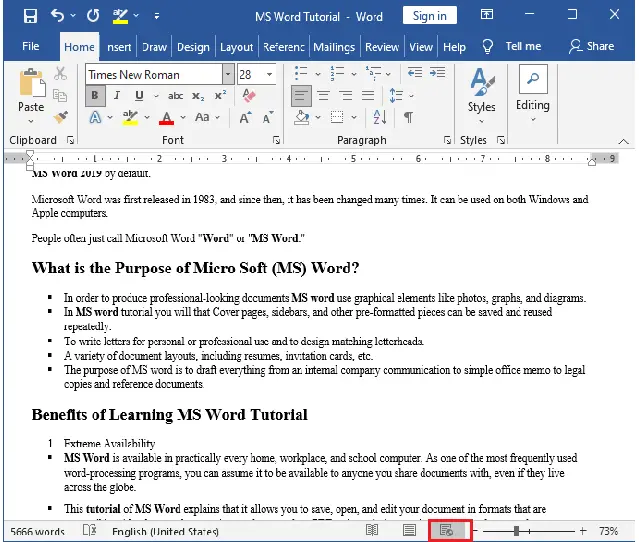
or a continuous, infinitely scrolling fixed-width page… or both! Like the Web Layout, but with a customizable width - A4, …, or fill the screen.
I often work with objects like text boxes and images and i hate it when they jump onto the next page because there’s not enough space for them on the previous one, so this would greatly help me and (I’m sure that) other people, too.
We’ve merged these threads so everything related to this request stays in one place.
@slvkrt , I’ve also added your comment to the existing feature request in our internal tracker.
Unfortunately, there are still no updates on its implementation at the moment.
As soon as we have any news, we’ll post it in this thread.
Web would be really nice because you can zoom in and it will automatically word wrap with out having to mess with font size and page size.
Thanks!
Hello @asaadnordien
I have moved your topic into this one to avoid duplicates. Your has been added to the existing suggestion. Thank you for the interest.
Hi. I want an infinite doc page nor a NO PAGE option like Google Doc.
Like a webpage.
Please.
NB: I bought the infomaniak suite
Hi,
I have merged this topic with the existing feature request to avoid duplicates, so all discussions and updates related to the pageless / Web Layout mode are kept in one place.
I have also added your comment to the existing feature request in our internal tracker.
As soon as we have any news, we will post an update in this thread.
Best regards.
A ‘pageless’ mode would be a valuable addition to Docs.
I’ve seen requests for and discussions about it going back several years, not only in the OnlyOffice community, but also at Github and Reddit.
In the case of document tables, it’s a necessity to prevent awkward effects on tables, especially when they split across pages.
Attempts to escape Google Docs fail as long as all of its features can’t be duplicated.
I agree that “pageless” is a helpful feature introduced by Google Docs.
Unlike Google Docs, OnlyOffice does not use its own internal format, but uses the OOXML format introduced by Microsoft natively, to achieve a high amount of compatibility with Microsoft Office.
When I create a pageless document in Google Docs and download it as docx, the resulting document has A4 format - not pageless. I assume then that the OOXML standard does not support the pageless format.
Ideally, Microsoft would first need to change the OOXML standard to include pageless format before OnlyOffice could implement it.
So far, what I have done is that I have changed the page format to A3 landscape. This gives me enough space for table columns. Another approach is to use the Excel format, instead of Word. The spreadsheet editor does not view the content based on the page format, so the format is irrelevant as long as nothing is printed.
Hi @mk7z, welcome to the community!
Thanks for the suggestion — a pageless / Web Layout view is already registered on our side (internal ref — 48757), and we’ve added your request to it.
@eunic thanks for sharing the workarounds! Just a small note — pageless is more of a view mode than a file format, similar to Web Layout in MS Word, so it doesn’t need changes to OOXML.
I’ve moved both posts to the existing topic so all the discussion stays in one place — feel free to follow it for updates.