Hello
Here is a feature request.
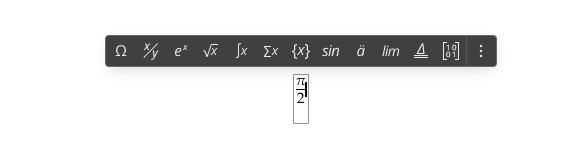
Currently, when you insert a fraction, the cursor is placed after it, hence you have to move your cursor to the numerator to edit it.
It would be way more efficient if the focus was directly set to the numerator, allowing to edit it straight away (which is, let’s face it, the purpose when you add a fraction in a text).
Thanks !
We discussed this scenario with our QA team. At the moment, the current behavior is intentional and matches the way MS Word works: after inserting a fraction, the cursor is placed after the fraction rather than directly in the numerator. In addition, if a user inserts a predefined fraction preset that already contains values, automatically moving the cursor to the numerator could be inconvenient in that scenario.
For now, we do not plan to change this behavior. Still, we appreciate your feedback and have taken your request into account.
I don’t understand this use-case. Is it possible to have an example as it may be useful ?
Sometimes it is good not to be afraid to do things better that the guy next door
I’m curious to find one person really using the fractions and satisfied by the current behavior .
where the fraction is inserted already filled in rather than as an empty template. In such a case, some users may want to insert it as a complete expression and continue typing after it immediately, without moving the cursor back into the numerator.
We understand your point that, for an empty fraction template, placing the cursor in the numerator could feel more convenient. At the moment, however, we are not planning to change the current behavior.
If you’d like, you can also submit this idea to our feedback portal: https://feedback.onlyoffice.com/. If other users support it there and confirm with their votes that this workflow would be more convenient, our team may reconsider the current behavior.