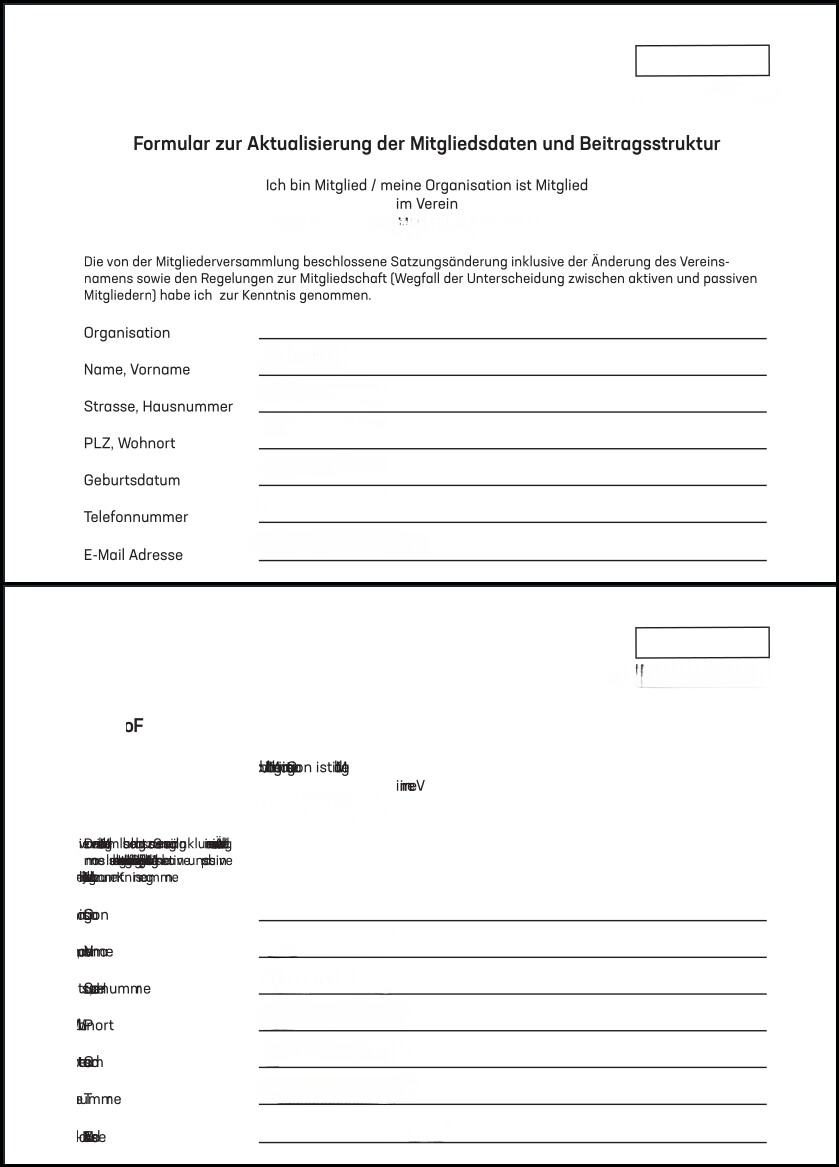
I don’t know if this is a bug or I just missed a setting – help would be very much appreciated.
When I edit text in a PDF, the layout looks normal. But as soon as I save the PDF (or save as new file, or print-to-PDF) the layout of the existing text – not the text boxes I created myself – is squeezed together and becomes unreadable. Here’s a before and after:
I’ve tried making the text boxes larger so the letters would fit, but that creates even more layout problems. This issue appears in various PDFs and with different fonts and since the fonts are embedded, I guess this can be ruled out as a reason. So what is causing this issue?
I’m using ONLYOFFICE Community Version 9.4.0.129 (x64 flatpak) on Zorin OS 18.1 Core.
Hi @dulfried, welcome to the community!
Thanks for the report — could you share one of the affected PDFs? It’ll let us check it on our side with the same build. Feel free to remove any personal data before uploading.
Thanks!
Thank you for looking into it! Here’s one of the files I’m having this issue with:
Test_Document.pdf (39.6 KB)
I can reproduce it by opening the PDF in OnlyOffice, selecting “edit PDF” anywhere and typing a single character, then saving.
Hi @dulfried,
Thanks for the file — we’ve reproduced the issue on our side and are now checking it with the team. We’ll update the thread once there’s progress.
Hi @dulfried,
Quick update — the issue is now filed as a bug on our side (internal ref — 84041).
We’ll update the thread once it’s fixed.
Thank you so much! If I can provide anything else, please let me know.
Hi @dulfried,
Quick update — this should be fixed in version 10.0. After using Edit Text and saving, the text should stay readable when you reopen the file.
Please update and let us know how it goes!
Yesss, that’s almost perfect! I can delete and add characters without the text going zalgo.
However I’ve noticed that sometimes when I add text in a field and it overflows to the next line, it’s still written above the original text, as you can see here:
Same document as above. I can’t tell if this the same or a separate issue, though. Any idea? Thank you <3