Please provide and Admin Panel Documentation. This page is useless because there is no information how to connect the admin panel with the Document Server. ONLYOFFICE Docs Admin Panel for enterprises | ONLYOFFICE Blog. Further more in this documentation there is no link to the docker image https://hub.docker.com/r/onlyoffice/docs-adminpanel-ee and even there is no documentation. Thank you for support.
@tim.herrmann
Hello, the documentation on the Admin Page is in progress. However, you don’t need to install a separate container to gain access to this page, as it exists as a service inside the default Document Server container. You can start it with supervisorctl start ds:adminpage and access it by adding /admin to the address of your Document Server in the browser.
Dear Carl, thank you.
Could I fixate this in my docker compose that it works again after a restart of my container?
Best Tim.
@tim.herrmann
Hello, we have published the guide here:
At the Welcome page of the Document Server you will also find a command to add the adminpanel service to autostart.
Dear Carl, supervisorctl start ds:adminpage don’t work for my DS Enterprise 9.1 docker based version. I get the massage “ds:adminpage: ERROR (no such process)”
Dear Carl, I solved the Problem partly.
- You need to input:
supervisorctl start ds:adminpanel - The admin page runs on a different port than the welcome page. >> Port: 9000
But this makes it start only once. There is no command at the Welcome page of the Document Server to add the adminpanel service to autostart.
@tim.herrmann,
Hello, please accept my apologies for the typo above. Yes, the correct name of the service is ds:adminpanel.
The command is located at the bottom of the page:
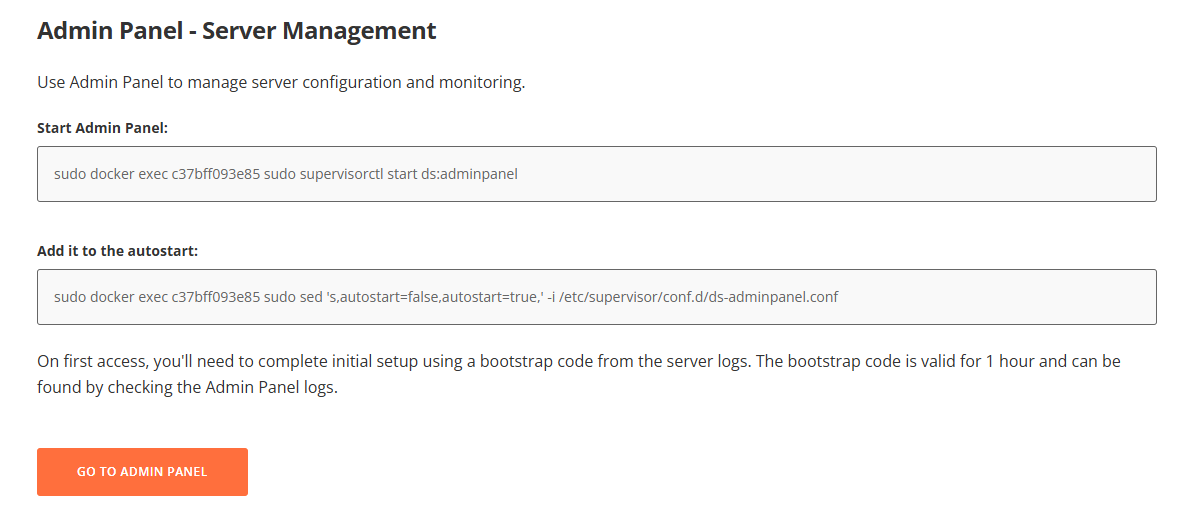
sudo docker exec your_container_id sudo sed 's,autostart=false,autostart=true,' -i /etc/supervisor/conf.d/ds-adminpanel.conf
Thank you.
1 Like